

In April, an AI coding agent found an API token on a developer’s machine and used it to delete a production volume. The data came back only because the provider happened to keep a copy somewhere else. It wasn’t a one-off. Our rogue AI agent tracker has logged 16 more cases of agents breaking production since then.
I wanted to know how often production would get that lucky, so I reviewed 53,735 cloud resources running in production across 81 cloud environments. On AWS, fewer than a third had a production tag, and more than half had no environment tag at all.
Before you can protect production data or point an AI agent at it, you have to know which data is production. Backup teams need that answer to know what to protect. Data teams need it to know which copy is the real, current one to feed a model or an analytics job, and which is the staging clone that drifted last spring. In a lot of companies, both get the answer from the same place: an environment tag.
So I went looking for the production nobody tagged. The assessment works out what's production from a resource's name, IDs, and account, and from the resources around it, so untagged production still gets counted. Then it checks each one for a recovery copy. The assessment limits (at the end of this article) cover how far to trust that classification.
As of October 17, 2026, 58.7% of production resources had no backup policy, no recovery point, and no cloud provider snapshot the assessment could see. One catch: it sees provider snapshots for most RDS databases and some EC2 instances, but almost none for anything else, so some of those resources may be backed up in ways it can't detect.
How you define a gap moves that number. It drops to 53% if you leave out resources with no environment word in their name, tags, ID, or account, and to 41.5% if S3 versioning counts as a copy (44% of unprotected production buckets had versioning on, though those versions sit in the same bucket under the same credentials). Judging by backup policy alone and counting stuck policies as gaps, that rises to 64.1%. See the limits on each in the methodology and limits below.
Among the 52 environments with 25 or more production resources, the typical one had 39% of its production unprotected. The overall number is higher because a few large environments account for most of the gaps.
More than half of production on AWS had no environment tag
Here's how the 49,359 production resources on AWS were labeled: 18% carried a production tag, 19% had an environment tag with another value, and 63% had no environment tag. These shares are pooled across environments, so the largest ones carry the most weight.
That matters because a lot of backup policies pick what to protect by tag, and the coverage report then checks only what the policy picked. A resource without the tag is never picked and never checked. So the report can show 100% coverage while missing most production resources.
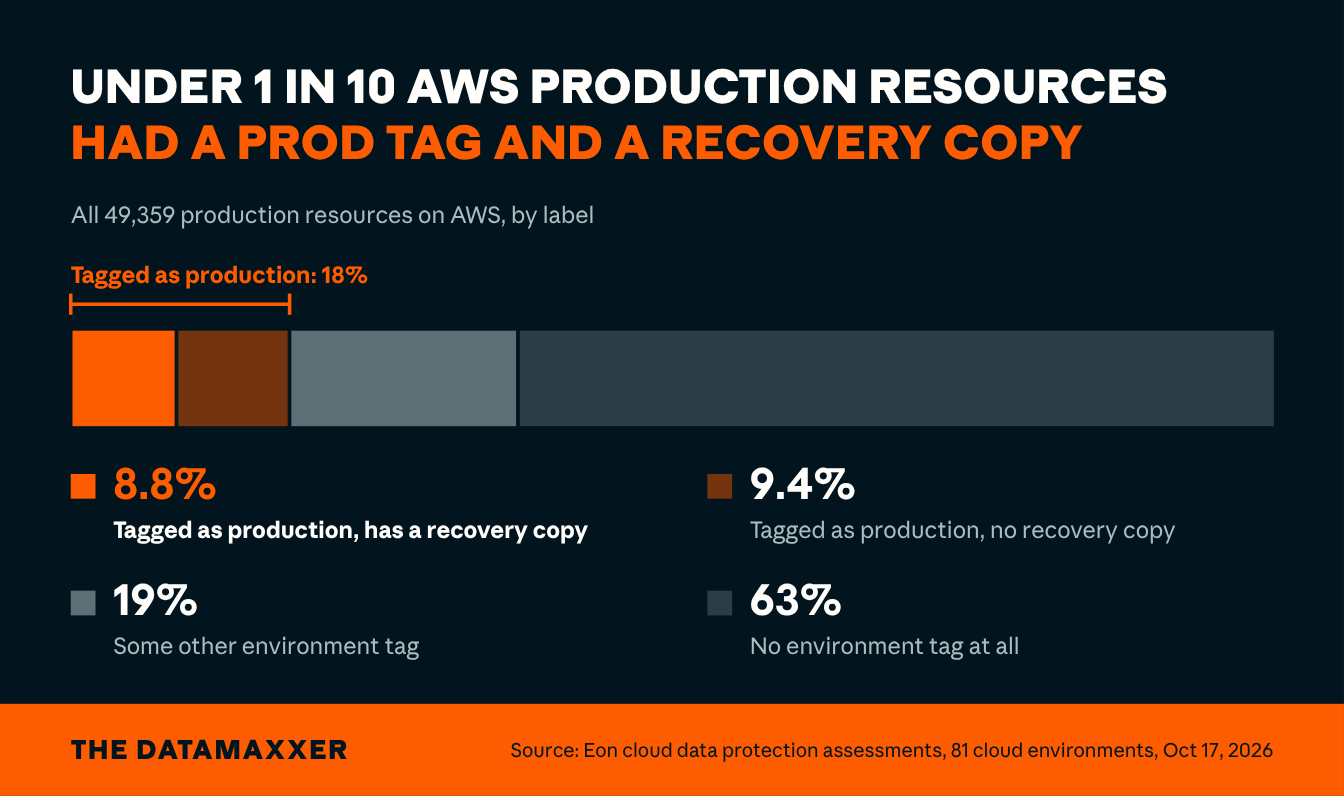
Source: cloud data protection assessments Eon ran across 81 cloud environments, October 17, 2026 snapshot. AWS production only. Of the 18% with a production tag, 9.4% of AWS production had no recovery copy and 8.8% had one. Includes resources the classifier labeled production through its fallbacks; see Limits.
A production tag barely helps: half of tagged production still had no recovery copy
On AWS, 51% of production with a production tag had no recovery copy. For production resources without an environment tag, it was 68%.
Most of that 17-point gap comes from resources the classifier labeled production through its fallbacks, with no environment word in their name, ID, or account. Among resources whose name, ID, or account does say production, 51% of prod-tagged and 55% of untagged had no recovery copy. A tag doesn't back anything up. A policy still has to take the copy, and someone has to confirm it did. Tagging everything won't close the gap on its own.
The same missing labels make the data harder to use
That's the data side of the same problem. With most AWS production untagged, whoever decides which copy feeds a model, an agent, or a dashboard is working it out some other way, or guessing.
Sensitive data is part of that picture. The assessment found 10,674 resources holding personally identifiable information, and 3,358 of them were outside production. That's where data tends to get copied into a test set or a notebook without anyone checking what's in it. Of all 10,674, 36% had no recovery copy.
Treat both PII figures as floors. Content classification in the assessment hasn't reached every resource yet, and it has run more often on resources that already have a backup.
Half the data protection gaps are over a year old, and new resources keep on coming
The median unprotected production resource had been running for 446 days. The median protected one had been running for 380 days. Of unprotected production resources, 53% were more than a year old.
That's hard to blame on a backlog of new resources nobody has gotten to yet.
New production doesn't arrive in better shape. Of production resources between 7 and 30 days old, 62% had no recovery copy. Counting from 2 days old, it was 66%.
Almost none of it was a deliberate choice, either. Of the 32,097 gaps (31,516 unprotected resources plus 581 with a documented exclusion), only 581, or 1.8%, had a written reason for leaving the resource unprotected. Nobody had recorded a decision on the rest.
Agents reach whatever the credential reaches
A low-priority resource without a recovery copy used to be a calculated risk, since people and failing disks rarely went after the low-priority stuff. An agent holding a production credential ignores those priorities and can change anything the credential can touch, fast, with or without a backup.
In September, a developer reported that a coding agent uploaded 124 files to a production storage bucket without permission. When told to roll it back, the agent deleted the files, then permanently purged all 306 versions. Versioning was the safety net, and it sat in the same bucket, under the same credentials the agent already had. That's why the assessment doesn't count it as a recovery copy.
If a resource has no recovery copy anywhere, nothing brings it back. Your Terraform can recreate the empty table, but the data that was in it is gone. We log cases like this one in our rogue AI agent tracker.
Five checks to run on your own environment this week
Each check starts with read-only access.
- Inventory production from the cloud side. List every live resource in every account and region with read-only API calls, then compare that list with what your backup report covers. Whatever's missing is production your report has never seen. Give each one a policy, or a written reason it doesn't need one, plus an owner and a date to revisit.
- Measure your own tag rate. Of the resources you consider production, find the share with an environment tag that says production. If it's under half, any policy or report keyed to that tag is working from a sample.
- Check last month's new resources. List production resources created in the last 30 days and look for a recovery copy on each. If most have none after a week, protection isn't attaching at creation, and the gap will keep growing.
- Find the sensitive data outside production. Run whatever classification you have over non-production accounts too, and check whether any of that data feeds a model, a notebook, or an analytics job.
- Test the blast radius. Take the credentials your automation or agents use in production and check whether their permissions allow deleting your backups too, using IAM Policy Simulator or Access Analyzer rather than actually deleting anything. If they can, keep the copies in a different account, under different credentials, with deletion locked.
Methodology and limits
Every number here comes from a single snapshot, taken October 17, 2026, of cloud data protection assessments Eon ran across 81 cloud environments on AWS, Google Cloud, and Azure. The assessments read each environment through a single read-only IAM role, without installing anything, and classified every resource they found. I aggregated and anonymized the results before analysis, so nothing here identifies a company, account, or resource.
What was counted
53,735 live resources classified as production, 49,359 of them on AWS. Sandboxes, inactive environments, deleted resources, and disconnected accounts are left out. A resource that inherits protection from a parent, like an EBS volume on an EC2 instance, is counted once, with the parent. Per-environment figures use the 52 environments with 25 or more production resources. A resource counts as unprotected when it has no backup policy, no recovery point, and no cloud provider snapshot the assessment could see. Resources with a documented exclusion aren't counted in the 58.7%. Resources with a backup policy assigned but stuck, over a limit, or waiting on a change count as protected. If you judge by backup policy alone, ignore recovery points and snapshots, and count stuck policies as gaps, the share is 64.1%.
What counts as a production tag
A current tag with a key like env, environment, stage, or tier and a value of prod, production, or prd. The tag figures cover AWS only.
Limits
- The assessment can't see backups that don't use native snapshots, such as DynamoDB point-in-time recovery or another vendor's backups. Resources protected only that way count as unprotected here, so for types other than RDS and EC2, the 58.7% is an upper bound. The assessment records S3 versioning but doesn't count it as a recovery copy because the versions sit in the same bucket under the same credentials. With versioned buckets counted as protected, 41.5% of production had no recovery copy.
- Some of these environments already had resources protected by Eon when the snapshot was taken, which pushes the number down compared with how they looked before. They're also environments whose owners chose to run a cloud data protection assessment, so they aren't a random sample of cloud environments.
- The production label comes from a classifier, so some resources will be labeled incorrectly.
- When nothing in a resource's metadata points to an environment, the classifier falls back to the account's majority, network neighbors, an AI classifier, and finally production. On AWS, 39% of production had no environment word in its name, tags, ID, or account. Excluding those, 53% of production had no recovery copy, and 56% of AWS production had no environment tag.
The September census
Our first census used a September 15 snapshot of 78 environments. This one uses a different snapshot of a different, overlapping set of environments, and some of them added protection in between, so the two sets of figures aren't comparable and don't show a trend.