

Most teams think they have backup coverage
We recently spoke to an infrastructure engineer at a software company about whether his managed service backed up a particular dataset. He said he was "putting two and two together" and figured it did.
We hear a version of that answer often. The team has a backup tool with a dashboard, and the dashboard is green. The catch is what the dashboard measures: the resources the tool already knows about. A database that was never enrolled doesn't show up as unprotected. It doesn't show up at all.
The assumption holds until something rewrites that database. Often now, that something is an AI agent with a valid credential, though a bad script or a stolen key has done the same thing for years. The on-call engineer opens the backup console to find the last good copy, and the database isn't there. A team that no longer exists created it two years ago. Nobody tagged it, so no policy picked it up, and the report never counted it.
We wanted to know how often that happens, so we counted. We ran cloud data protection assessments across 78 companies' cloud environments on AWS, Google Cloud, and Azure, covering 101,340 live resources, 53,709 of them production, and checked each production resource for a recovery copy. The findings below are aggregated and anonymized across all 78.
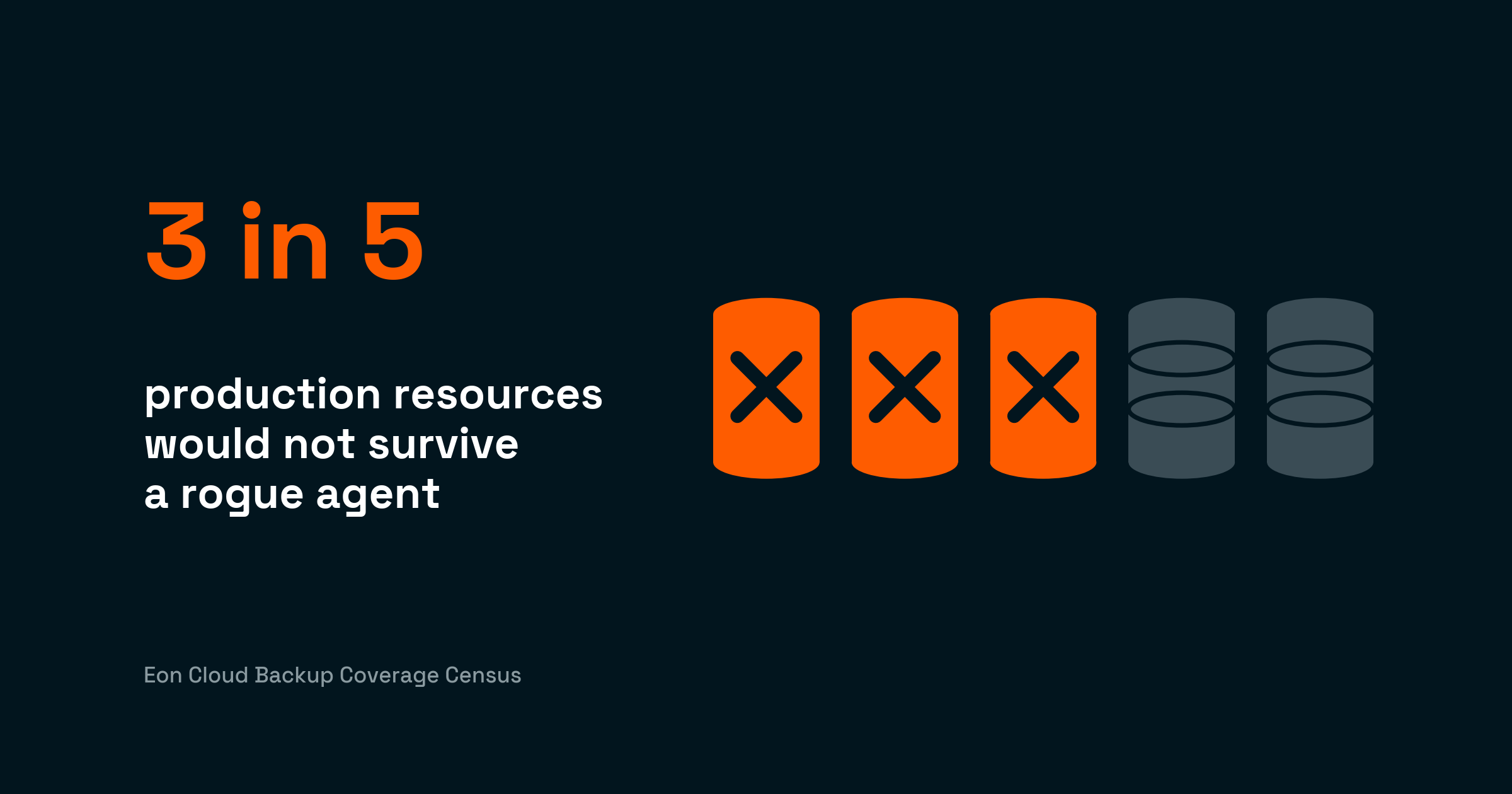
What we found: 61% of production has no recovery copy
3 in 5 production resources have no recovery copy
If something rewrites one of those resources, you're rebuilding it by hand from whatever you can piece together.
One limit worth stating up front: the assessment sees native cloud snapshots for RDS and EC2, and on other services a native backup, or a backup made by another tool, could exist outside its view.
What standard coverage reports miss
Coverage reports only measure what's tagged
Most coverage reports start from the resources a backup policy has already enrolled, usually selected by tag. The report then checks how many of those have a copy. A resource that was never enrolled never enters the count, so the report can look complete while missing much of the environment.
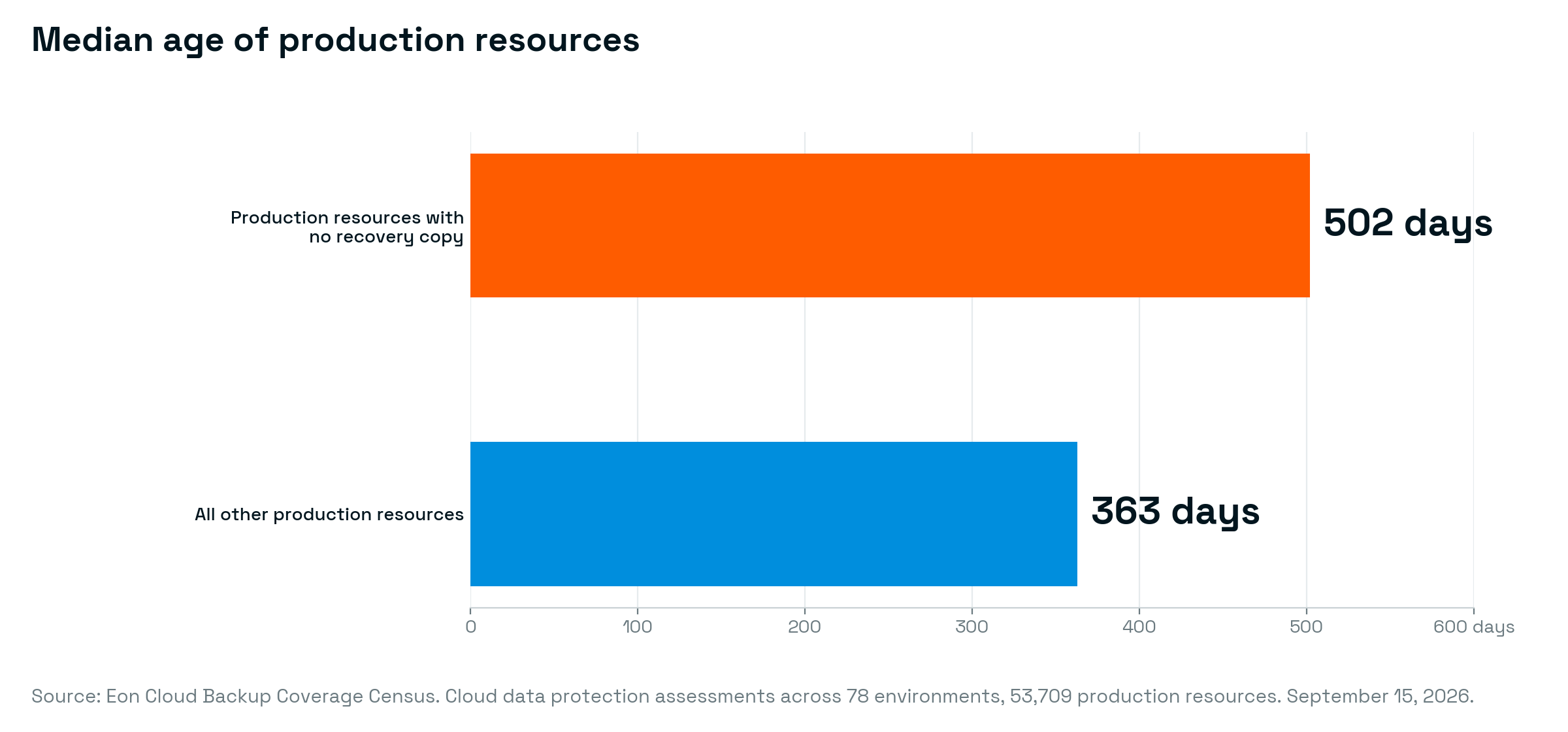
The assessment classifies production from the resource's name, IDs, and account as well as its tags, which is how it sees the rest. A principal backup engineer at a large retailer described what an assessment surfaced across thousands of accounts: The resources weren't in the backup numbers or the cost numbers, "because we're not backing them up, but we're supposed to be."
Fewer than 1 in 100 backup gaps had a documented reason
Teams sometimes skip protection on purpose, and that's fine.
A director of technical projects at a data firm told us his team protects some workloads "because it's a requirement of a contract" and leaves lower-risk applications on whatever the cloud provider covers by default.
The deliberate exclusions in the assessments follow the same logic: a server that code rebuilds on every deploy, a cache that refills from upstream, or a low-value system where the cost wasn't worth it. Someone weighed it and wrote the decision down.
What surprised us is how rarely anyone documents the call. The reasons we hear come down to speed.
Teams create resources faster than anyone attaches a backup policy, often from code that sets up compute and storage without setting up protection. Teams reorganize, and the resource keeps running under nobody's name. And people assume someone else has it: the cloud provider, a managed service, or the infrastructure code that can rebuild the server but not the data inside it.
The difference matters when someone asks. "We assessed it and accepted the risk" is an answer an auditor or an incident review will take. "We didn't know it was there" is a harder conversation, and it's the one most of the 61% would be having.
The typical unprotected resource has run for 16 months
They aren't new resources waiting for their turn. More than half have run for over a year, and a resource that old with no policy, no tag, and no note is a resource nobody is watching. It's also why we doubt many of them have a native backup outside the assessment's view.
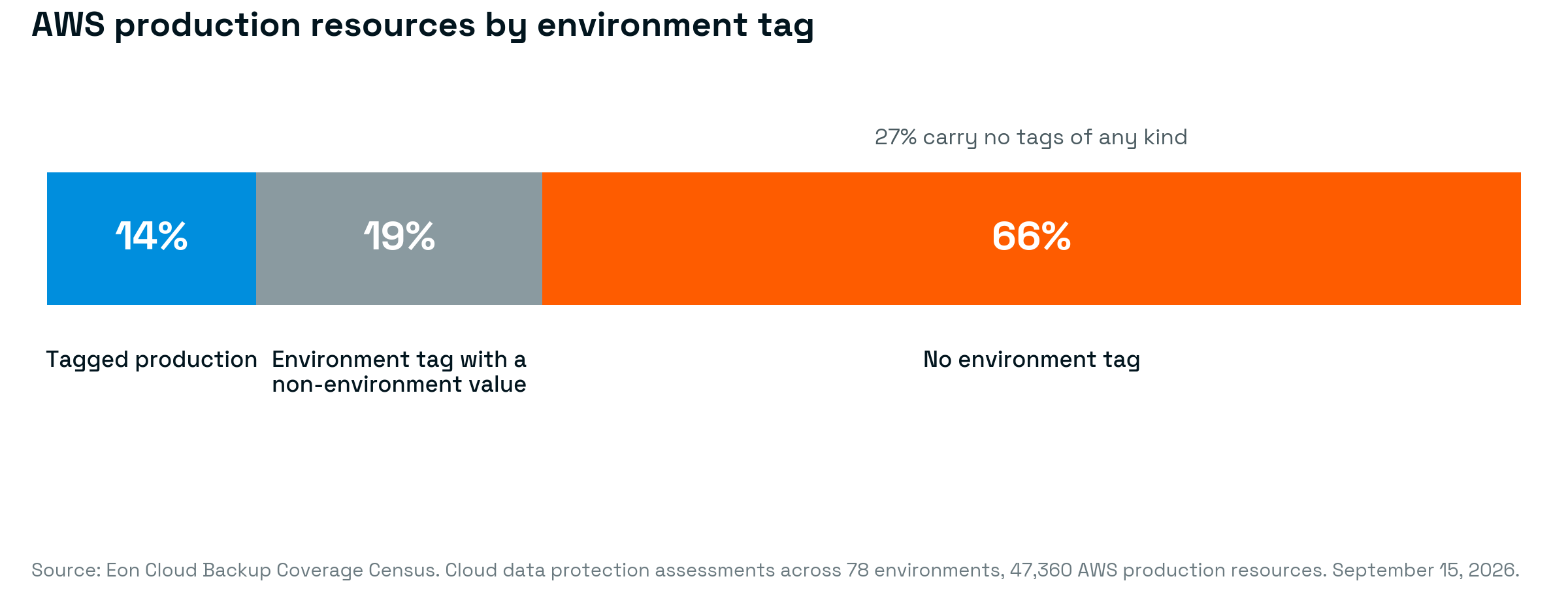
And it isn't a few messy environments dragging the average. Among the environments with 25 or more production resources:
- The typical one has 64.5% of its production unprotected
- More than half are above 50% unprotected
- None reached 100%
- The best stopped at 99.8%
Sensitive data shows the same pattern: 38% of the 10,542 resources classified as holding personally identifiable information had no recovery copy. The real share is higher, since the unprotected resources are the ones the assessments have scanned least for PII.
Why it matters now
A rogue agent doesn't care which tier you put a resource in
Two years ago, leaving a low-tier resource without a recovery copy was a cost decision, and often a reasonable one. What broke production was a person making a mistake or hardware failing, and both were fixable by redeploying from code and reloading data from upstream.
An AI agent with valid credentials can write to any resource those credentials reach, at machine speed, and it doesn't know which tier you put a resource in. Your queue, your cache, your read replica, and the production database behind them sit in the same blast radius.
A CIO at a regional bank told us that the vendors running agents against his data won't tell him how many tables the agent modifies when it runs.
Afterward, infrastructure-as-code can rebuild the table, but not the rows that were in it, and the upstream system you planned to reload from may have been hit in the same run. The 61% is the share of production where recovery means starting over.
The 2 controls everyone is arguing about don't help with that share. A tool-level undo covers less than you'd think, and limiting what the agent can touch doesn't hold either. A gap nobody documented was a tolerable risk in 2024. With agents holding production credentials, the risk level increases.
5 ways to prove your coverage before an agent tests it
When a 2024 disruption took down a dozen services at Sigdo Koppers, getting them back was only half the scramble. Every team was trying to answer the same question: what can we restore, how fast, and who's on the hook for it. Good means you can answer that on any given day, for the whole environment, including the part nobody tagged.
If you can't prove coverage, you don't have coverage.
- Count from the cloud side, not from your backup tool. Pull the live inventory from every account and region through read-only APIs, then match each production resource to a recovery point. Your backup tool's report can only count what it already knows. The first count is the hardest; after that, you just re-run the query.
- Classify production from several signals. A resource is production if a paying customer or a downstream job depends on it, regardless of what its tag says. Look at the name, the account, what depends on it, and who wakes up when it breaks. Expect the untagged ones to be the oldest.
- Turn every gap into a recorded decision. For each unprotected production resource, either attach a policy or write down why not, with an owner and a review date. The assessments found that record on fewer than 1 in 100 production resources. A written exclusion is a decision you can defend; a gap nobody decided on is hard to explain to an auditor.
- Keep recovery copies outside the blast radius. Credentials broad enough to modify production data are often broad enough to delete the snapshots kept in the same account, and versioning inside a bucket protects against overwrites but not against a credential that can delete versions. Put recovery copies in a separate account with its own credentials, logically air-gapped, and locked against changes for as long as you keep them.
- Re-run the count on a schedule, and treat drift as an incident. New resources arrive every week, and unless a policy attaches when they're created, the coverage you proved on Tuesday is out of date by Friday. In the assessments, the gaps that form this way last about 16 months. Run the count as often as you run access reviews, and assign someone to close what it finds.
Where Eon fits
Tags describe the resource. Eon reads what's inside it, and updates as the data changes. Eon Data Protection keeps your entire cloud environment safe and recoverable in minutes, catching ransomware and rogue-agent damage and rolling back the exact records hit, from a single read-only role with no appliances, at up to 50% lower cost. Cloud Backup Posture Management (CBPM) keeps the coverage question answered continuously: which resources exist, which have a recovery copy, and which don't, so the answer is ready before an auditor, or an agent, asks.
SoFi took this approach across 5 AWS regions, replacing region-by-region visibility with a single view of what was protected.
Methodology
The numbers come from cloud data protection assessments Eon ran across 78 companies' cloud environments. Each assessment connects to the environment through a single read-only IAM role and discovers and classifies every resource, with no agents, appliances, or manual tagging. Sensitive-data classification is based on content-level signals rather than tags alone; the environment label is assigned from the resource's metadata and its account, so the findings don't depend on any one team having tagged its resources. We aggregated results across assessments and anonymized them before analysis; this post includes no customer-identifiable data or content. The numbers are from September 15, 2026, and every figure comes from the same pull.
What was assessed
78 cloud environments with 101,340 live resources across AWS, Google Cloud, and Azure, 53,709 of them production. We counted each environment as the assessment found it, including resources that no policy visible to the assessment had ever been attached to, which is how the findings can include gaps no backup tool had touched. We excluded sandboxes, inactive environments, deleted resources, disconnected accounts, and child resources that inherit a parent's protection (an EBS volume attached to an EC2 instance counts once, through the instance). Distribution figures use environments with 25 or more production resources.
What counts as production
The environment label comes from the resource's metadata: its name and IDs, its tags, the account it runs in, and how the rest of that account has already been classified. Sensitivity, including PII, is classified from content-level signals rather than tags alone. Teams can override the classification per resource; across the 78 environments, they did so on 729 resources, including 25 in production.
What counts as a recovery copy
A production resource counted as unprotected only if it had none of these three things: a backup policy assigned through the assessment platform, a recovery point that platform had taken, or a native cloud snapshot the assessment could see. The third has limits. Native snapshots were visible for most RDS instances (98%), some FSx file systems (42%) and EC2 instances (24%), and almost none of the other resource types. Backups made by other tools count only where they leave a native snapshot the assessment can see, so for some resources a backup could exist outside its view.
Using the strict definition, 61.2% of production is unprotected. Counting only whether a policy was assigned, it's 62.8%. Also counting resources whose assigned policy was stuck, either waiting on a change in the environment or over a configured limit, it's 65.4%.
A couple of limits:
- A classifier is a model of the environment, and it has an error rate like any other.
- A count of unprotected resources says nothing about how well the protected ones would restore.
How to cite: Eon, Cloud Backup Coverage Census, September 2026
FAQ
What percentage of production data has no backup?
In Eon's Cloud Backup Coverage Census, drawn from cloud data protection assessments across 78 companies' environments on September 15, 2026, 61.2% of the 53,709 resources classified as production had no recovery copy: no backup policy, no recovery point, and no native snapshot visible to the assessment. The figure comes from counting live resources against protection status rather than from a survey, and the results are aggregated and anonymized.
Why do production resources end up with no backup?
Rarely because someone decided to skip them. In the assessments, 0.9% of production resources had a deliberate exclusion, and the rest were never addressed. Common causes include resources created faster than policies attach, code that provisions compute but not protection, resources left running after their team moved on, and the assumption that the provider or a managed service has it covered.
Why do coverage reports miss unprotected resources?
Most coverage reports measure the resources a backup policy has already enrolled, usually by tag. In the assessments, 66% of AWS production resources had no environment tag and 14% had a tag that said production, so a report keyed to that tag would have found about 1 in 7 of them. Classifying resources from their name, account, and other metadata, rather than from one tag, surfaces the rest.
How do AI agents change the risk of leaving a resource unprotected?
An agent with valid credentials can write to any resource those credentials reach, at machine speed, regardless of how you tiered your environment. Systems that were safe to leave unprotected under the old failure modes now share a blast radius with production. The agent may reach the upstream data you planned to rebuild from in the same run.