




At 2:14 a.m., a misconfigured reprice job wakes up, authenticates with valid credentials, calls an approved API, and writes garbage into roughly 5,000 records of a 300 TB production orders table. It's doing exactly what it was told to do.
By the time on-call acknowledges the alert, those bad writes have committed, replicated across regions, and blended in with the millions of legitimate writes that landed in the same window. Now they're nearly impossible to pick out.
It's the AI-era version of an old problem. Coding agents and automated jobs act at machine speed with valid credentials, so the blast radius lands before anyone's awake to catch it. The question stops being "do we have a backup" and becomes "can we undo 5,000 records without losing a night of good writes."
Where native DynamoDB recovery stops
You get two native options, and neither lets you touch one record without touching all of them.
Point-in-time recovery rewinds the entire table to a timestamp
The RestoreTableToPointInTime API requires a TargetTableName and restores to a new table, rebuilding GSIs, LSIs, capacity, and encryption from the source table's current settings. There is no in-place, record-level rewind.
So to undo that 2:14 a.m. incident, you roll the whole table back to a pre-incident timestamp, and every legitimate write since then is gone unless you reconcile it by hand. PITR also caps recovery points at 35 days, short of many audit and compliance retention windows.
AWS Backup restores the full table
An on-demand restore brings the table back to the exact state it was in when the backup ran. Item-level recovery caps out at five items per restore job, with no way to query the backup. Cross-account restore is fenced in too: AWS Backup requires both accounts to belong to the same AWS organization, so a recovery account outside that boundary can't receive the copy.
At 300 TB, the full-table path is also slow and expensive. Restore time varies and isn't reliably correlated with table size, but the survey numbers are clear: 60% of teams need six or more hours to complete a full restore, and only 5% can do it in under an hour. On top of that, you provision and pay for a duplicate table to hold a copy you mostly already have, all to recover a few gigabytes of bad rows.
Eon takes a different path on large DynamoDB tables. We documented the cost and scale side of this in a separate breakdown of backing up DynamoDB tables up to 300 TB. The recovery side is below.
Eon turns the snapshot into a queryable dataset
Eon's model drops the forced choice between losing good writes and waiting hours for a duplicate table. The snapshot itself is queryable, so you find the bad records first and bring back only those.
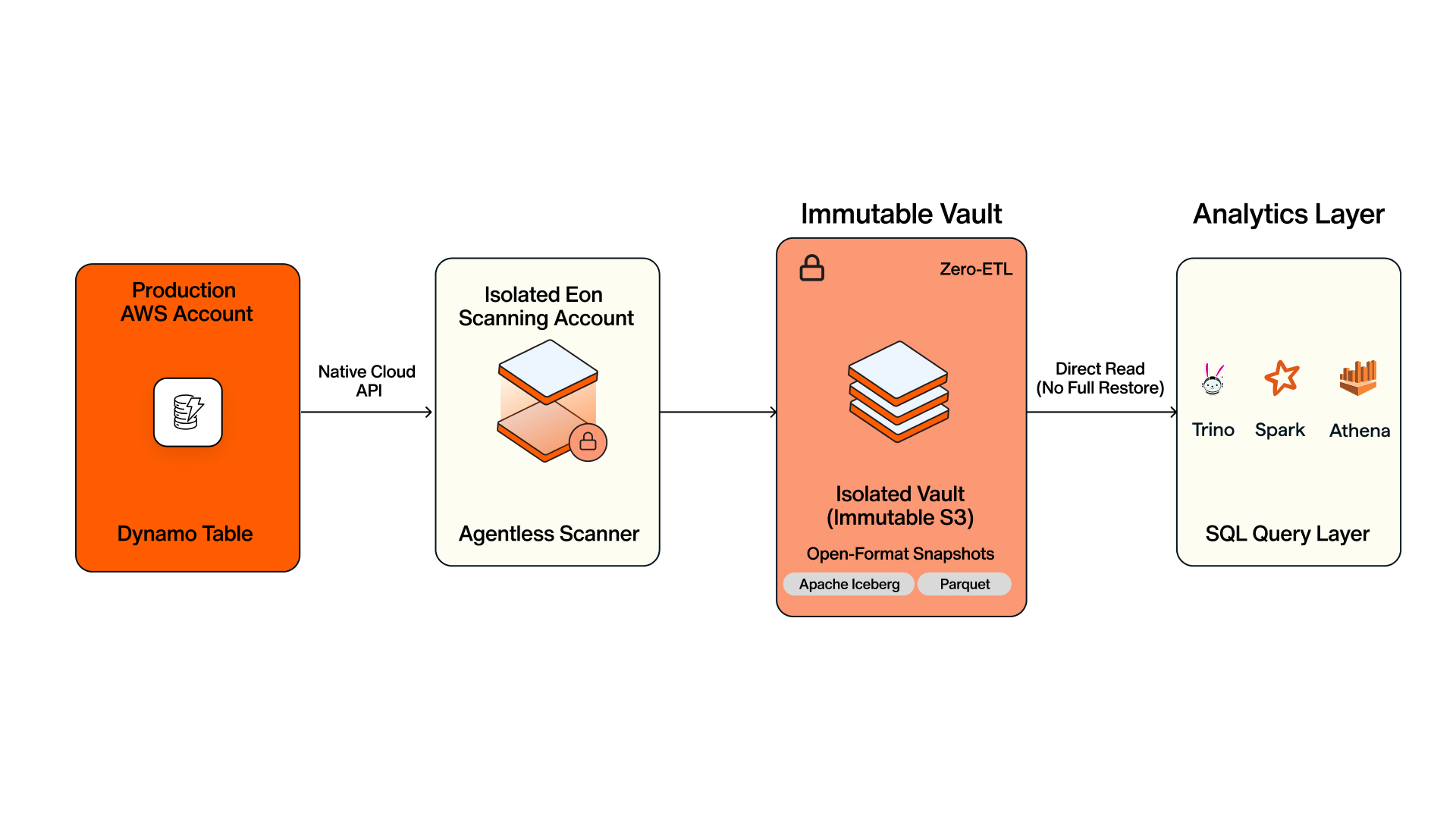
The capture path is simple enough. Eon captures DynamoDB with full table scans plus DynamoDB Streams: the initial full scan completes first, then Eon rides the stream for incremental changes and runs periodic full scans to keep things in sync. Capacity mode, read/write settings, and LSIs/GSIs come along with the data. And because Eon captures changes incrementally instead of re-copying everything, snapshots stay forever-incremental with cloud-native dedup.
No agents run on the production database. Eon uses native cloud APIs to take an isolated copy, processes it in a separate Eon-managed scanning account, and lands it in an immutable vault outside the production blast radius. Inside that vault, snapshots sit in open formats (Apache Iceberg and Parquet) and stay SQL-queryable through Athena, Trino, or Spark, no GSIs and no full restore first. You pull a single record without disturbing the rest of the table, and the model is proven at trillions of records and multi-petabyte volumes.
Build the recovery pipeline
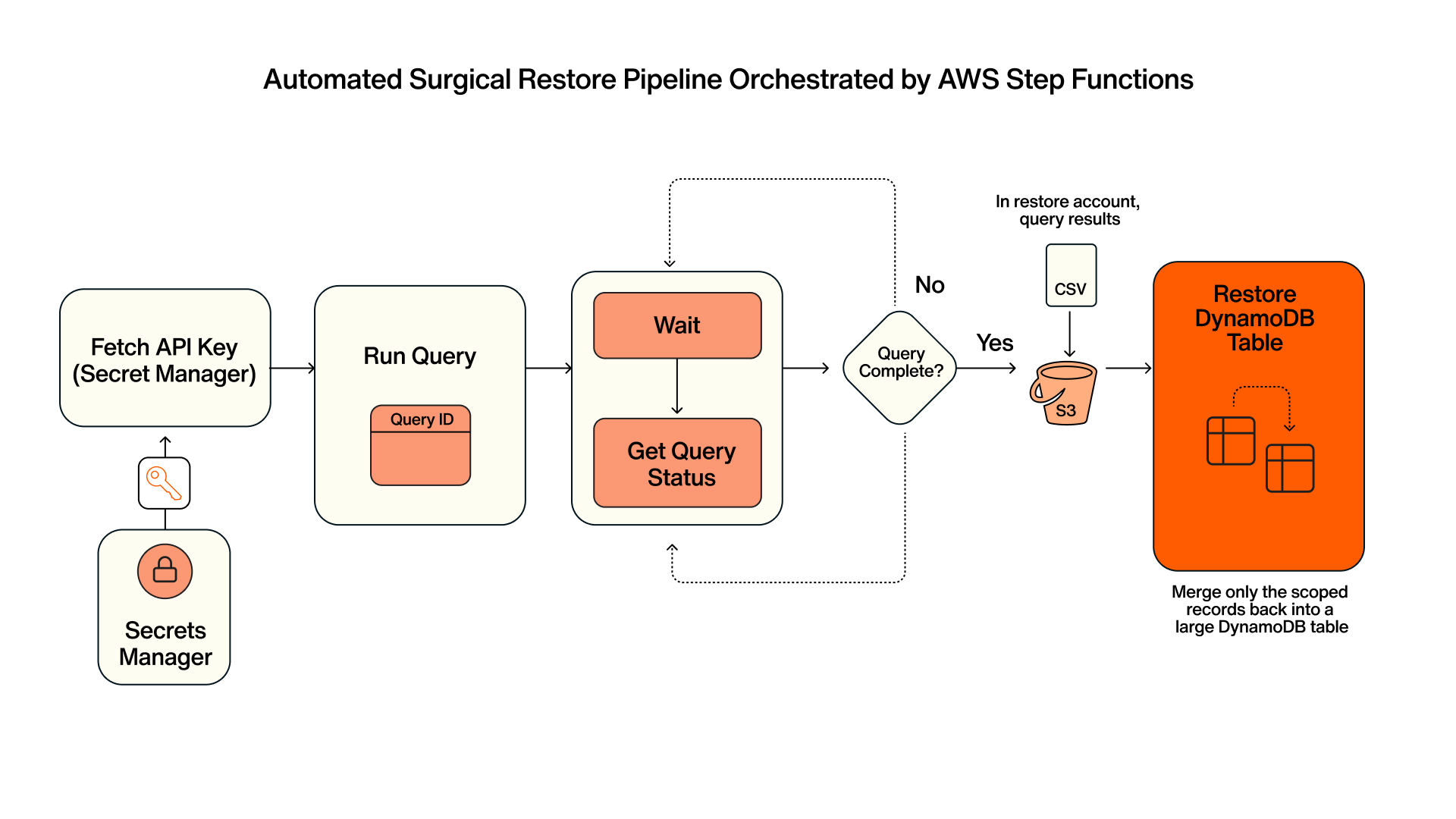
The recovery you'd run by hand maps cleanly onto four documented Eon API operations. Two are asynchronous and hand back an ID you poll on (Run Query and Restore DynamoDB Table); the other two (Get Query Status, Get Query Result) are the synchronous reads you poll with. That async/sync split is what makes the whole thing scriptable in Lambda and orchestratable in Step Functions.
One caveat before you build: the endpoints, methods, and async behavior below are documented, but the request and response bodies are representative. Confirm exact field names against the Eon API reference before you ship.
Step 1: Query the snapshot for the bad records
The pre-incident snapshot doesn't contain the bad writes, so you can't find the affected records by filtering the snapshot for the incident window. You work backward instead. Pull the affected primary keys from the live table or the reprice job's own logs, then query the pre-incident snapshot by those keys to get their good prior values.
Run Query runs SQL against a snapshot and writes the results as CSV to a location you control in your restore account.
The key list comes from the job logs, the keys the reprice batch touched between 02:00 and 02:14. Querying the 01:50Z snapshot by those keys hands back the last good version of each affected row, captured before the incident, plus an ID to track:
Get Query Result returns the columns and rows as paginated JSON once the query completes, useful when you want to validate or transform records before restoring them:
Step 2: Run it from Lambda, with credentials from Secrets Manager
Keep the Eon API key out of code and environment variables, and pull it from AWS Secrets Manager at invocation. This Lambda fetches the key, submits the query, and returns the queryId for the orchestrator to poll:
The destination bucket must be in your restore account, in the same region as the vault you're querying. Query results land in your security perimeter, not Eon's.
Step 3: Orchestrate query, store, and restore in Step Functions
Step Functions handles the asynchronous waits and retries. The query writes its CSV to S3 in your restore account on completion (the store step is native to Run Query), then the restore job hydrates the snapshot you reconcile from:
Get Query Status exposes the outputLocations URIs on completion, so the status poll doubles as the signal that the CSV is in S3 and ready to hydrate.
Step 4: Hydrate the records back into DynamoDB
Restore DynamoDB Table is asynchronous and returns a job ID you track via Get Restore Job. The restore step hydrates the snapshot into a separate DynamoDB table (restoredName) you reconcile from, which keeps the corrupted live table untouched while you validate. Eon can also restore directly to an existing table when that fits the recovery. Reconciling from a side table is one of several DynamoDB backup best practices worth settling before an incident.
Eon selects the restore method automatically (importing the table or provisioning capacity). With the good rows isolated by the query, you reconcile only the ~5,000 affected keys back into production (for example, a BatchWriteItem job driven by the query results), leaving every legitimate write since 2:14 a.m. in place. Because the destination is selected by restore account, sending the data to another region or AWS account is a configuration choice, not the AWS Organizations hard boundary that native tooling imposes.
Full-table rollback vs. surgical restore
A full-table rollback restores the entire table to a timestamp into a new table. An Eon surgical restore returns only the affected records via SQL query and preserves every legitimate write. The two approaches compared across six dimensions:
Full-table rollback vs. surgical restore
| Dimension | Full-table PITR / AWS Backup | Eon surgical restore |
|---|---|---|
| Recovery scope | Whole table to a timestamp, into a new table | Only the affected records, via SQL query |
| Data integrity | Good writes since the incident are lost or reconciled by hand | Legitimate writes preserved; reconcile scoped records into the live table |
| RTO (illustrative) | 60% of teams take 6+ hours for a full restore; only 5% under an hour | Record-level restore in minutes |
| Cost (illustrative) | Repeated full copies plus a duplicate table; TCO grows with data volume | Forever-incremental, per-GB; 40–50% lower storage TCO |
| Access scope | AWS Backup cross-account bound to the same AWS Organization; PITR has no cross-account | Cross-account and cross-region restore, beyond the org boundary |
| Backup queryability | Not queryable without GSIs; restore first | SQL-queryable snapshots, no GSIs; zero-ETL via Athena/Trino/Spark |
What you get when recovery is code
The pipeline above is reproducible and testable. You can run it as a game-day drill against last night's snapshot, wire it into CI/CD so a recovery path ships and gets verified like any other code, and trigger it across regions and accounts without the AWS Organizations fence in the way.
When the next 2 a.m. job misfires, the difference is whether you roll back 300 TB and lose a night of good writes, or pull back 5,000 records and move on.
Request an Eon demo to see a surgical DynamoDB restore run end to end against your own scale.
Frequently Asked Questions
Can you restore specific DynamoDB records without a full-table rollback?
Yes. Eon makes backup snapshots SQL-queryable, so you can query only the affected records and restore just those, either into a new table or reconciled into the live table, without rolling the whole table back to a timestamp. Native DynamoDB point-in-time recovery and AWS Backup restore the entire table.
Does DynamoDB point-in-time recovery (PITR) restore to a new table?
Yes. The RestoreTableToPointInTime API requires a TargetTableName and restores the table to a new table, rebuilding GSIs, LSIs, capacity, and encryption from the source table's current settings. PITR retains up to 35 days of recovery points.
Can AWS Backup restore a DynamoDB table across AWS accounts?
Only within the same AWS Organization. AWS Backup requires both accounts to belong to the same organization, so a recovery account outside that boundary can't receive the copy. Eon supports cross-account and cross-region restore beyond the organization boundary.
How do you automate an Eon DynamoDB restore with Lambda and Step Functions?
Chain four asynchronous Eon API operations (Run Query, Get Query Status, Get Query Result, and Restore DynamoDB Table), each returning an ID you poll, which maps cleanly onto Step Functions states with retries. Query results are written as CSV to a bucket in your restore account, in the same region as the vault.