

Article

January 2026 Eon Product Update

In January, we introduced a few new capabilites to enable greater cost visibility, expanded database support, and faster, more granular recovery.

Around
0
 min read
Updated on 
Feb 2, 2026
January 2026 Eon Product UpdateJanuary 2026 Eon Product Update
Article

January 2026 Eon Product Update

In January, we introduced a few new capabilites to enable greater cost visibility, expanded database support, and faster, more granular recovery.

Around
2
 min read
Industry
Size
Cloud Provider
Use Cases
Eon Solutions
Contact sales
Get a demo
Download PDF

Quick Summary

  • Resource Level Cost Visibility: Group by resource to track spend of a single resource across vaults
  • More Flexible Retention: Apply snapshot holds to prevent deletion past expiration for compliance or maintenance
  • Expanded Database Resource Support: Automated discovery for Aurora Global and Cloud SQL for PostgreSQL
  • Enhanced support for DynamoDB: Restore DynamoDB directly to existing tables or using a new S3 import restore method
  • Higher Frequency EC2 backups: Achieve tighter RPOs with 15-minute EC2 backups

Resource-Level Tracking in Cost Explorer

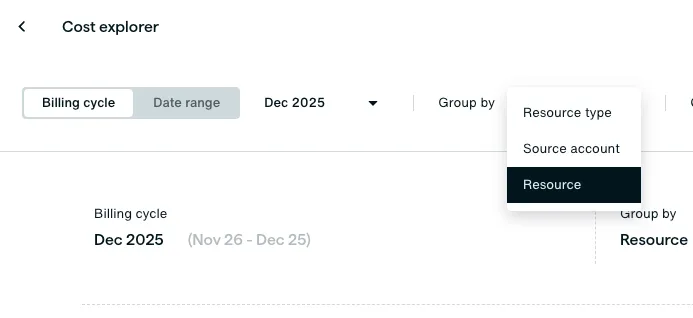
We’ve upgraded Cost Explorer to give you a more granular view of your spend. In addition to grouping by resource type (like S3 or EC2), you can now drill down into individual resources. This allows for precise cost tracking per resource and per vault, even if a single resource is backed up to multiple vaults.
Snapshot Holds for Enhanced Data Protection

To protect a snapshot past its expiration for critical maintenance or compliance windows, you can now place and remove holds on snapshots. When a hold is active, the snapshot is retained indefinitely from deletion, or until the hold is explicitly removed.

Expanded database support: Aurora Global and Cloud SQL for PostgreSQL

We’ve expanded our multi-cloud resource discovery to include Amazon Aurora Global Database and Google Cloud SQL for PostgreSQL. These resources will now be automatically discovered and available for backup configuration.

Note: Existing RDS or CloudSQL backup policies will apply to these new resources automatically. If you do not wish to back them up, please refine your policy conditions to exclude them.

Granular recovery and S3 import restores for DynamoDB

Our restore capabilities for DynamoDB have become more flexible. Using the restore API, you can now restore DynamoDB table snapshots directly to existing tables. This eliminates the need to create new tables during a recovery process, streamlining your restoration workflows and maintaining configuration consistency.

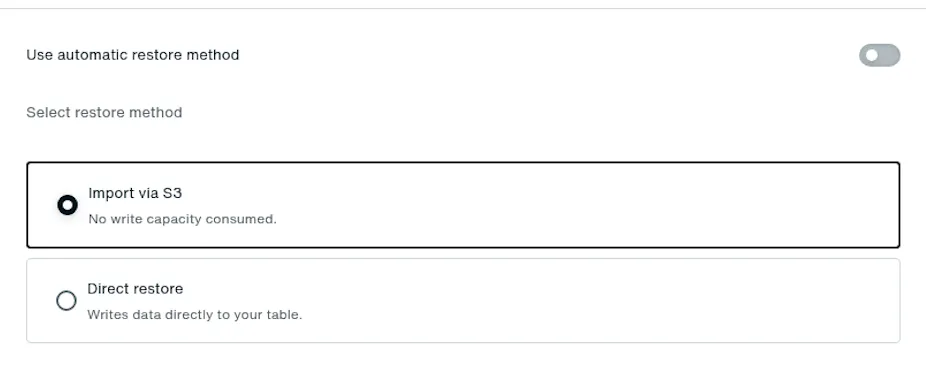
Additionally, we’ve introduced an S3 import restore method that bypasses account-level Write Capacity Unit (WCU) limits. By staging data in a dedicated S3 bucket, we eliminate WCU consumption and significantly reduce recovery times. You can select your preferred method and customize index configurations within the revised restore interface.
High-frequency backups for EC2

For mission-critical workloads requiring low recovery point objectives (RPO), we’ve introduced 15-minute backup intervals for EC2 instances. You can now configure high-frequency backup policies to ensure your EC2 instances are protected with minimal time between backup windows.

Note: While these Eon snapshots are logically air-gapped, they do not get scanned or indexed. As a result, data-aware features like filesystem exploration and granular recovery are unavailable for high-frequency EC2 backups. To use these features, we recommend maintaining a separate daily backup policy.

Learn more

Want to learn more about Eon? Request a demo or follow us on LinkedIn to stay up to date on the latest developments. We will be publishing these product updates monthly moving forward.


FAQ

No items found.

Product Marketing Manager at Eon

Industry
Size
Cloud Provider
Use Cases
Eon Solutions
Contact sales
Get a demo
Download PDF

Quick Summary

  • Resource Level Cost Visibility: Group by resource to track spend of a single resource across vaults
  • More Flexible Retention: Apply snapshot holds to prevent deletion past expiration for compliance or maintenance
  • Expanded Database Resource Support: Automated discovery for Aurora Global and Cloud SQL for PostgreSQL
  • Enhanced support for DynamoDB: Restore DynamoDB directly to existing tables or using a new S3 import restore method
  • Higher Frequency EC2 backups: Achieve tighter RPOs with 15-minute EC2 backups

Resource-Level Tracking in Cost Explorer

We’ve upgraded Cost Explorer to give you a more granular view of your spend. In addition to grouping by resource type (like S3 or EC2), you can now drill down into individual resources. This allows for precise cost tracking per resource and per vault, even if a single resource is backed up to multiple vaults.

Snapshot Holds for Enhanced Data Protection

To protect a snapshot past its expiration for critical maintenance or compliance windows, you can now place and remove holds on snapshots. When a hold is active, the snapshot is retained indefinitely from deletion, or until the hold is explicitly removed.

Expanded database support: Aurora Global and Cloud SQL for PostgreSQL

We’ve expanded our multi-cloud resource discovery to include Amazon Aurora Global Database and Google Cloud SQL for PostgreSQL. These resources will now be automatically discovered and available for backup configuration.

Note: Existing RDS or CloudSQL backup policies will apply to these new resources automatically. If you do not wish to back them up, please refine your policy conditions to exclude them.

Granular recovery and S3 import restores for DynamoDB

Our restore capabilities for DynamoDB have become more flexible. Using the restore API, you can now restore DynamoDB table snapshots directly to existing tables. This eliminates the need to create new tables during a recovery process, streamlining your restoration workflows and maintaining configuration consistency.

Additionally, we’ve introduced an S3 import restore method that bypasses account-level Write Capacity Unit (WCU) limits. By staging data in a dedicated S3 bucket, we eliminate WCU consumption and significantly reduce recovery times. You can select your preferred method and customize index configurations within the revised restore interface.

High-frequency backups for EC2

For mission-critical workloads requiring low recovery point objectives (RPO), we’ve introduced 15-minute backup intervals for EC2 instances. You can now configure high-frequency backup policies to ensure your EC2 instances are protected with minimal time between backup windows.

Note: While these Eon snapshots are logically air-gapped, they do not get scanned or indexed. As a result, data-aware features like filesystem exploration and granular recovery are unavailable for high-frequency EC2 backups. To use these features, we recommend maintaining a separate daily backup policy.

Learn more

Want to learn more about Eon? Request a demo or follow us on LinkedIn to stay up to date on the latest developments. We will be publishing these product updates monthly moving forward.

Product Marketing Manager at Eon

What You’ll Learn

Key Findings at a Glance

What You’ll Learn

Key Findings at a Glance