


Turning backup data into a queryable data asset is central to Eon as the autonomous data foundation for the AI era, which keeps enterprise data safe and recoverable while making it usable for analytics and AI. The Microsoft Fabric integration is a direct expression of that approach: backup data becomes usable in the analytics and AI tools your teams already use, without a second pipeline or a second copy.
You can activate backup data in Microsoft Fabric without building a separate ETL pipeline or creating another full data copy for analytics. Eon publishes backup datasets as Iceberg tables, exposes them via OneLake Shortcuts, and lets Fabric virtualize metadata so teams can query backup data in place using Fabric tools.
Why does backup data usually stay trapped?
Most backup systems were built for recovery first. Analytics, BI, and AI usually show up later, if at all.
The problem is not a lack of data. The problem is that backup data lives in systems that are awkward to query, expensive to duplicate, or painful to move. Once a team has to build a new ingestion pipeline just to use backup data, the project usually stalls.
If backup data is only useful after a restore, it is still trapped.
For data and infrastructure leaders running multi-cloud estates at hundreds of TB to multi-PB scale, the pattern repeats itself. Every new analytics or AI initiative starts with a pipeline rebuild. Every restore is a ticket. The cost of having the data and not being able to use it compounds quietly until someone asks why the AI roadmap keeps slipping.
What does the Eon and Fabric integration actually do?
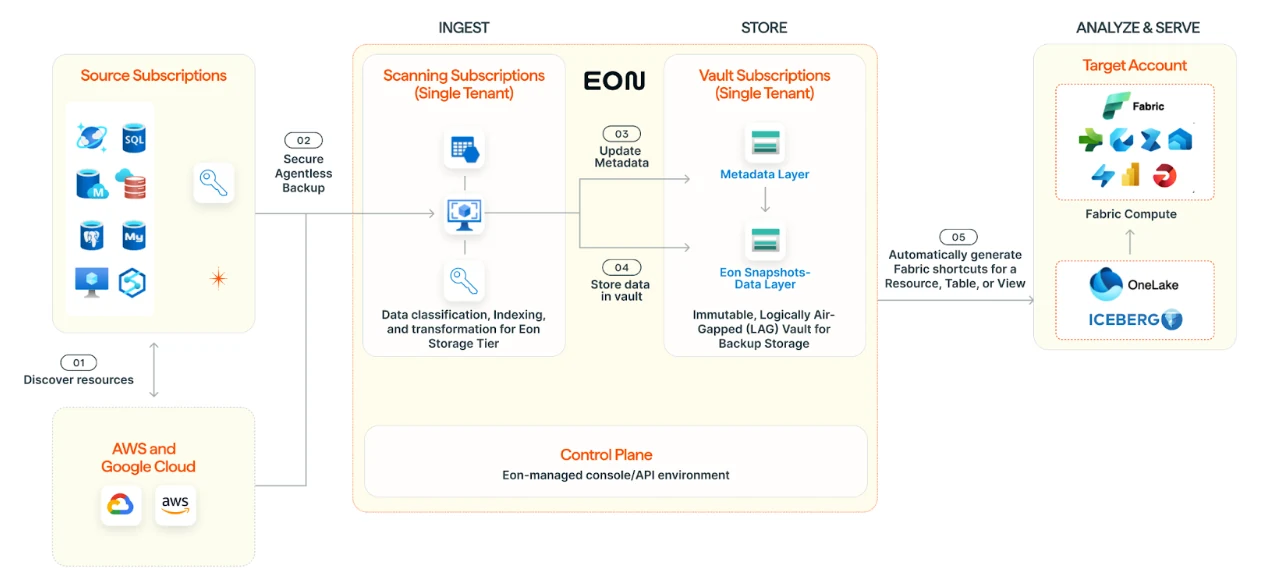
Eon turns backup data into structured, queryable datasets and exposes them to Microsoft Fabric through OneLake. That gives teams a way to use backup data for reporting, analysis, compliance, and AI workflows without having to restore it first.
In practice, the integration does a few important things:
- Exposes backup datasets through OneLake Shortcuts
- Lets Fabric register those datasets as queryable tables
- Avoids a second storage copy just to make the data usable for this access path
- Keeps the path read-only and governed
- Works across backup data stored in Azure, AWS, and Google Cloud
The payoff: the same backups you already pay to keep become usable data assets inside the tools your teams already use.
The integration rests on the same foundation as the rest of the platform: cloud-native discovery and deployment with no agents, appliances, or clusters, an air-gapped immutable vault for the backup data itself, and open-format storage (Parquet, Iceberg) that analytics engines can read natively. Fabric access is a surface on top of that foundation, not a separate product.
What are OneLake Shortcuts, in plain English?
A OneLake Shortcut is a pointer to data that lives outside Fabric.
Instead of copying files into Fabric-managed storage, the shortcut tells Fabric where the data already lives. Fabric workloads can then read through that shortcut as if the data were local to the lakehouse.
The core reason the model is attractive is that teams get access without creating another copy job, another storage bill, or another brittle pipeline to maintain.
How does metadata virtualization make backup data queryable?
The integration rests on two pieces: OneLake Shortcuts and metadata virtualization.
Eon publishes backup datasets as Apache Iceberg tables backed by Parquet files. When Fabric sees an Iceberg table through a OneLake Shortcut, it virtualizes the metadata into a format its engines can read.
The important part: Fabric translates metadata for access. It does not rebuild the dataset through a separate ingestion process.
Because the integration relies on open formats such as Apache Iceberg and Parquet, the access pattern remains consistent across clouds and helps reduce lock-in to any single backup or analytics path.
Watch the short demo: See how Eon exposes backup data to Fabric and makes it queryable without a separate ETL path.
How do you activate backup data in Microsoft Fabric?
The flow is straightforward.
Step 1: Eon writes backups as Iceberg tables
Eon manages the backup data as Apache Iceberg tables stored in cloud object storage. That includes examples such as PostgreSQL, MySQL, and DynamoDB backups, as well as other supported database workloads.
Each dataset includes Parquet data files plus an Iceberg metadata layer. That metadata tells query engines where the right files are located, so they do not need to scan the entire dataset every time.
Iceberg also supports schema evolution and historical access across backup versions, which is useful when teams need to inspect data as it existed at a specific point in time.
On storage ownership, the deployment model can vary. For many customers using Eon’s air-gapped backup design, the backup data lives in an Eon-managed single-tenant cloud account or subscription. Eon also supports customer-managed object storage for customers who want to host the backup storage themselves.
Step 2: Enable Fabric access in Eon
In the Eon console, teams set up the Microsoft Fabric integration at the tenant and workspace level.
From there, they can choose Automatic Access for ongoing publication of selected backup datasets based on configured backup cadence, or On-Demand Access for specific tables, views, or datasets. That gives teams a practical choice: keep a working set of backup data available at all times, or expose only the data they need when they need it.
Eon configures the connection with read-only access, so Fabric can query the backup data but cannot modify or delete the underlying files.
Because OneLake Shortcuts are lightweight metadata objects, provisioning is fast compared with a traditional data ingestion flow.
Step 3: Fabric virtualizes the metadata
When the shortcut is placed under the Tables directory in a Fabric lakehouse, Fabric detects the Iceberg metadata and virtualizes the table into a format its engines can query.
Fabric does not copy or rewrite the underlying Parquet files. It only translates the metadata.
Once the shortcut points to a valid Iceberg table location, including the expected metadata/ and data/ subdirectories, Fabric handles the rest. The table appears in the Lakehouse Explorer alongside native tables and is ready to query.
From the user’s point of view, the backup table behaves like any other table in the lakehouse.
Step 4: Query the data in Fabric tools
Once the table is available, teams can use it from familiar Fabric workloads:
- Fabric Data Warehouse and SQL analytics paths for T-SQL-style querying
- Fabric Spark for larger-scale analysis and feature engineering
- Power BI for reporting and dashboards
- Related Microsoft workflows that can work from OneLake-backed data, including AI-oriented use cases
Because the underlying files are stored in Parquet, query engines can apply column pruning and partition filtering to reduce the amount of data scanned.
Once the shortcut points to a valid table path and the required permissions are in place, the backup data becomes queryable from the Fabric tools your teams already use.
What can teams actually do with backup data in Fabric?
The architecture matters, but the real question is what teams get out of it once the data is available.
Analytics and BI at scale
Historical backup data gives teams a longer, richer record than most operational systems expose day to day. Once that data is queryable in Fabric, teams can use it for trend analysis, reporting, and dashboarding without first restoring it to a separate environment.
The use case covers both business reporting and infrastructure reporting. Backup growth, retention behavior, restore trends, and historical operational patterns all become easier to inspect.
Cross-cloud analysis in one place
The cross-cloud angle gets more interesting in multi-cloud environments.
Teams can surface backup datasets stored in Azure Blob Storage, AWS S3, and Google Cloud Storage into one Fabric workspace. The result is a single place to compare data across clouds, instead of building separate pipelines for each provider.
Teams can also query and join data across datasets from different clouds inside the same lakehouse context. The kind of work that usually turns into a mini integration project becomes much simpler.
AI and model development
Backup data often holds the historical context teams wish they had during model work.
Once backup data is queryable in Fabric, data teams can use those tables in their existing analytics and model development workflows without staging a separate restore. The approach works especially well for long-range trend work, operational history, and datasets that are too expensive or messy to keep mirrored elsewhere.
Compliance and risk analysis
Long-term retention does not need to live in a separate compliance stack.
Teams can run retention verification queries directly against backup tables, inspect historical datasets for audit work, and combine this workflow with governance tooling already in their environment for lineage, classification, and access review.
Recovery and cyber resilience analysis
A backup that exists is not the same thing as a backup you trust.
By querying backup metadata and backup datasets directly, teams can review coverage gaps, recovery-point history, and readiness indicators alongside periodic restore testing. Backup validation becomes an operational practice rather than a ceremonial one.
Cost and operational tuning
Backup storage tends to grow quietly until finance asks why.
Querying metadata and historical backup datasets in Fabric gives teams a better way to spot stale data, lifecycle drift, and retention patterns earlier. Retention and capacity decisions get easier to tune based on actual usage and growth trends.
How do security and governance work?
The security model is layered and pretty clean.
Access remains read-only at the dataset level. Fabric users can query the data, but they cannot modify or delete the underlying backup files through Fabric.
Authentication uses Microsoft Entra service principals and Fabric permissions, following a least-privilege model. Users without the right workspace or item permissions do not see the exposed backup tables.
The underlying files also stay in their original storage location. Fabric only virtualizes the metadata path inside the lakehouse. The result is a smaller blast radius and easier data residency preservation.
If the target data is moved or deleted, the shortcut breaks cleanly instead of serving stale data.
Eon continuously validates the shortcuts to confirm they still point to governed, secure storage. The guardrail matters in environments where storage paths and policies change over time.
What about multi-cloud performance?
The cross-cloud part is real, but performance still matters.
For scenarios where backup data sits outside Azure and teams query it often, validate Fabric caching behavior, refresh settings, and egress tradeoffs for your environment before making performance commitments.
What should teams do next?
If your team already uses Microsoft Fabric, the next step is simple: see the flow with your own backup data.
A good demo should answer the questions that matter in practice:
- Which backup datasets appear in Fabric
- How automatic and on-demand access behave
- How the permissions are scoped
- What the query path looks like in Power BI, SQL, and Spark
- How the model fits if your backups span more than one cloud
Organizations running backups across Azure, AWS, or Google Cloud can surface that data through OneLake Shortcuts and query it within Fabric using the architecture described above.
For a walkthrough of the integration in action, Eon and Microsoft presented a live session covering architecture and live demos. To explore it hands-on, request a demo.
FAQs
How does Eon integrate with Microsoft Fabric?
Eon publishes backup datasets as Iceberg tables and exposes them to Fabric through OneLake Shortcuts. Fabric then virtualizes the metadata so the datasets appear as queryable tables inside the lakehouse.
Does this copy backup data into OneLake?
No separate replicated analytics copy is required for the query path described here. Fabric reads the data through a shortcut and virtualized metadata layer while the underlying files stay in their original object storage location.
Where does the backup data live?
The answer depends on the deployment model. For many customers using Eon's air-gapped design, the backup data lives in Eon-managed, single-tenant cloud storage. Eon also supports customer-managed object storage.
Can teams choose automatic or on-demand access?
Yes. Teams can configure Automatic Access for ongoing publication based on configured backup cadence, or On-Demand Access for selected datasets. The choice lets them decide how much backup data to expose to Fabric and when.
How often is backup data synchronized?
The synchronization model is configurable. Teams can choose the cadence that fits their use case and can also decide whether Fabric should expose only the latest backup snapshot or multiple points in time.
Which Fabric tools can query the data?
The main paths called out here are Fabric Data Warehouse or SQL analytics, Fabric Spark, and Power BI. The broader value is that the data becomes usable inside the Fabric ecosystem rather than staying locked inside a recovery-only path.
Is access read-only?
Yes. Fabric users can query the data but cannot modify or delete the underlying backup files through Fabric.
What happens if the source path changes or disappears?
The shortcut breaks cleanly. Fabric does not keep serving stale data from a dead path, and operators should validate the external path, permissions, and configuration when troubleshooting.
Can this work across Azure, AWS, and Google Cloud?
Yes. The same shortcut pattern can surface backup datasets stored in Azure Blob Storage, AWS S3, and Google Cloud Storage into one Fabric workspace.
Can the integration help with AI and compliance beyond reporting?
Yes. Once backup data is queryable in Fabric, teams can use it for BI, compliance checks, model development, historical analysis, and recovery validation without restoring it first.