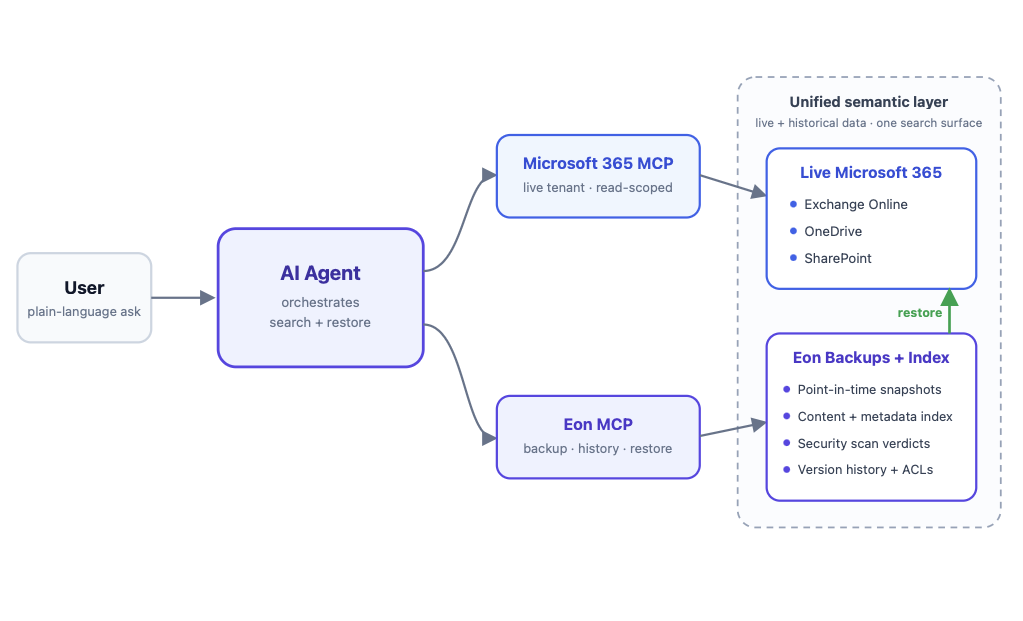




You can restore backup data to a live database without a full restore if your backup platform supports searching and querying the backup directly. With Eon, teams can identify the exact data they need, write the result to customer-managed storage, and restore that data into a running database using their own import and operational controls inside their cloud environment.
When a table gets corrupted, a job overwrites the wrong rows, or someone deletes the wrong data, most backup tools still force teams into the same workflow: restore the full database, stand up temporary infrastructure, dig through the data, and then reinsert the small subset they actually needed.
That is slow, expensive, and usually bigger than the incident requires.
A granular restore changes that. Instead of treating backups like black boxes, teams can search backup data, query it directly, and recover only the tables, databases, or result sets they actually need.
Eon supports database protection across AWS, GCP, and Azure, including workloads like Amazon RDS/Aurora, DynamoDB, BigQuery, Cloud SQL, and SQL Server on virtual machines. Restore behavior and feature depth can vary by service and engine, so teams should check current support details for their specific workload.
If BigQuery is one of your core platforms, see Introducing Eon Backup and Recovery for Google BigQuery.
The part people miss is how Eon gets there. Eon does not run agents on the production database or require ETL pipelines, schema changes, or customer-managed backup infrastructure. It uses native cloud APIs to create an isolated copy, then processes that copy in a separate Eon-managed scanning account. That is what makes the backup query-ready without adding load to production.
In this guide, we’ll break down why full restores create so much overhead, what a granular restore should look like in practice, and how Eon helps cloud teams recover faster without restoring more than necessary.
Why are full database restores still such a pain?
Full database restores are often too large for the problem at hand.
A lot of incidents are narrow. A table gets corrupted. A job overwrites the wrong rows. Someone deletes the wrong records. But traditional snapshot-based recovery usually pushes teams into a much larger workflow: restore the full instance, wait for it to come online, dig through the data, extract what matters, and then put that subset back into production.
That works, but it is slow, expensive, and operationally heavy because the team still has to validate the restored data, extract the correct subset, and load it back into production safely.
For many teams, the hard part is not finding a backup. It is pulling the right data out of it without restoring everything around it.
What is a granular database restore?
Granular database restore means recovering specific data from a backup rather than defaulting to the largest restore scope the platform allows.
Today, that can mean different things depending on the workload:
- A full instance restore
- An individual database restore for AWS RDS PostgreSQL and Aurora PostgreSQL
- A single table restore
- A targeted query result restore
The point is precision. If the issue affects only a slice of data, the restore process should match it.
Why do existing cloud backup providers struggle with this?
Many cloud backup tools still rely on snapshots as the main recovery format.
Snapshots are useful when you need a broad recovery. But for targeted recovery, they act more like black boxes. Teams often have to restore the entire database instance before they can inspect the data and extract the specific parts they need.
That drives up recovery time and cloud cost. It also creates a lot of overhead for incidents that should be much smaller.
This is where granular restore changes the experience. Instead of restoring first and investigating later, teams can inspect the data they need before deciding what to recover.
How does queryable backup data change database recovery?
Queryable backup data makes backup data usable.
Instead of treating a backup like a sealed container, teams can search, inspect, and run SELECT SQL queries against it before restoring anything.
Eon stores database backups in Apache Parquet, so each snapshot is both an immutable backup copy and a query-ready dataset. From the user’s perspective, teams can query backup snapshots as if they were querying the original database directly. Under the hood, Eon uses Amazon Athena to query the snapshot data.
That helps teams confirm they are looking at the right data and isolate the exact result they want to recover before they import anything.
That significantly changes the workflow. Teams can move from “restore everything, then sort it out” to “find the exact data, then restore only that.” That only works if the backup format is not a lossy analytical copy. In Eon’s architecture, the Parquet backup is designed to be fully recoverable too, with full type fidelity preserved for restore.
That is useful during incidents because it helps the team verify the recovery target before they import anything, and it is also useful for validation, troubleshooting, and audit-related checks.
The point is simple: teams can inspect backup data first, then recover only what the incident actually requires.
How does live database restore with Eon work?
Eon supports live database restore workflows by allowing teams to first inspect backup data, then isolate the data they need, and finally restore only that data to the target environment.

Just as important, this is not limited to one-off manual work. Teams can run these workflows in the Eon console or operationalize them via the API to enable repeatable recovery processes.
Step 1: Search backup data across environments
Eon’s global search and database exploration capabilities help teams locate the database objects or historical data they need without first standing up a full restored database.
That matters in larger environments where the challenge is not just restoring, but finding the right dataset quickly across accounts, regions, or cloud environments.
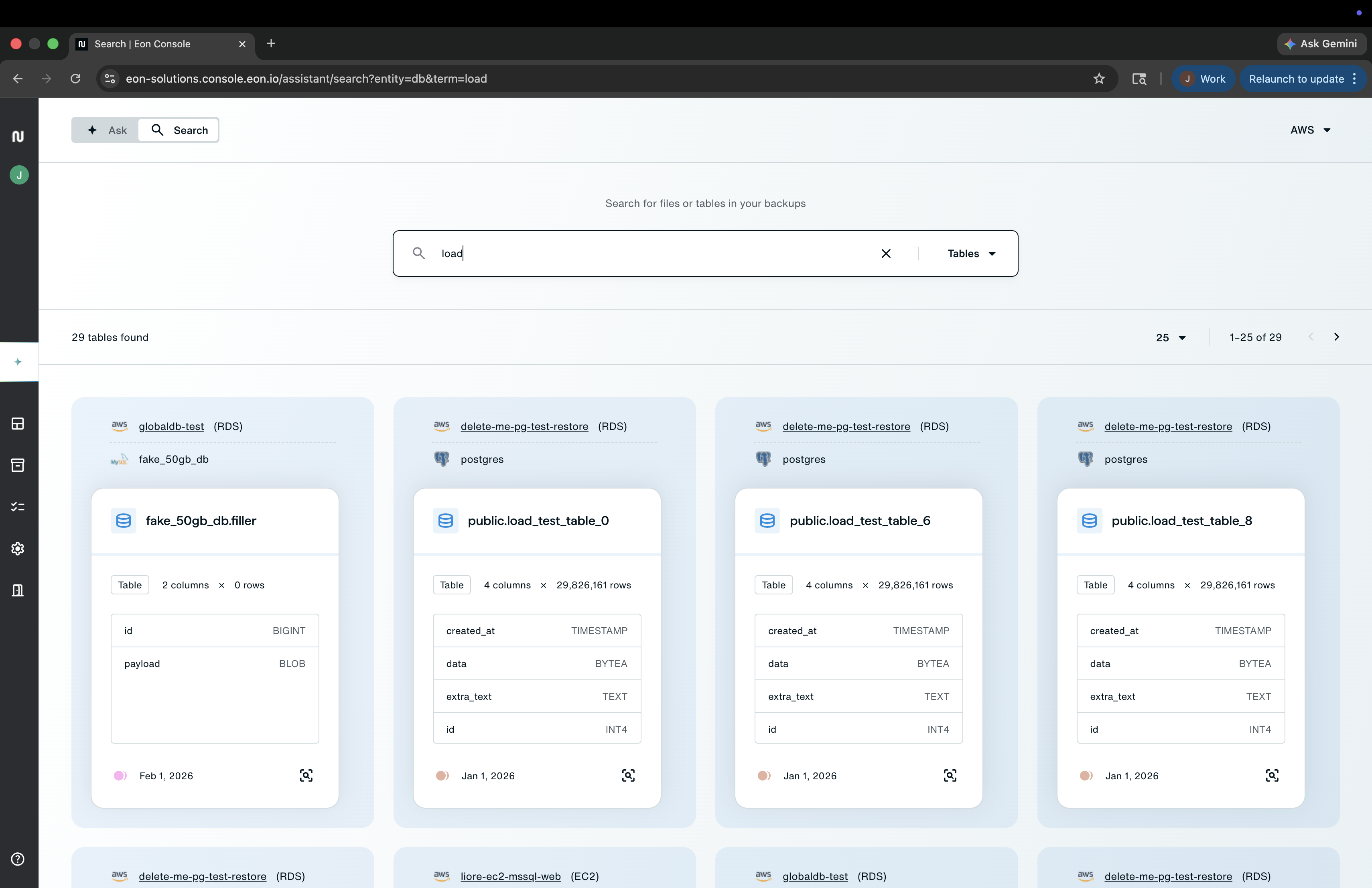
Step 2: Run a query to retrieve the data you need
Using the Eon Database Explorer, teams can query the Eon Storage Tier directly instead of restoring a full database first.
That lets them recover at different levels of scope, from a broader dataset down to a much narrower result set.
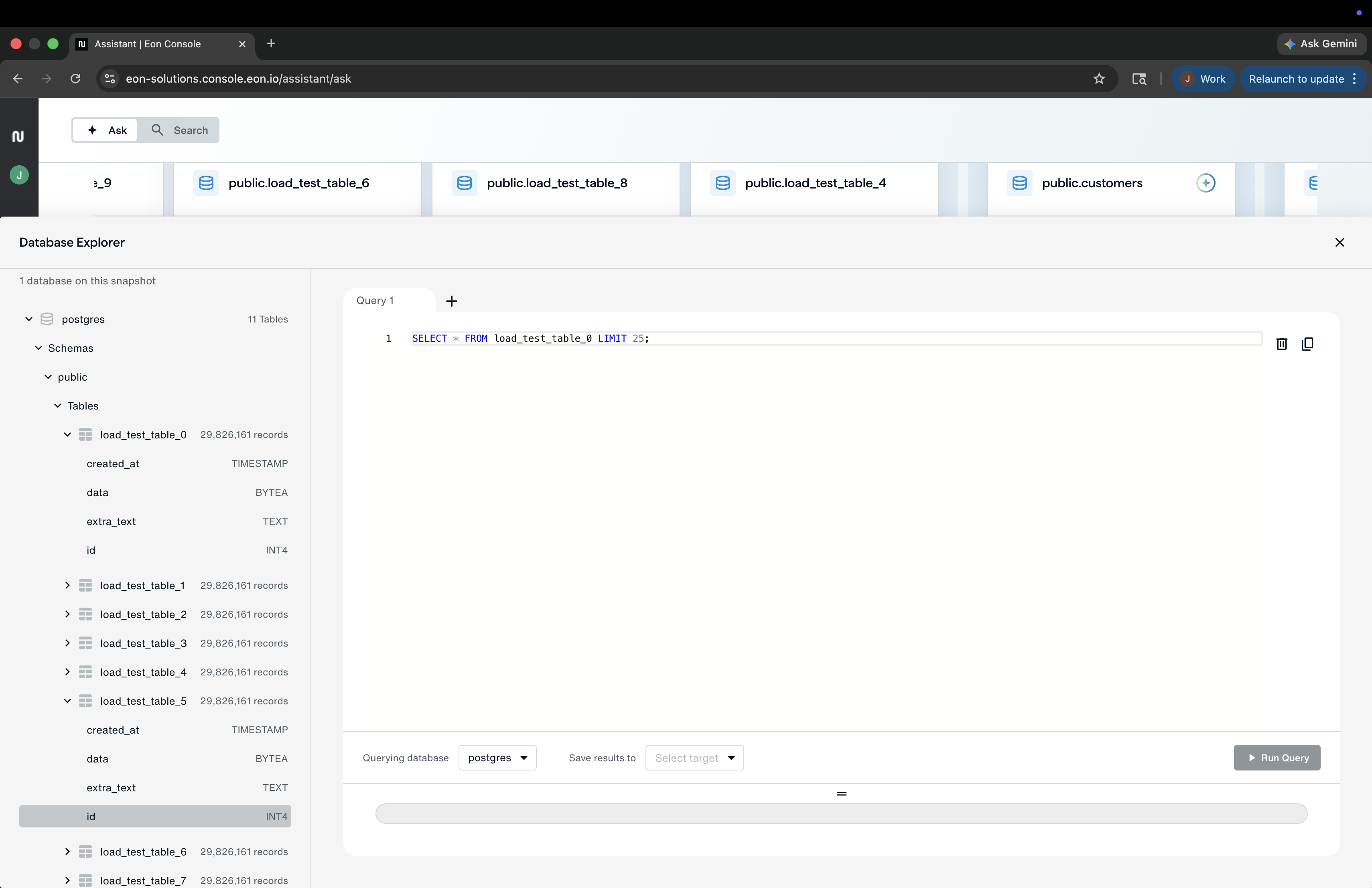
Step 3: Write the query result to customer-managed storage
In the workflow described here, the query result is written to a predefined S3 bucket in a customer-managed restore account.
Because the customer controls that bucket, the team can manage encryption and access settings based on its own requirements.

Step 4: Restore the data into the live database inside your own environment
Once the restore result is in object storage, the team can access it and restore it to a live, running database using a bastion compute resource within its own secure perimeter.
In this workflow, the team can keep the final import within its own cloud perimeter, avoiding the need to hand production credentials to a third party for the restore step.

Step 5: Automate the workflow if needed
These operations are also available via Eon’s REST API, enabling teams to build repeatable restore workflows, automate them in CI/CD pipelines, or integrate them into their own operational processes.
That changes restore from a one-time fire drill into something platform teams can standardize.
How does Eon verify that the backup is actually recoverable?
Queryable is good. Recoverable is the bar.
Eon uses a verification tool called DB Compare to validate backup accuracy. After the backup, it computes a cryptographic fingerprint for each table in the source database, restores the Parquet backup to a temporary instance, recomputes those fingerprints, and compares the results. That gives teams stronger proof that the backup is recoverable, not just retained. For a real customer example of faster large-scale recovery, see NETGEAR Cuts Backup Costs 35% and Accelerates 10TB Recovery by 88% with Eon.
What can teams restore with this approach?
Depending on the workload, Eon supports several recovery scopes from the same backup snapshot:
- Full instance restore, or for AWS RDS PostgreSQL and Aurora PostgreSQL, individual database restore from a snapshot
- Table-level restore when only one part of the database was affected
- Record-level restore by querying backup data with SQL and recovering the exact rows needed
- Point-in-time forensics across snapshots to identify when changes occurred
Recovery needs change by incident, so the restore scope should match the blast radius.
For full database restores, Eon also rebuilds non-table objects so the restored database is fully functional, not just a pile of table data. That includes objects like indexes, constraints, functions, triggers, roles, permissions, sequences, stored procedures, and more.
When does granular restore matter most?
Granular restore matters most when the blast radius is smaller than the database itself.
Common examples include:
- Accidental deletion
- Table-level corruption
- A failed migration or deployment that changed the wrong data
- A bad batch job or script that overwrote records
- A security incident where the team needs to recover only a known-good subset
- Validation work before committing to a larger restore
It is also useful when teams want to move fast without bringing along extra restore overhead they do not need. If security-driven recovery is part of the evaluation, read Eon’s Ransomware Detection for Databases.
Why does this lower overhead?
A full restore usually means extra infrastructure, extra time, and extra handling.
Granular restore helps reduce that by narrowing the recovery job to the data that actually needs attention. That means less wasted effort, less waiting, and a more practical path back to a healthy production state.
The benefit is not just speed. It is also control.
Restore only what you need
If your current process forces you to restore a full database environment to recover a single table or result set, the recovery workflow itself is getting in the way.
Granular database restore gives teams a more practical way to recover. And when backup data is searchable and queryable, teams can find the right data first, then restore only what they need into a live environment.
Want to see how Eon handles granular database restore in practice? Book a demo.
FAQ
Can you restore a single table from a database backup?
Yes. Eon supports restoring individual tables, allowing you to recover a narrower slice of data rather than performing a full restore.
Can you restore specific records from backup?
Yes. Eon supports record-level restore by allowing teams to query backup data with SQL, identify the exact rows they need, and recover them without first rebuilding the entire database.
Why are full database restores slow and expensive?
Because they often require teams to restore an entire database instance, provision temporary infrastructure, inspect the restored data, and then move only part of it back into production.
What is the difference between snapshot restore and granular restore?
Snapshot restore usually starts with restoring a broader database state or instance. Granular restore focuses on recovering only the specific data needed for the incident.
Can you query backup data before restoring it?
Yes. Structured data in the Eon Storage Tier is queryable without first performing a full database restore.
How does Eon keep the restoration process inside the customer’s control?
In the workflow described here, query results are written to a customer-managed S3 bucket, and the final restore can be performed using a bastion host within the customer’s secure perimeter.
When should a team use granular restore instead of a full restore?
When the issue affects only part of the data, like a table or a targeted set of results, and the team wants to avoid the time and overhead of a full restore.
Can these restore workflows be automated?
Yes. These operations are available through Eon’s REST API, which allows teams to automate parts of the workflow or integrate them into CI/CD pipelines, while still maintaining their own approval and import controls where needed.
Is a full restore ever still needed?
Yes. Eon can restore entire databases, too. Granular restore is useful when the problem is smaller than the whole database, but full restore can still be the right choice for broader recovery events. Where the line falls between the two is the subject of our guide to granular recovery.
Does Eon need agents, ETL, or schema changes to back up databases?
No. Eon uses native cloud APIs to create an isolated copy, then processes that copy in a separate Eon-managed scanning account. That means no agents on production, no ETL pipelines, and no schema changes to the source database.
Can you restore a single database from backup?
Yes, for AWS RDS PostgreSQL and Aurora PostgreSQL snapshots, Eon now supports restoring an individual database. For other workloads, the restore scope can vary, so teams should check the current supported behavior by service.