


I analyzed the latest cloud ransomware attack chains, threat reports, and data from 2025-2026. The pattern is clear: these attacks succeed or fail based on whether your backups are intact, verified clean, and recoverable at the level you need. Here's what you need to know. If you would rather start from the defensive side, we lay out the same ground as a ransomware backup strategy.
What is cloud ransomware?
Cloud ransomware is a cyberattack that targets data stored in cloud environments (AWS, Azure, GCP) by exploiting cloud-native features, APIs, and identity systems rather than encrypting files on local machines.
Here’s what makes it different from the ransomware you’re used to: traditional ransomware drops malware on an endpoint, encrypts local files, and demands a decryption key. Cloud ransomware doesn’t work that way.
Attackers abuse the cloud services you already rely on. They change encryption key policies, delete your snapshots and backups, exfiltrate data to storage they control, and then demand payment.
This aligns with how security researchers describe cloud ransomware: not as endpoint encryption, but as campaigns centered on data exfiltration, resource deletion, and extortion, enabled by the interconnected nature of cloud services.
Why this matters now: Cloud-conscious intrusions rose 37% overall in 2025, with a 266% spike among state-sponsored actors specifically targeting cloud environments. Separately, ransomware appeared in 44% of all data breaches last year. Publicly reported ransomware attacks also jumped 47%, from 4,900 in 2024 to 7,200 in 2025.
How cloud ransomware works in 2026
Cloud ransomware targets identity systems, APIs, and misconfigured services to steal data and disrupt recovery. According to Google Cloud's Cloud Threat Horizons Report, threat actors destroy cloud resources before or during ransom demands to cripple recovery efforts.
The typical attack chain follows five steps.
Step 1: Initial access
Attackers commonly get in through:
- Stolen credentials: The top entry point. 63% of all logins involved credentials already compromised elsewhere, making credential reuse a persistent risk in cloud environments.
- Exploited vulnerabilities: In Google Cloud’s H2 2025 sample, unpatched third-party applications became the leading initial access path.
- Phishing and social engineering: Voice-based phishing (vishing) grew in 2025, with attackers impersonating internal staff or support personnel to pressure help desks into resetting credentials.
- Misconfigured cloud storage: Publicly exposed storage buckets, databases, or VMs with weak access controls that allow unauthorized access without requiring exploitation. These are the exposures that cloud storage security controls exist to close.
Step 2: Privilege escalation
Once inside, attackers hunt for higher-privilege accounts. They target service accounts with overly broad permissions, non-human identities that lack MFA, and admin accounts where on-premises and cloud passwords match.
The goal is Global Administrator or Owner-level access to the cloud environment.
Step 3: Lateral movement and discovery
Attackers map out your environment: where critical data lives, where backups and snapshots are stored, which security tools are active, and what accounts they can exploit next.
This process is fast. CrowdStrike reported that the average eCrime breakout time fell to 29 minutes in 2025, with the fastest at 27 seconds.
Step 4: Data exfiltration
Before doing anything destructive, attackers copy your data to the infrastructure they control. They use cloud-native tools like AzCopy, gsutil, or AWS CLI to move data quickly and quietly, blending in with normal cloud operations.
Step 5: Destruction and extortion
This is where attackers try to remove your recovery options. Attackers mass-delete cloud resources (storage accounts, VM snapshots, recovery vaults), turn off backup protections by removing resource locks and immutability policies, encrypt the remaining data with keys they control, and then delete those keys. They also tamper with logs to slow forensic response.
Then they make contact (sometimes through your own compromised Microsoft Teams or Slack accounts) and demand a ransom.
5 cloud ransomware attack vectors (And how they play out)
The most common cloud ransomware attack vectors are compromised credentials, misconfigured cloud storage, overly permissive IAM policies, supply chain compromises, and unpatched cloud-facing applications. Ransomware in the cloud behaves differently from its on-prem ancestor: the attack moves through identity and API calls rather than file shares, which is why cloud ransomware recovery depends less on endpoint tooling than on whether the backup layer survived the attacker's credentials.
Here's how each one works in real incidents.
1. Compromised credentials and identity abuse
Credential theft is the number one attack vector. Attackers steal credentials through phishing, infostealers, or credential stuffing. Once they have valid credentials, they log in like a normal user.
Real-world example: Microsoft's Threat Intelligence team documented Storm-0501 doing exactly this. The group compromised on-premises Active Directory through known vulnerabilities, moved laterally across domains and Entra Connect Sync servers, and performed a DCSync attack to extract password hashes.
They identified a synced non-human account with Global Administrator privileges in Entra ID that lacked MFA, reset its on-premises password, and gained full administrative control in the cloud.
From there, the attackers escalated to Owner across Azure subscriptions, exfiltrated data using native tools, deleted resources, including backups and recovery vaults, and encrypted remaining data using a Key Vault key they controlled before issuing ransom demands.
The pattern reflects a common weakness: identity gaps between on-premises and cloud environments, especially around privileged and synced accounts.
The fix: Enforce phishing-resistant MFA on all accounts, especially admin and service accounts. Audit non-human identities regularly. Don't sync admin passwords between on-premises and cloud environments.
2. Misconfigured cloud storage
Publicly exposed S3 buckets, Azure Blob containers, and GCS buckets remain a persistent risk. Attackers scan for these constantly. We trace all five paths an attacker takes into a storage layer in how ransomware affects cloud storage.
Real-world example: An attacker discovers a publicly readable S3 bucket through automated scanning, downloads sensitive data, then uses stolen or guessed credentials to delete the bucket contents and any associated backups.
The organization only finds out when the ransom demand arrives.
The fix: Enforce private access by default. Use cloud-native posture management tools to detect and alert on public exposure. Audit storage permissions regularly.
3. Overly permissive IAM policies
Too many accounts with too many permissions. When one gets compromised, the blast radius is massive.
Real-world example: A developer's access key with broad permissions gets leaked in a public GitHub commit. An attacker uses it to enumerate all S3 buckets, download sensitive data, delete snapshots and versioning configurations, and spin up new resources for cryptomining, all before the key is rotated.
The fix: Follow the principle of least privilege. Use just-in-time access for admin operations. Review and trim permissions regularly.
4. Supply chain and third-party integrations
Compromised CI/CD pipelines, OAuth tokens from third-party apps, and vulnerable SaaS integrations all provide trusted access that attackers exploit.
Real-world example: An attacker compromises a third-party monitoring tool with OAuth access to your cloud environment. They use the tool's legitimate API permissions to exfiltrate data from connected storage accounts and databases, then revoke your access to those resources.
The fix: Audit all third-party integrations and OAuth consents. Monitor for token theft and unusual API activity. Limit what third-party apps can access.
5. Unpatched cloud-facing applications
Google Cloud's report found that unpatched third-party applications overtook weak credentials as the primary initial access path. Remote code execution vulnerabilities in externally exposed applications were a major factor.
Real-world example: An attacker exploits an unpatched vulnerability in an internet-facing web application to gain a foothold in the cloud environment. From there, they use the application's service account permissions to access cloud storage, escalate privileges, and exfiltrate data before deploying ransomware.
The fix: Prioritize patching for internet-facing applications. Use automated vulnerability scanning. Have a rapid response plan for zero-day disclosures.
7 defenses that work against cloud ransomware
Cloud ransomware protection requires layered defenses across identity, backup infrastructure, monitoring, and incident response. Using MFA isn't wrong, but from what we've seen, it's not enough for teams managing large cloud environments. The recovery half of that stack is its own exercise, covered in our guide to building a ransomware disaster recovery plan.
Here are seven strategies that work.
1. Protect your backups like they’re a target (Because they are)
Attackers go after cloud backups first. Backup-based recovery dropped from 73% to 53% in 2025, reflecting how much more effective attackers have become at compromising backup infrastructure.
But even when backups survive, there's a second problem most teams overlook: verifying that those backups are actually clean. An immutable snapshot that captured already-corrupted data doesn't help you recover.
This is especially true for managed cloud databases (RDS, Aurora, DynamoDB), where file-level malware scanning doesn't apply and detecting ransomware requires logical analysis of the backup data itself.
What to do:
- Store backups in immutable, logically air-gapped vaults that attackers can't modify or delete, even with admin access
- Keep backup infrastructure in a separate account or environment from production
- Test restore procedures regularly (not once a year)
- Use backup solutions that support granular restoration so you can recover individual files or database records without spinning up entire environments
- Verify backup integrity, not just immutability, especially for managed databases where volume-level snapshots hide whether the data inside is clean
2. Enforce least privilege across all cloud identities
Storm-0501 succeeded because they found a Global Admin account without MFA. That shouldn't exist in your environment.
What to do:
- Audit all accounts with admin or owner-level access. Eliminate any that don't need it.
- Require phishing-resistant MFA (FIDO2 keys, not SMS) for all privileged accounts
- Use just-in-time access for admin operations so privileges aren't always active
- Pay special attention to non-human identities (service accounts, sync accounts, automation accounts). These are often overlooked and overly permissioned.
3. Get visibility into what you’re backing up
You can't protect what you can't see. Many organizations don't have a clear picture of which cloud resources their backup policies cover and which ones sit exposed.
What to do:
- Conduct a backup coverage audit across all accounts, regions, and cloud providers
- Identify unprotected resources (databases, object storage, VMs spun up after backup policies were last updated)
- Monitor for backup policy drift where configurations change and leave gaps
- Automate backup classification based on data type and criticality
4. Monitor for cloud-specific attack signals
Cloud ransomware leaves different traces than traditional ransomware. Watch for:
- Unusual IAM activity: Permission changes, new admin role assignments, MFA resets
- Bulk data operations: Large downloads, cross-account copies, transfers to external storage
- Backup and snapshot deletion: Any mass deletion of snapshots, recovery vaults, or backup policies should trigger an immediate alert
- Logging changes: Attempts to stop CloudTrail, modify Azure Monitor diagnostic settings, or delete GCP Audit Log sinks
- Key management changes: New KMS keys, key policy modifications, key vault creation
5. Segment your cloud environment
Flat networks are a gift to attackers. If one compromised account can reach everything, you're in trouble.
What to do:
- Use separate accounts or subscriptions for production, development, and backup environments
- Implement network segmentation so cloud services can't freely communicate across boundaries
- Apply conditional access policies based on device, location, and risk level
- Don't sync the same identity across all tenants with the same level of access
6. Plan for granular recovery (Not full restores)
When an attacker deletes specific databases or corrupts individual tables, you don't want to restore an entire environment. That's slow, expensive, and often creates more problems.
The key is connecting detection to recovery. If your tools can identify exactly where corruption occurred (down to the table or record level in a managed database), you can restore surgically from the last verified clean point instead of rolling back days of legitimate work.
What to do:
- Choose backup and recovery tools that support file-level, table-level, and record-level restores
- Maintain the ability to identify the last clean backup point, so you're not restoring infected data
- For managed databases, look for tools that perform logical analysis of backup data rather than relying on file-level scanning, which doesn't apply to services like RDS or DynamoDB
- Practice targeted recovery scenarios (individual files, tables, or records), not full disaster recovery drills alone
- Make sure restore operations can happen without spinning up entire server environments
7. Build a cloud-specific ransomware response plan
Your incident response plan must account for cloud-specific scenarios. On-premises playbooks don't translate directly. CISA provides a solid baseline, but you'll need to adapt it for cloud-specific scenarios.
What to do:
- Define who has the authority to isolate cloud accounts and revoke access during an incident
- Pre-identify which cloud resources are critical and what order they need to be recovered
- Establish relationships with your cloud provider's security teams before you need them
- Run tabletop exercises that simulate cloud-specific scenarios (credential compromise, mass deletion, backup destruction)
- Document how to preserve cloud forensic evidence (logs, snapshots, IAM activity) before taking recovery actions
Why backups are your most critical defense
Traditional backup approaches break down in cloud ransomware scenarios for a specific reason: attackers target backup infrastructure first, and even when backups survive, teams can't confirm they're clean. We go further into the specific gaps in legacy backup tools and ransomware recovery.
Immutability gets most of the attention, and it matters. But immutability only proves the backup wasn't tampered with after it was taken. It doesn't tell you whether the data inside was already compromised. A perfectly immutable snapshot of an infected database is still an infected database. Our guide to immutable cloud storage sets out exactly what that protection does and does not cover.
This is where most backup strategies fall short. They protect the container but never verify what's inside it.
The database blind spot
Most native cloud backup tools and even many third-party solutions treat databases as opaque blobs. They take volume-level snapshots, and if you need to restore, you restore the whole thing. There's no way to look inside and ask, "Is this backup actually clean?"
That's a problem for managed cloud databases (RDS, Aurora, DynamoDB, Cloud SQL) where file-level malware scanning doesn't apply. These aren't file systems. You can't run a virus scan on an Aurora snapshot. Detecting ransomware corruption in a managed database requires logical analysis of the backup data itself: comparing schemas, tracking row-level changes, and identifying the point at which legitimate data ends and attacker-controlled manipulation begins.
Without that, recovery becomes guesswork. Teams either roll back further than necessary (losing legitimate transactions) or restore a backup that still contains the damage.
What effective cloud ransomware defense looks like
Protecting backups from deletion is necessary. Knowing your backups are clean is what makes recovery possible. Effective defense requires both:
- Immutable, isolated backups that attackers can't delete even with admin access
- Backup integrity verification that goes beyond immutability to confirm the data inside is clean, including logical analysis of managed database backups
- Granular restore capabilities so you can recover a single database table, record, or file instead of rebuilding entire environments
- Continuous backup posture monitoring (CBPM) tied directly to ransomware readiness: which resources are protected, which aren't, where policy drift has created gaps, and whether protected copies are verified clean
- Surgical recovery from the last known clean point, so teams restore only what changed, not everything
How Eon approaches this differently
Eon's CBPM platform continuously discovers and classifies cloud resources across accounts and regions, assigns protection policies based on data type and criticality, and monitors for coverage drift. But for ransomware specifically, the platform goes further than coverage visibility.
Eon performs logical analysis of database backups for managed cloud databases, not surface-level file scanning. The platform examines the underlying data structures in RDS, Aurora, DynamoDB, and Cloud SQL backups, tracking row-count anomalies, cardinality shifts, and table-deletion patterns to distinguish clean recovery points from compromised ones.
From there, recovery is surgical. Instead of restoring an entire database environment and hoping the damage doesn't come back with it, teams recover only the affected tables, records, or files from a confirmed clean point.
Recovered data can be accessed or queried directly without ETL pipelines, making backups usable for validation and investigation, not only restoration.
The platform also detects ransomware indicators across managed databases, object storage, and VMs, covering the full scope of cloud workloads rather than treating each resource type as a separate problem.
The goal isn't just to have backups. You need backups that are protected, verified, clean, and recoverable at the exact granularity you need when an attack happens.
Eon's ransomware protection mapped to the NIST framework
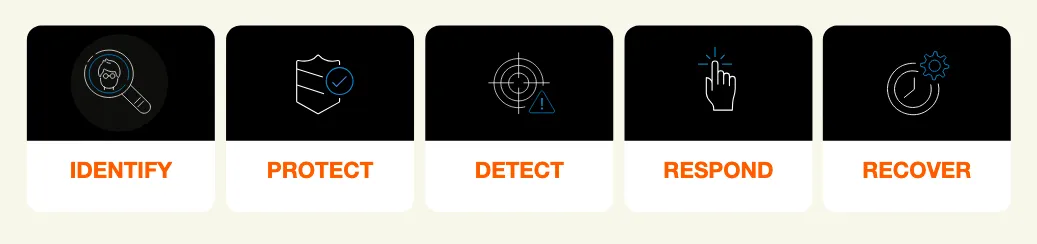
Eon's ransomware protection aligns with all five functions of the NIST Cybersecurity Framework (CSF), not just protection and recovery:
- Identify: Eon's CBPM platform continuously discovers and classifies cloud resources across accounts and regions, ensuring critical data is backed up according to security, compliance, and legal requirements, regardless of how large the cloud estate is.
- Protect: Backups are stored in immutable, logically air-gapped (LAG) vaults isolated from source data. Even if production is compromised, backup data remains available for recovery.
- Detect: Eon analyzes the logical contents of database backups, tracking row-count anomalies, cardinality shifts, and table deletion patterns to identify ransomware and corruption. For VMs and object storage, the platform detects entropy changes, file extension modifications, and other attack signatures.
- Respond: A single-pane view of the cloud landscape with custom RBAC permissions lets teams collaborate on ransomware response. Eon's inventory, file explorer, and search capabilities, combined with ransomware findings, help operators discover the extent of an attack and plan targeted recovery.
- Recover: Eon's granular restore capabilities let teams recover critical data in minutes, restoring individual files, tables, or database records from the last verified clean point rather than rebuilding entire environments.
The goal isn't just to have backups. You need backups that are protected, verified clean, and recoverable at the exact granularity you need when an attack happens.
Cloud ransomware is a backup problem as much as a security problem
Cloud ransomware isn't going away. Attacks are getting faster, more targeted, and harder to detect. And the groups behind them (like Storm-0501) are specifically designing their playbooks around destroying backups and recovery infrastructure first. Writing the playbook before that happens is the point of our ransomware attack response plan, which breaks the work into seven stages.
From everything we've analyzed, the organizations that recover quickly from cloud ransomware share three things in common: immutable backups that attackers can't delete, granular restore capabilities that get them back online fast, and continuous visibility into what's protected and what isn't.
If you're running production workloads in AWS, Azure, or GCP and you're not confident your backup infrastructure could survive a targeted cloud ransomware attack, that's the gap to close first.
Eon helps cloud-first enterprises close that gap with agentless cloud data protection built for exactly this threat: immutable vaults, CBPM that flags unprotected resources and policy drift before attackers find them, logical analysis of database backups to verify clean recovery points, and surgical restore down to the file, table, or database record across managed databases, object storage, and VMs.
See how Eon's ransomware protection works.
Frequently asked questions
What is cloud ransomware?
Cloud ransomware is a cyberattack that targets data stored in cloud environments like AWS, Azure, and GCP. Attackers exploit cloud-native features, APIs, and identity systems to steal, delete, or lock data and demand payment. Unlike traditional ransomware, cloud attacks often skip encryption and focus on data exfiltration and resource deletion.
Can ransomware attack cloud storage?
Yes, ransomware can attack cloud storage. Attackers target S3 buckets, Azure Blob containers, and GCS storage by exploiting stolen credentials, misconfigured access controls, or overly permissive IAM policies. Once inside, they exfiltrate data, delete objects, turn off versioning, and demand payment. Cloud storage is not immune to ransomware by default.
Can ransomware spread through the cloud?
Yes, ransomware spreads through the cloud by exploiting identity systems, API connections, and trust relationships between services. Once attackers compromise a single account or service, they move laterally using cloud-native tools (not malware), escalating privileges and accessing storage, databases, and backup infrastructure across accounts and regions.
What is an example of a cloud ransomware attack?
Storm-0501 is one of the most well-documented examples of cloud ransomware. Microsoft tracked this group as it pivoted from on-premises Active Directory into Azure, escalated to Global Admin, exfiltrated data using cloud-native tools, mass-deleted Azure resources, including backups, and demanded ransom through a compromised Microsoft Teams account.
Is cloud storage safe from ransomware?
No, cloud storage is not inherently safe from ransomware. Cloud providers secure the infrastructure, but you're responsible for securing your data, identities, and configurations under the shared responsibility model. Immutable backups, least-privilege access, and continuous monitoring are needed to protect cloud storage from ransomware.
How do you recover from cloud ransomware?
You recover from cloud ransomware by restoring data from immutable, logically air-gapped backups that attackers couldn't reach or delete. The fastest recovery comes from tools that support granular restoration, allowing you to restore individual files or database records rather than entire environments. Identify the last clean backup point to avoid restoring compromised data.
How do you detect cloud ransomware early?
You detect cloud ransomware early by monitoring for unusual identity activity (MFA resets, privilege escalation), bulk data transfers, backup or snapshot deletions, logging changes (like stopping CloudTrail), and unexpected key management operations. Real-time correlation across identity, network, and data layers is critical because cloud attacks unfold across multiple services simultaneously.
How do you validate that a cloud database backup is clean?
You validate a cloud database backup by analyzing the backup data at a logical level, not by running file-level malware scans (which don't work on managed databases like RDS, Aurora, or DynamoDB). Logical analysis tracks indicators such as row-count anomalies, cardinality shifts, and table-deletion patterns to distinguish clean recovery points from compromised ones. Eon performs this analysis automatically across managed database backups to pinpoint the last verified clean point before corruption occurred.