



On-prem tactics leave cloud teams exposed because cloud ransomware changes what gets attacked, what gets missed, and what recovery needs to look like. On-prem backup programs were built around hosts, files, and backup infrastructure you controlled directly. If you are starting from the on-prem playbook, our guide to cloud ransomware covers what changes and why.
In the cloud, the harder problems are coverage drift, identity misuse, object storage abuse, and managed databases that file-based inspection cannot properly judge. A stronger approach combines policy enforcement, isolated backups, workload-aware detection, and recovery from a cleaner point.
The hybrid trap
Most teams do not set out to use the wrong ransomware playbook. They carry forward what already worked.
That is what makes hybrid environments tricky. The same team often owns both on-prem and cloud, so the old mental model stays in place longer than it should. On-prem backups were usually easier to reason about: known hosts, known storage, known tooling, slower change. Cloud does not behave that way.
A new workload appears and never gets pulled under policy. A storage service changes hands between teams. A backup rule that worked in one account stops working cleanly across twenty. By the time a ransomware event forces a restore decision, the team may be dealing with gaps it did not know were there.
So this is not a story about old instincts being bad. It is a story about those instincts being built for a different operating model.
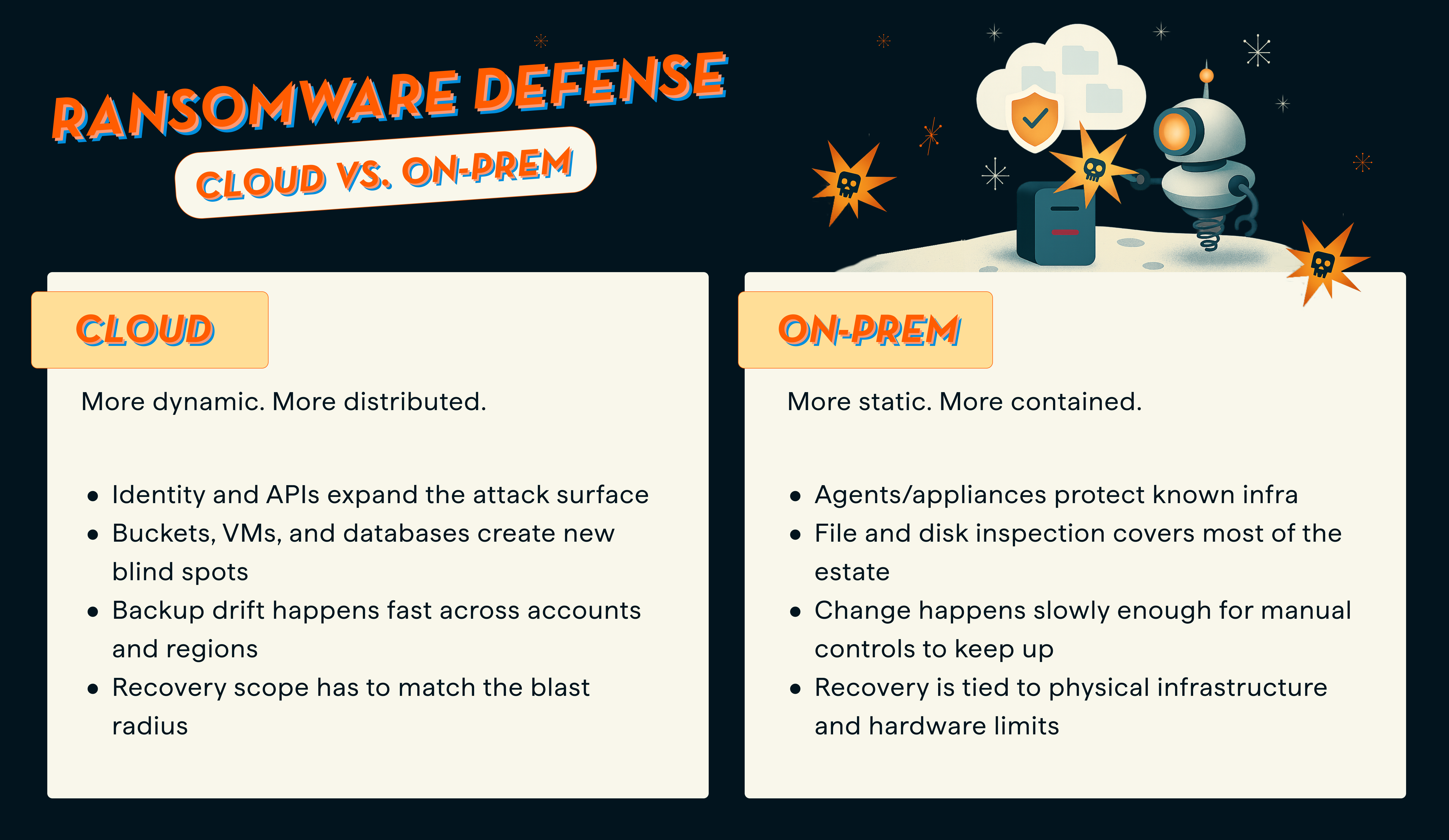
On-prem and cloud do not fail the same way
The gap is easiest to see side by side.
AWS has published guidance indicating that ransomware events targeting Amazon S3 often differ from classic endpoint events. Rather than behaving only like server-side file encryption, attacks can exploit exposed credentials and API actions to discover, modify, or destroy data in object storage. That is a useful reminder that cloud ransomware is often less about one infected host and more about control paths that reach data at scale. Those control paths, and what each one does to the data once it has them, are enumerated in can ransomware affect cloud storage.
Backups still matter. The standard changed.
Backups are still the foundation of recovery. That part did not change.
What changed is the standard teams have to meet.
Immutability protects a copy. It does not prove the copy is clean.
That matters because backing up data does not guarantee it is clean, uncompromised, or ready to use.
The operator’s real problem during a ransomware event is not just whether a backup survived. The team needs to know which recovery point is safe to use, how much data actually changed, and whether the restore scope can stay narrow.
Cybersecurity Ventures projects that global ransomware damage will exceed $275 billion annually by 2031. That does not tell you how to recover, but it does underline the pressure teams are under to recover fast and recover correctly.
In on-prem environments, many teams treated backups as a fallback plan. In cloud environments, backups are part of the control story too. You need to prove coverage, separate recovery data from the production blast radius, and inspect what changed before you start restoring.
The clearest cloud gap is databases
This is where the on-prem versus cloud comparison stops being abstract.
Traditional ransomware detection usually starts at the file or disk layer. That works better when the workload lives inside a VM and exposes backup files in a familiar way. It does not hold up the same way for managed databases.
Managed cloud databases such as Amazon RDS and Google Cloud SQL do not expose filesystem-level backup files the way VM-based systems do, so file-based inspection cannot operate the same way.
That’s why Eon analyzes the logical content of database backups instead, using signals such as row-count anomalies, cardinality shifts, table deletion detection, and schema validation checks. That matters because it closes a detection gap older methods miss.
Plenty of teams still think about ransomware in server terms. But critical data is spread across VMs, object storage, and managed databases now. Each of those workloads needs to be inspected differently.
Good cloud ransomware readiness has a higher bar
The bar for cloud ransomware readiness is higher than “we have backups.”
What good looks like starts with recovery points you can trust.
Complete coverage
You know what is protected, what is not, and why. In practice, that means continuous discovery and policy enforcement, not a pile of tags and good intentions.
Isolated recovery data
Backups sit outside production access and are protected with immutability controls.
Deep backup inspection across the workloads that matter
That means VMs, object storage, and managed databases, not only the easiest layer to scan.
Recovery that matches the blast radius
A contained incident should not automatically become a broad rollback. Scoped recovery matters because the restore can become its own incident when the recovery path is too broad.
How Eon closes the gap
Eon is a cloud-native, agentless backup platform built for AWS, Azure, and Google Cloud. It automates discovery, classification, and policy enforcement across cloud environments, stores backups in a logically air-gapped immutable vault, and applies ransomware detection across VMs, object storage, and managed databases. It also supports granular search and recovery, so teams are not forced into a full rollback when a narrower recovery path makes more sense.
That matters because hybrid teams usually feel the pain in the same order. First, they lose track of what is covered. Then they struggle to trust the recovery point. Then they find out the restore path is broader and slower than the incident requires.
Eon is built to close those gaps in order.
The bottom line
On-prem tactics fail in the cloud for a simple reason: they were built for a different failure mode.
Cloud ransomware is more distributed, more identity-driven, and more likely to expose gaps in ownership, coverage, and restore scope. So the bar cannot be “we have backups.”
The bar is: we can prove coverage, identify a clean recovery point, and restore the right data without turning a contained incident into a bigger one.
Read the database ransomware announcement to see how Eon closes the database detection gap, or request a demo to see how it would work in your environment.
FAQ
Does immutable backup stop ransomware by itself?
No. Immutability helps prevent backup data from being changed, but it does not tell you whether the recovery point is clean or appropriate to restore. Teams still need coverage, inspection, and recovery judgment.
Why is cloud ransomware different from on-prem ransomware?
Because cloud attacks can use credentials, APIs, storage controls, and distributed ownership in ways that classic on-prem backup models were not built to handle. AWS’s S3 ransomware guidance is a good example of that difference.
Why is database ransomware detection harder?
Because many managed databases do not expose backup data as normal files. File-level inspection cannot see enough of the data structure to judge what changed inside the backup. Eon’s database ransomware work is built around logical analysis for that reason.
What should teams validate before a ransomware incident?
Validate coverage, retention, immutability, restore scope options, access controls, and whether you can review suspicious changes before restoring data. Each of those is a control in its own right, which is why ransomware backup protection solutions are best judged on the whole set rather than any single feature.
Is ransomware readiness mainly a security problem or a backup problem?
It is both. Ransomware hits the security layer, but the restore decision lands on backup, infrastructure, and operations teams. That is why coverage, isolation, detection, and recovery scope all have to work together.