




When an Entra ID account is deleted and the 30-day window closes, the business needs a working identity back. It has to own its mailbox and OneDrive, sit in the groups that grant it access, carry its licenses, and hold the role assignments it had the day before. All of that hangs on one thing: the object's identifier. SharePoint and OneDrive authorize on a per-user unique ID, historically the PUID, and not on the UPN.
So we built our Entra ID backup around the object ID and the relationships attached to it. We capture a tenant as a graph of objects and relationships, and we restore in place, into the same tenant, one object at a time. Here is how that works, and where it stops.
Same UPN, new object ID
Recreating a deleted user with the same UPN does not give you the old user back. The new account gets a new object ID, and SharePoint and OneDrive deny access because they authorize on that ID.
When a user is created in Microsoft Entra ID there is no guarantee the UPN is unique, so a unique ID (historically called the PUID) is generated and passed to SharePoint. When that user is granted explicit permission to a site, the site user ID is written into a hidden per-site-collection list, the User Information List. At authorization time SharePoint compares the ID in that list against the ID carried in the authentication token, and if they do not match, authorization fails. Microsoft's troubleshooting article names the cause plainly: the new user is assigned a new ID value even though the UPN is the same, and the UserInfo list for the associated SharePoint and OneDrive sites holds only the old ID.
Microsoft Q&A threads show the same failure in the wild. One describes a new user with a UPN reused from an account deleted years earlier, unable to open OneDrive share links; pressing "request access" sent the original sender a request showing the deleted user's name and address. A rehired employee reports the identical symptom and gets the identical answer.
The Entra ID recycle bin is a 30-day grace period. Its value is that it preserves the object's identity in the directory. Soft-deleted users, Microsoft 365 groups, cloud security groups and application registrations keep all their properties and can be restored for 30 days, and every other object type is hard deleted immediately. After the window closes, neither an administrator nor Microsoft Support can restore the user.
The recycle bin is not a backup, though. An admin with the right role can permanently delete an object from it before the 30 days are up, and an attacker holding that role can empty it on the way out. That is why Eon keeps Entra ID backups air-gapped and immutable, outside the tenant they protect.
What we capture
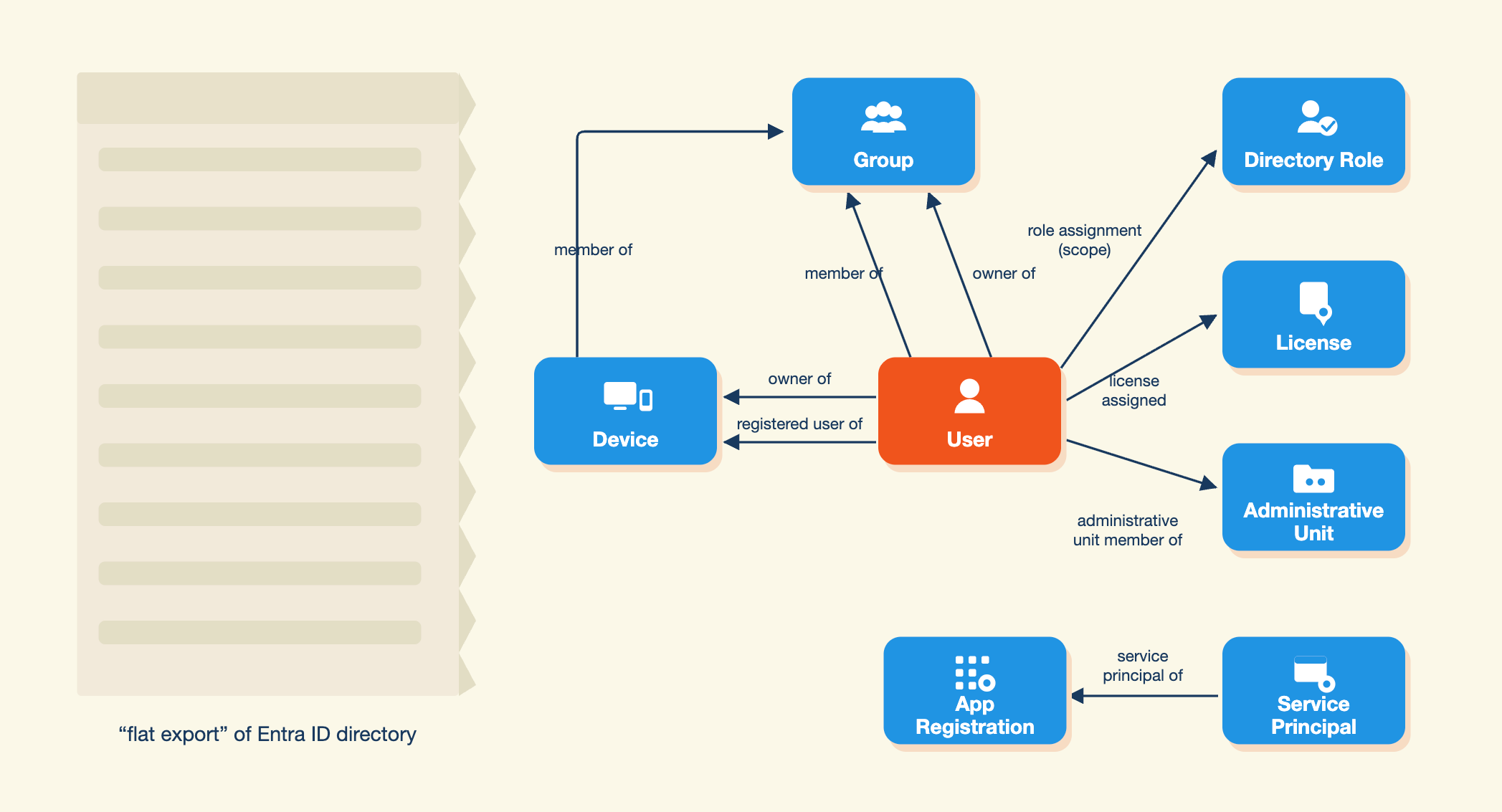
The relationships are the state that makes an object useful, so a flat per-object export drops exactly the thing that made the object worth restoring.
We store users, groups, devices, directory roles, licenses, app registrations, service principals (Enterprise Applications) and administrative units, and the edges between them: member of, owner of, registered user of, role assignment, license assigned, administrative unit member of, service principal of, app role assignment, and OAuth2 permission grant. Scope rides on the role-assignment edge, so we keep an assignment's scope alongside the role itself. Devices are why the edge vocabulary stays small: a device in a group reuses member of, a device's registered owner reuses owner of, and only registered user of is new.
What a snapshot holds
Each snapshot stores every object in full, with all of its attributes, so nothing gets lost because we didn't anticipate needing it.
Every snapshot also carries its time, so you can see the directory as it stood at any backup point. "What were this user's group memberships and role assignments on the 14th" is a question you answer by opening that snapshot.
How we restore
Restore is in-place, into the same tenant, and per-object. You can select several objects for a single restore, which is how a group and its members come back together: the group with its assignments, the users with theirs, and the memberships that connect them. For every selected object we take the best path available.
From the recycle bin, when it can. If the object is still in the Entra ID recycle bin, we restore it from there. It comes back with its original object ID, and the directory reattaches its organization information, memberships and licenses on its own. We try this first because nothing else reaches the same fidelity.
From the snapshot, when it can't. Past the recycle bin, we recreate the object from your backup. It gets a new object ID, so Eon re-links every relationship automatically, in dependency order: group memberships, ownership, license assignments, then role assignments. Recreated users are created with a random, unusable password and a forced password change.
A relationship that fails to re-link becomes a warning on that object instead of failing the run, and the report shows counts per outcome so the gaps stay visible. Getting 40 users back with 3 missing group memberships beats an aborted job.
Our read scopes are least-privileged permissions per object type rather than a blanket read-all permission.
What we cannot bring back
Authentication method registrations, meaning Authenticator, FIDO2 keys and phone methods, cannot be exported or restored by third-party backup tools, so MFA has to be re-registered when a user is recreated. Microsoft's own first-party recovery path lands in the same place operationally: where methods cannot or should not be restored, remove the untrusted entries and have the user register new ones. Passwords cannot be restored either, so credentials have to be reissued.
Similar limits apply to app registrations. Client secret values and certificate private keys cannot be restored, a recreated application gets a new application ID, and admin consent has to be granted again.
Because these are platform constraints, every restore emits a report naming what came back, by which path, and what a human still has to do. "Restored; reissue credentials and re-register MFA for these 6 accounts" tells the operator what to do next. A success message leaves them to find the missing half at the next login attempt.
One platform for the directory and the data it points at
An identity and the data it points at fail together. A deleted user leaves behind a mailbox and a OneDrive nobody owns, and a recreated user has no claim on the permission entries that referenced the old identifier. We put the directory on the same platform as the Microsoft 365 data for that reason. Each is backed up as its own source, with its own policy and its own snapshots, and both are managed from the same console under the same access controls.
Four questions decide whether an identity backup can return you a working user:
- Does it preserve the object ID when the object is still recoverable?
- Does it capture relationships, or only objects?
- Can it show the directory as it stood at a past point in time?
- Does it tell you what it could not restore?
The Microsoft 365 data side of the platform is covered in Expanding Eon Data Protection to Microsoft 365.
See how Eon protects Entra ID and Microsoft 365 data on one platform, or start a free trial and run a snapshot of your own tenant.
Frequently Asked Questions
How long can you restore a deleted Microsoft Entra ID user?
With Microsoft's native recycle bin, a soft-deleted object stays available for up to 30 days and is then permanently deleted, after which neither an administrator nor Microsoft Support can restore it. Only users, Microsoft 365 groups, cloud security groups and application registrations are soft-deleted at all; every other object type is hard deleted immediately. With Eon, how far back you can restore is set by your backup policy's retention.
Why does a recreated Entra ID user get "Access Denied" in SharePoint and OneDrive?
SharePoint authorizes on a per-user unique ID (historically the PUID) that it caches in a hidden per-site-collection User Information List and compares against the ID carried in the authentication token; if the two do not match, authorization fails. A recreated account is assigned a new ID value even though the UPN is the same, while the UserInfo list for the associated SharePoint and OneDrive sites still holds only the old ID.
Does restoring an Entra ID user bring back group memberships and licenses?
A recycle-bin restore does: the object returns with the same object ID and the directory reattaches its preserved organization information, memberships and licenses itself. Past the recycle bin, Eon recreates the object from your backup. It gets a new object ID, and Eon re-links its memberships, ownership, licenses and role assignments automatically, so the user comes back with its access in place.
What can an Entra ID backup never restore?
Authentication method registrations such as Authenticator, FIDO2 security keys and phone methods cannot be exported or restored by third-party backup tools, so MFA must be re-registered when a user is recreated. Passwords, client secret values and certificate private keys cannot be restored either, and a recreated application gets a new application ID.