

Cloud bills don’t lie, but they do hide things. Once you’re managing multi-cloud backups, spend gets buried under generic storage, snapshot, and egress labels, making it painful to audit without hours of spreadsheet gymnastics. Eon fixes that by turning backup spend from a blended mix of stored snapshots and data transfer charges into something you can actually analyze, explain, and optimize.
Native billing tools weren’t built to answer backup-specific questions cleanly. They can show that storage, snapshot, or transfer costs increased. They usually can’t show (quickly and without spreadsheet work) which backup policy, retention setting, account, application, or cross-region workflow caused the increase.
And the stakes are higher than they used to be. AI workloads are driving total cloud spend up fast, which means every dollar wasted on backup is a dollar that can't go toward an AI initiative. Finding and cutting that waste isn't just hygiene anymore. It's how teams free up budget for the work leadership actually wants to fund.
Eon does not just aggregate bills; it understands the architecture behind them. By mapping multi-cloud backups to a unified Cloud Backup Posture Management (CBPM) layer, Eon treats snapshots as active data rather than static storage.
Because the platform uses a Zero-ETL approach, mapping backups directly to Apache Iceberg, infrastructure and FinOps teams get a transparent view of exactly what they are paying for. They get the granularity to cut costs without breaking a compliance policy or weakening a recovery SLA.
In this article, we’ll cover five practical ways to use Eon’s Cost Explorer to answer the questions enterprise teams ask every week:
- How do I see my backup costs across AWS, Azure, and Google Cloud?
- Can I break down backup spend by account or subscription?
- Which resources are driving costs?
- How much are retention and cross-region replication costing me?
- What caused that sudden spike?
Why Backup Costs Get Hard to Manage in Multi-Cloud Environments
Cost visibility starts to break down the moment backup operations go multi-cloud. AWS, Azure, and Google Cloud each expose billing data differently, and backup spend is often lumped into generic categories such as block storage, object storage, snapshots, archive tiers, or egress fees. For the Google Cloud side of that specifically, we rank the GCP cost optimization tools that close the gap.
Teams are left digging through line items just to understand what is protected, where the cost is coming from, and whether protection is scaling efficiently.
This lack of clarity hits three teams especially hard:
- Cloud infrastructure leaders need to know whether protection is scaling efficiently or whether snapshot growth is quietly driving up spend.
- FinOps teams need defensible data. They cannot walk into a showback or chargeback conversation with vague estimates. They need to tie backup spend back to a specific application, team, environment, or business unit. That mapping is the general problem of allocating cloud costs.
- Security and compliance teams need to justify retention, immutability, and replication policies. They should not have to guess at the cost impact of a seven-year retention or immutability requirement.
Legacy backup tools don’t always help. Many still treat backup data like a black box: expensive to store, hard to inspect, and difficult to connect back to operational decisions.
Eon takes a different approach. Backup data should be visible, searchable, and operationally useful, not buried under vendor abstractions or scattered across disconnected billing reports.
1. Get a Unified View of Backup Spend Across AWS, Azure, and Google Cloud
If you’re asking, “What are we actually spending on backups?” you’re usually in for a long afternoon of tab-switching.
Eon stops the console-hopping by consolidating multi-cloud backup spend into a single view. You can pivot between the last 7, 30, or 90 days across AWS, Azure, and Google Cloud without stitching together mismatched CSV exports.
In most setups, backup costs are buried under a mess of different naming conventions and service categories. Getting a trustworthy total is a project in itself. Eon shortens that path to seconds.

This level of visibility turns monthly "guessing sessions" into actual operational reviews. A FinOps analyst can instantly see if AWS growth is outstripping Azure and, more importantly, start asking the right questions.
NETGEAR used Cost Explorer to do exactly this, replacing manual reporting with instant spend visibility by resource and application, and cutting backup storage costs 35% in the process.
You stop asking, “Why did storage go up?” and start asking, “Why did our replication costs for this specific region spike this week?”
2. Drill Down from Accounts and Subscriptions to Resources and Tags
Once you have the top-line number, the inevitable follow-up is: “Who owns this?” This is where the manual work begins.
Native tools might provide the account or subscription, but they rarely indicate which application, environment, or business unit is responsible without manual cleanup of tags and additional reporting work.
Eon’s Cost Explorer lets teams drill from cloud-level totals into accounts, subscriptions, projects, and specific protected resources, such as EC2 instances, RDS databases, Azure VMs, managed disks, Azure SQL databases, Google Compute Engine instances, Cloud SQL databases, storage buckets, and databases. From there, tags and labels like business_unit, environment, and application help produce a clearer answer.
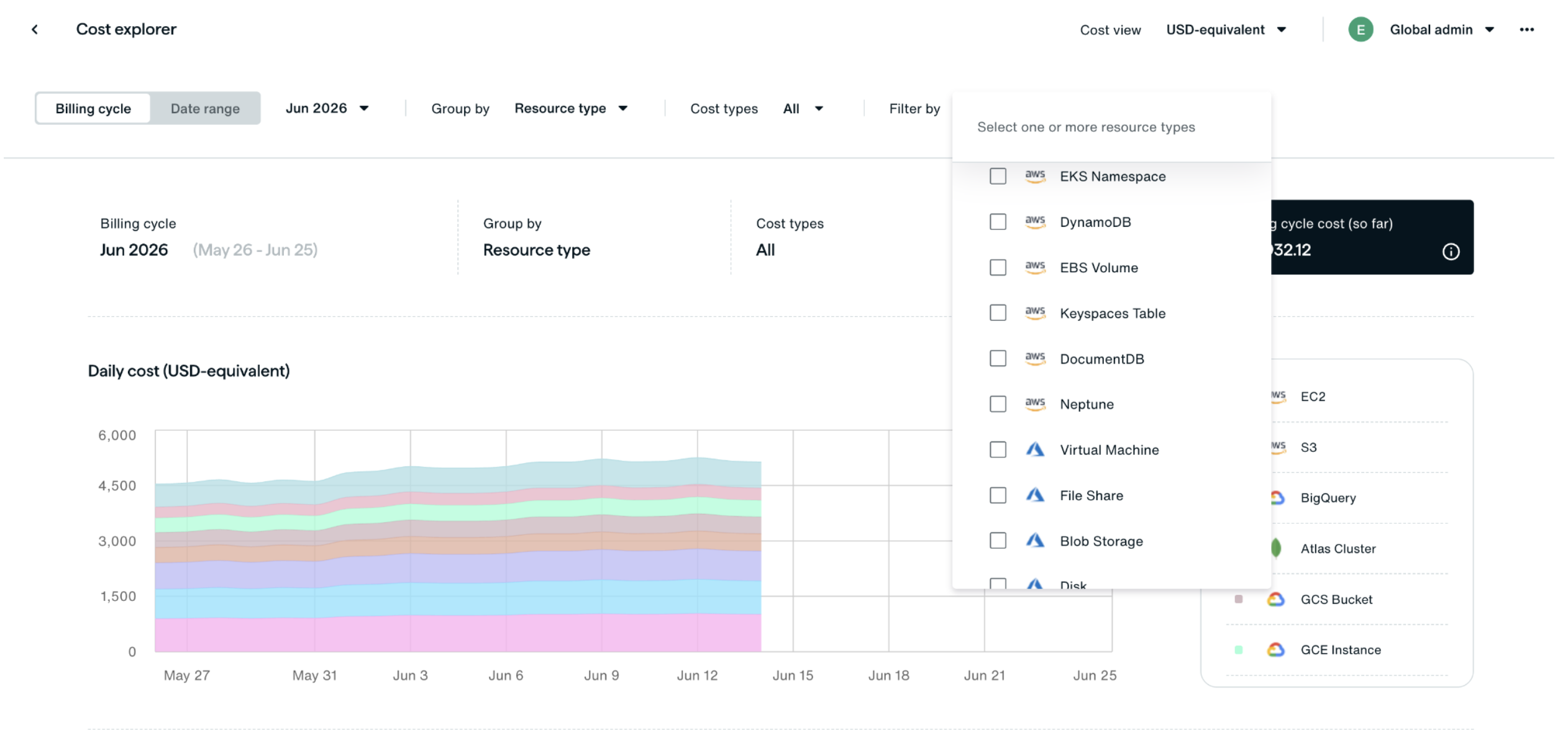
Application owners can trace charges back to the protected resources behind them, whether that is an AWS RDS or PostgreSQL database, an Azure VM, or a Google Cloud Cloud SQL instance. The conversation shifts from “backup is too expensive” to “which resource, policy, or retention setting needs to be right-sized?” This makes backup cost attribution defensible. You are not walking into a review with estimates; you are bringing evidence:
- Finance gets an allocation model that adds up.
- Application owners can trace charges back to specific resources, policy scope, or retention settings.
- Audit stakeholders get a clearer paper trail for control decisions.
Eon doesn’t just rely on tags. It continuously maps and classifies cloud resources, reducing the tagging drift that usually undermines cost reporting in sprawling environments.
The result is stronger showback and chargeback data. Teams can identify which application group is driving Azure backup growth and whether dev or test workloads are being overprotected. Showback and chargeback each sit on a different one of the cloud cost allocation methods.
3. Expose Hidden Cross-Region and Retention-Driven Costs
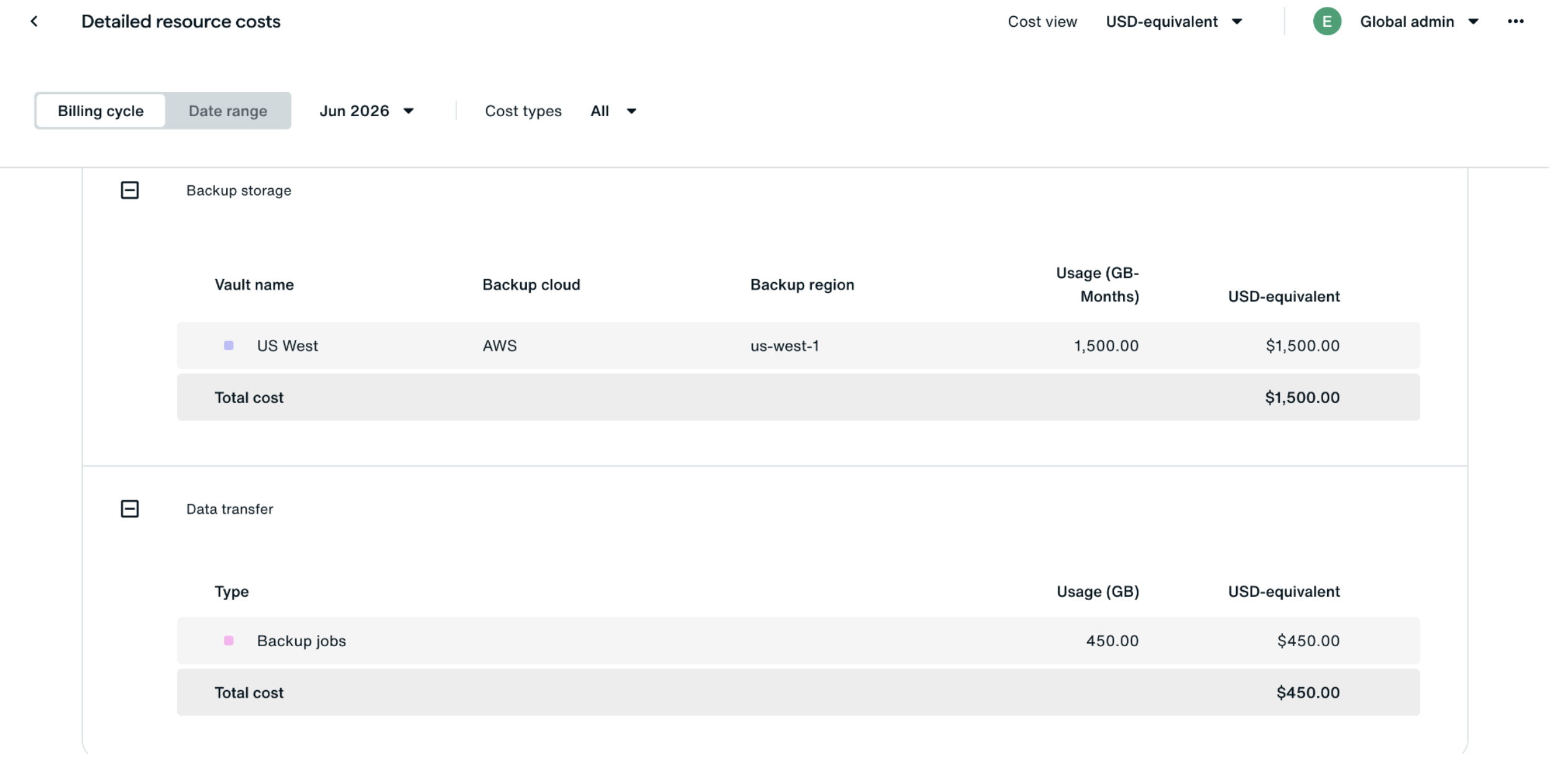
Cross-region replication and extended retention windows can become hidden cost drivers in your backup budget. Native billing tools might show total storage or transfer costs. Still, they rarely show the specific resource, policy, or region choice behind an expensive cross-region transfer or unnecessary storage pattern.
Teams can end up paying for high-cost data protection they don’t actually need, with no easy way to see why.
Retention is one of the easiest backup costs to underestimate. A policy tweak that looks harmless on one RDS or PostgreSQL database, Azure VM, or Google Cloud Cloud SQL instance can become expensive when applied across many accounts, regions, and high-change datasets.
Eon exposes these hidden drivers at the resource level before they become harder to unwind.
Backup retention costs are rarely linear. A policy that looks safe on paper, such as a 90-day retention window, can grow quickly when applied to high-change datasets across dozens of accounts. The same happens with replication: a protection rule intended for mission-critical systems can extend to less critical workloads, increasing cross-region transfer costs for data that may not require that level of protection.
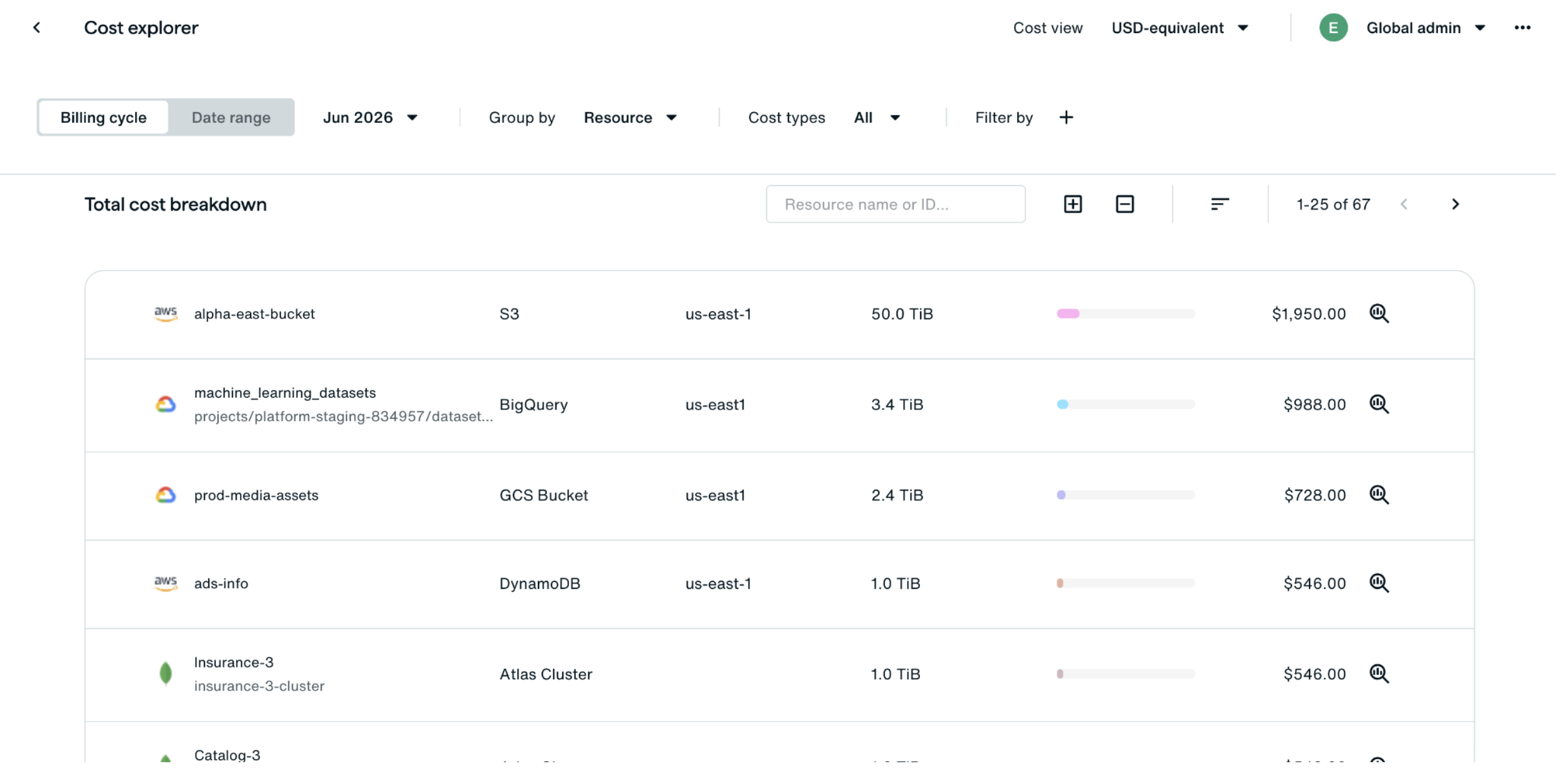
With Eon, teams can find these quick wins without weakening recovery SLAs where they matter. You can quickly spot non-production applications being unnecessarily replicated across regions, or identify where a compliance-level retention window has expanded into ordinary operational backups.
That’s the core of real optimization. It’s not just about cutting spend. It’s about matching retention, replication, and protection depth to the workload's actual technical, business, and compliance requirements.
Cross-region replication is often one of the easiest backup costs to miss. Eon helps identify where non-critical dev or test workloads are being replicated across regions, so teams can reduce unnecessary transfer and storage costs while keeping production databases, regulated datasets, and recovery-critical systems fully protected.
4. Investigate Backup Cost Spikes with Audit Logs
We’ve all been there: A cost spike appears on Monday, and by Wednesday, you’re still trying to explain why.
Eon helps stop the guessing by tying cost anomalies directly to audit logs.
Native billing tools can tell you that spending increased. They’re much less effective at showing what operational change caused the increase. That gap turns root cause analysis into manual investigation across disconnected consoles. Closing that gap is the whole point of a backup-aware cloud cost analysis.
Eon closes that gap by pairing cost trends with operational context. Teams can isolate a daily or weekly spike, check the corresponding audit log window, and identify the policy, retention, replication, or backup action that changed around the same time.
Most spikes aren’t mysteries. They’re usually driven by:
- A new backup policy applied too broadly
- A surge in on-demand backups during a migration or test cycle
- A temporary replication setting that never got turned off
- Retention rules that were extended globally after a compliance review
With a backup-specific analytics layer, teams can move from anomaly to explanation faster. That gives infrastructure and FinOps leaders the evidence they need to show whether a spike resulted from a deliberate protection decision rather than a random budget overrun.
5. Automate Showback, Chargeback, and Anomaly Detection Through the API
Manual reporting is a bottleneck. Even if you nail the analysis once, trying to repeat that same report every week or month is a recipe for inconsistency and human error. In large environments, automation is what makes backup cost governance repeatable.
Eon’s platform lets technical teams pull backup cost data programmatically, turning manual reporting into automated governance workflows. Eon’s API is designed to feed existing FinOps and observability pipelines by programmatically retrieving:
- Resource rankings: Lists of the most expensive backup resources to prioritize for optimization.
- Anomaly metrics: Specific data points on cost spikes for real-time alerting in tools like Slack or PagerDuty.
- Categorized spend: Cost groupings by tag, account, and resource to automate monthly showback and chargeback reports.
FinOps teams can build automated showback and chargeback pipelines that stay up to date. Infrastructure teams can set up dashboards to flag unexpected growth before the monthly review.
Eon isn’t just a reporting layer; it’s a data layer. Because backup data is mapped to Apache Iceberg, teams can move beyond cost visibility and understand the utility of the data they’re protecting. Use the API to pull cost and ownership data into chargeback models, route anomaly signals into existing workflows, and automate governance without brittle ETL pipelines or production disruption.
Teams can also connect Cost Explorer insights with adjacent workflows, such as implementing cloud backup posture management best practices, reducing backup sprawl and storage waste, or cutting retention-related backup costs.
Turn Backup Spend Into Something You Can Actually Manage
Fragmented backup costs across AWS, Azure, and Google Cloud make it far too easy to overspend without understanding why. (Check out our list of the best AWS cost optimization tools).
Eon's Cost Explorer gives teams one place to analyze spend, drill into ownership, and reveal the real impact of retention and replication.
This is the strategic shift: backup stops being a generic, "black box" line item and becomes a transparent, manageable part of cloud operations. For teams balancing resilience, compliance, and efficiency, financial clarity should not come at the expense of strong protection. With Eon, you get a platform built for both. And the spend you reclaim from backup waste is budget you can redirect to the AI projects that are driving cloud costs up in the first place. (Learn more here about cloud cost optimization).
Don’t wait for your next cloud bill to start looking for answers. Identify savings opportunities and act on them faster, with clearer ownership, less guesswork, and fewer surprises. Book an Eon platform demo.