


Microsoft 365 recovery has traditionally required users to move through multiple steps and tools to find the right data, identify the right restore point, and initiate recovery. With Eon, that process can now begin in plain language while keeping the governance and controls enterprises need.
This is made possible through the Model Context Protocol (MCP), an open standard for connecting AI agents to tools and data. Microsoft provides an MCP server for Microsoft 365, and Eon provides one for its data protection platform. When an agent connects to both, search and recovery become part of the same conversational workflow.
From backup to agentic recovery
Traditional recovery often involves an admin, a support ticket, a backup console, and a fair amount of manual correlation. Which mailbox? Which folder? Which recovery point? Which version? The process works, but it can be slow and puts every recovery request in the hands of a small number of administrators.
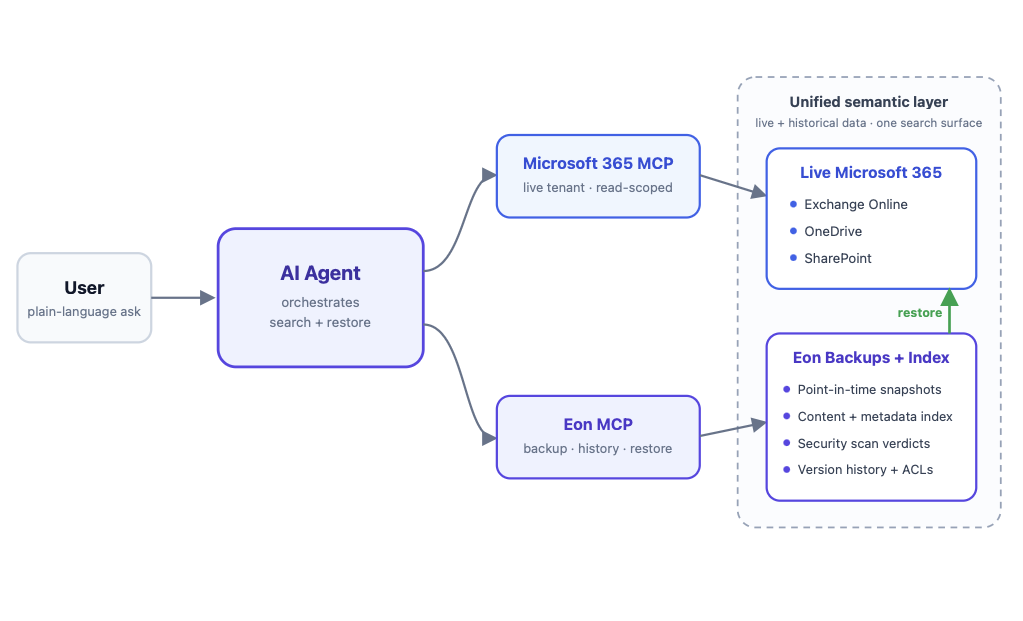
Agentic recovery uses the same underlying recovery capabilities but changes how users interact with them. Instead of navigating across consoles and manually piecing together the right recovery path, an AI agent can work across two MCP servers.
- Microsoft 365 MCP gives the agent access to the live Microsoft 365 environment within the permissions of the signed-in user, allowing it to search Exchange Online, OneDrive, and SharePoint.
- Eon MCP connects the agent to protected historical data, including point-in-time snapshots, content and metadata indexes, security scan results, and recovery workflows.
Together, they allow the agent to reason across the live and protected environments. It can determine what exists today, look back through protected history when something is missing or compromised, identify the appropriate recovery point, and initiate the governed restore workflow. The user simply describes what they need to recover.
One semantic layer across live and historical data
This works because Eon does more than copy data into a backup vault. As data is protected, Eon indexes its contents and captures the metadata needed for recovery, including access controls, sensitivity labels, sharing scope, and version history across recovery points. That makes historical data searchable in much the same way as live data.
The result is a unified semantic layer across both environments. A user can ask for “the onboarding email from the Product Team group,” and the agent can resolve that request against the live mailbox and, if needed, search months of protected history. The user does not need to know which system, snapshot, or recovery point contains it. Live and historical data become one searchable surface.
Use case 1: Recovering a lost email
Consider a real walkthrough from our own tenant. A user is looking for a notification email - "You've joined the Product Team group" - that they can no longer find.
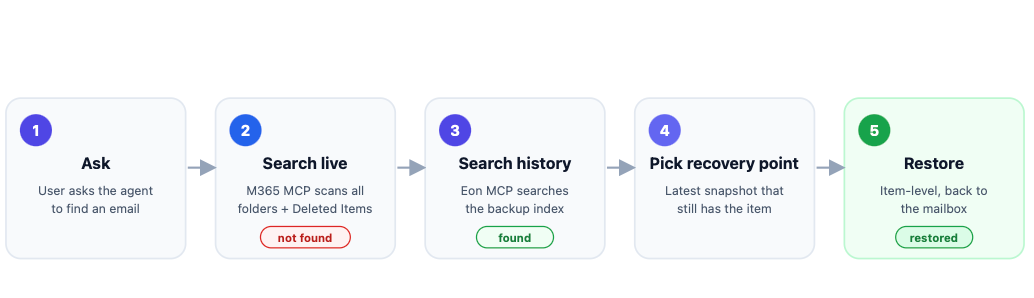
- Ask. The user asks the agent to find the email by subject and sender.
- Search live. Through Microsoft 365 MCP, the agent searches every folder in the live mailbox, including Deleted Items. It comes back empty as the item is genuinely gone.
- Fall back to history. The agent switches to Eon MCP and searches the backup index. It finds the email preserved across multiple snapshots, with its full metadata intact: subject, sender, recipient, original date, and message ID.
- Pick the right recovery point. The agent selects the most recent snapshot that still contains the item because the live copy was deleted, that is an older snapshot than the newest backup, and the agent reasons about exactly that.
- Restore. The agent restores the email item-level into a destination folder in the user's mailbox.
Use case 2: Recovering from a ransomware event across OneDrive and SharePoint
A compromised account or a malicious sync encrypts a user's OneDrive files, and the damage propagates across SharePoint document libraries at machine speed. Native recycle bins and version history may already be polluted with the encrypted versions.
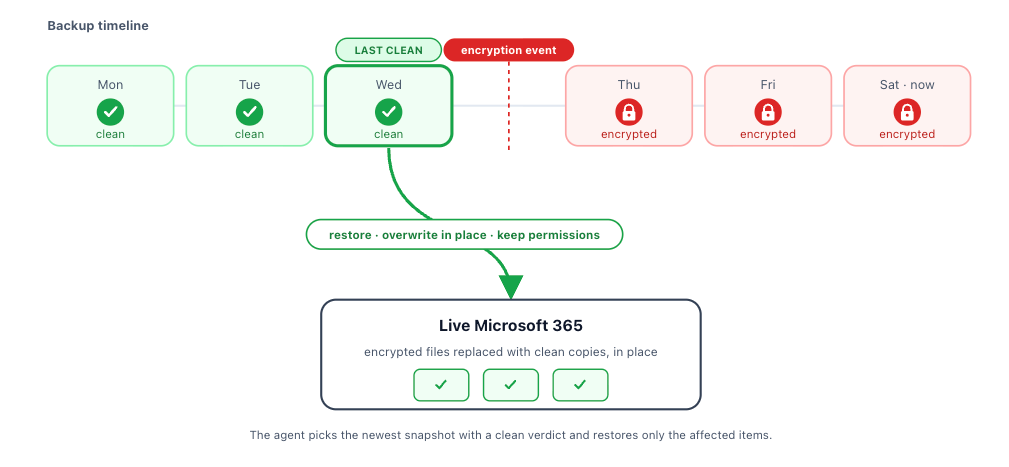
This is where indexing plus security scanning changes the recovery. Eon scans backups for ransomware behavior, malware, and data anomalies, and records a verdict per snapshot. An agent can use that directly:
- Scope the blast radius. The agent identifies the affected files and libraries and reads Eon's scan verdicts across recent snapshots.
- Find the last clean recovery point. Instead of guessing a date, the agent locates the most recent snapshot marked clean (aka the point in time before encryption began).
- Restore clean copies. The agent restores the affected files from that clean recovery point, overwriting the encrypted versions in place, and preserves the original access control lists and sharing scope so nothing has to be manually re-permissioned.
- Verify. The agent confirms the restored files are back and readable in the live tenant.
Secure and Governed by Default
Giving an agent the ability to initiate recovery, and in some cases write data back into a live environment, requires clear guardrails. Agentic recovery is designed so the agent does not act unilaterally. Two controls keep recovery governed without losing the simplicity of a conversational workflow:
- Least privilege by scope. The agent operates within the permissions of the signed-in user. It can search and recover only the mail and files that user is authorized to access, without exposing data from other users or resources.
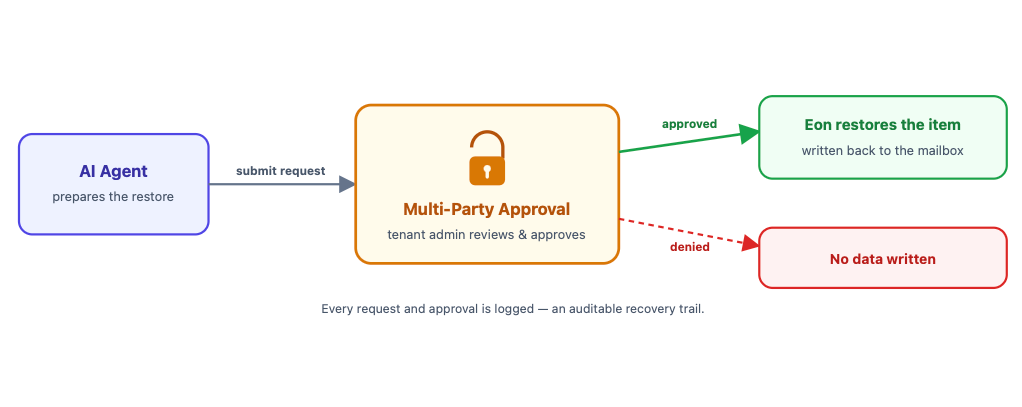
- Multi-Party Approval (MPA). Sensitive or higher-impact restores can require approval before anything is written back. The agent submits the restore request, and an authorized administrator approves it before Eon executes the recovery. The model is simple: the agent proposes, a human approves, with an auditable record of the request and approval.
Why this matters
Backup proves its value at the moment of recovery, and recovery has traditionally been the slowest and most specialized part of data protection. By connecting live and historical data through a shared semantic layer and allowing a governed agent to act across both, the gap between “I lost something” and “it’s back” gets much smaller.
That becomes even more important as AI agents, Copilot, and automated workflows gain the ability to modify enterprise data at machine speed. Organizations will need recovery experiences that can keep pace without sacrificing control. Agents should be able to help recover data as naturally as they can act on it, with the right permissions and approvals built in.
Get started
Agentic recovery builds on Eon Data Protection for Microsoft 365, bringing the same point-in-time protection, granular restore, and rich metadata into a conversational workflow through MCP. Book a demo to see agentic recovery for Microsoft 365 in action.
Frequently Asked Questions
What is MCP, and why does it matter for recovery?
The Model Context Protocol (MCP) is an open standard for connecting AI agents to tools and data. With MCP access to both Microsoft 365 and Eon, an agent can work across live and protected data in the same workflow, making recovery conversational instead of console-driven.
Does the agent have access to everyone’s data?
No. The agent operates within the permissions of the signed-in user. It can only search and recover data that user is authorized to access.
How does agentic recovery handle ransomware?
Eon analyzes protected data for signs of ransomware and other anomalies across recovery points. The agent can use those signals to identify a clean recovery point and restore unaffected versions of impacted files while preserving their associated metadata and permissions.
Can restores require approval?
Yes. Restores can be gated by Multi-Party Approval. The agent submits a restore request, and an authorized administrator approves it before Eon writes data back, creating an auditable approval trail.
Is this a replacement for Eon’s standard restore experience?
No. Agentic recovery is an additional way to use the same underlying backup and recovery capabilities. Administrators can continue using the Eon console and existing automation workflows as before.