


The biggest backup gaps in cloud ransomware defense are weak isolation, incomplete immutability, poor recovery confidence, retention drift, and restores that are too slow or too broad. If teams cannot prove which backup is clean, where it is protected, and how fast they can restore it, their last line of defense is weaker than it looks. A disaster recovery plan for ransomware is where each of those gets an owner and a tested path.
Ransomware defense usually starts in the usual places: endpoints, identity, network controls, and threat detection. That makes sense. But when an attack gets through, the conversation changes fast.
At that point, backups are no longer a background system. They are the recovery plan.
And that is where a lot of teams find out they have a problem. The backup exists. The policy says it is protected. The restore runbook looks fine. But under real pressure, the gaps show up.
For a broader look at how these risks show up across cloud environments, see Eon’s cloud ransomware guide.
What are the most common gaps in ransomware backup strategies?
Five operational and architectural gaps explain why backups fail during ransomware attacks. Here is where they show up, and what stronger cloud ransomware protection should look like instead.
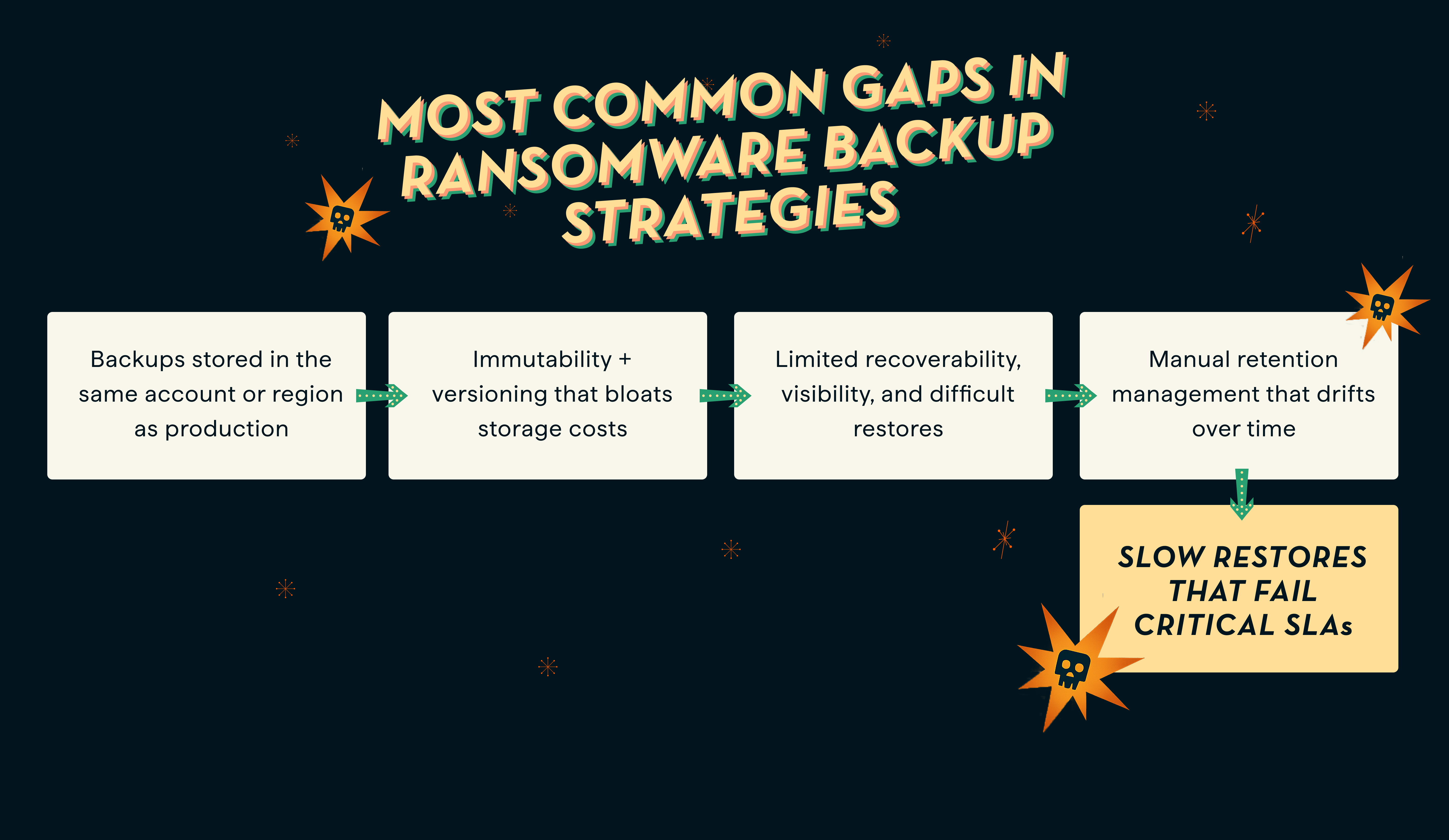
Gap #1: Backups stored in the same account or region as production
The moment your backup environment resides in the same account, region, or control plane as your production workloads, your ransomware backup strategy isn’t resilient.
Why? Because attackers may be able to reach backups through the same account boundaries, control paths, or compromised production credentials.
Storing backups inside the same access boundary as production turns your safety net into a single point of failure. Once attackers breach production, they can reach your backups, too, and then delete or encrypt both production and backup data, meaning you’re facing total data loss with no recovery path.
To stop ransomware in the cloud from moving laterally (from production to backup), logical or physical isolation is critical.
For one cloud-specific take on this problem, see AWS storage expert Mansi Vaghela’s perspective on cloud backup security concerns in a new age of ransomware.
Air-gapped cloud backups help reduce the likelihood that attackers can access backups via live workloads, giving you a stronger recovery path if production is compromised.
Eon helps you follow ransomware backup best practices by storing backups in a logically air-gapped vault, separate from production access paths.
Definition: What is a logical air gap?
A logical air gap separates backup access from production access so the same credentials, permissions, or control path cannot easily compromise both.
Gap #2: Immutability helps, but it doesn’t solve recovery confidence
Many cloud ransomware protection approaches rely on immutability, often using object lock or similar controls to prevent backup data from being altered or deleted during the retention period.
This write-once-read-many, or WORM, model helps preserve backup integrity. But immutability alone does not tell you whether a recovery point is clean, easy to find, or practical to restore at the right scope. We cover the mechanics of that model, and where it stops, in our guide to immutable backups.
Immutability matters, but it does not solve everything on its own. Teams still need confidence that they can identify the right recovery point, enforce policy consistently, and restore only what they need without turning every incident into a full rollback.
A better ransomware backup practice is to treat immutability as one layer of protection, then pair it with isolation, policy enforcement, and recovery paths teams can actually trust under pressure.
Eon combines logical air-gapping, automated policy enforcement, and granular recovery to strengthen ransomware resilience beyond what immutability alone can provide. Working through those layers in order is the practical shape of ransomware backup protection.
Gap #3: Restore problems stay hidden until the incident
One of the most dangerous backup gaps is assuming a backup is usable without sufficient confidence that the recovery point is actually clean. Many teams still treat backups like sealed containers in long-term storage. The problem shows up during recovery: teams are forced to guess which snapshot is clean, usable, or compromised. And if the only way to find out is during an incident, recovery confidence is already low.
The confusion and blind spots can quickly derail ransomware recovery time objectives (RTOs), but that is only part of the problem. This matters even more for managed databases, where teams need confidence that recovery points are clean and usable without defaulting to broad, disruptive restore workflows. See Eon’s latest update on ransomware protection for databases.
There’s still the restore nightmare. If teams somehow determine which copy is clean, they must perform full snapshot rollbacks, restoring entire volumes rather than just the affected workloads or files, which is a slow, costly, and outage-prone process.
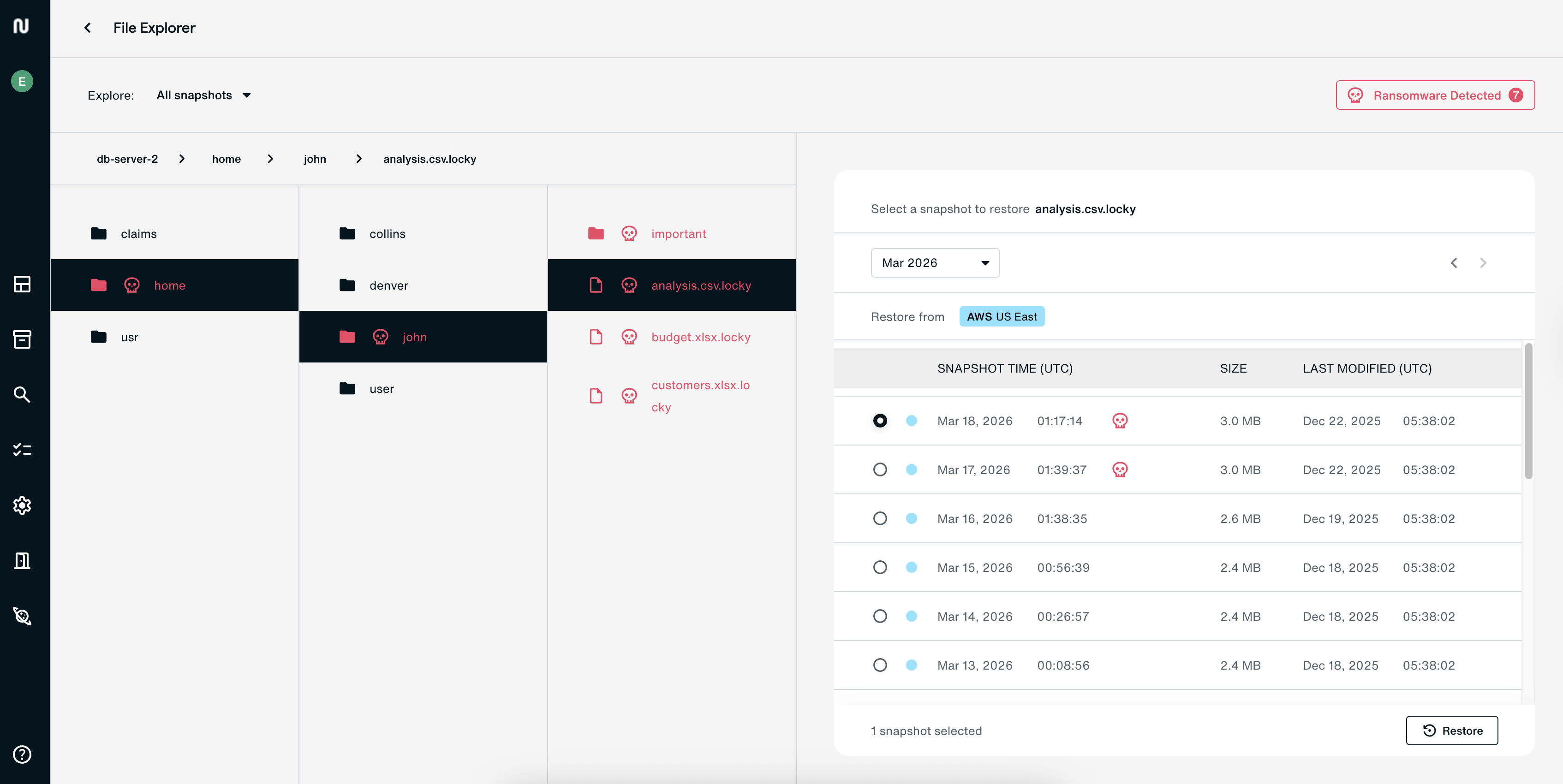
True ransomware backup resilience means:
- Confidence in which recovery points are usable
- Granular, searchable recovery paths that make it easier to identify and restore the data you need
Eon is designed to help teams identify clean recovery points and recover at a more granular level, reducing the need for full snapshot rollbacks.
Gap #4: Manual retention management and policy drift over time
Cloud environments change fast. New accounts get added. New workloads show up. Ownership shifts. What started as a solid retention policy slowly becomes inconsistent across teams and environments.
That drift creates real risk.
The implications are not minor:
- Backup intervals stretch too far, so when ransomware strikes, the latest available snapshot may already be too old.
- Policy drift occurs when policies are inconsistent across data types, accounts, and regions, leading to compliance violations and exploitable gaps that attackers can use to erase recovery options.
To build a more resilient cloud ransomware protection model, teams need centrally enforced retention policies with audit logging. This is also where Cloud Backup Posture Management becomes important, because it helps teams enforce backup policy consistently as environments change. That means backup settings are applied consistently across environments, including where backups are stored and how long they are retained. On top of that, detailed records of all backup activities should be automatically collected for security and compliance purposes.
Eon helps reduce retention drift through automated backups, centrally enforced policies, and compliance-focused controls.
Gap #5: Slow restores that fail critical SLAs
Legacy backup solutions treat snapshots as a single unit of unsearchable, undividable data, meaning every restore operation is a complete snapshot rollback. Imagine having to restore terabytes of data just to access a 30GB file.
Many legacy systems rely on slower retrieval workflows and broader restore operations, making recovery more time-consuming and operationally heavy. This turns what should be a fast recovery into a painfully slow process.
The impact on businesses? They suffer missed ransomware recovery time objectives (RTOs), lost revenue, and reputational damage.
These restore bottlenecks are one reason legacy backup tools fall short on ransomware recovery.
A faster way to recover after ransomware is to use cloud-native backup platforms designed for more precise and efficient recovery at cloud scale.
Eon is designed for faster, more precise restores at cloud scale.
How does Eon help close ransomware backup gaps?
Eon helps close ransomware backup gaps through the following key differentiators.
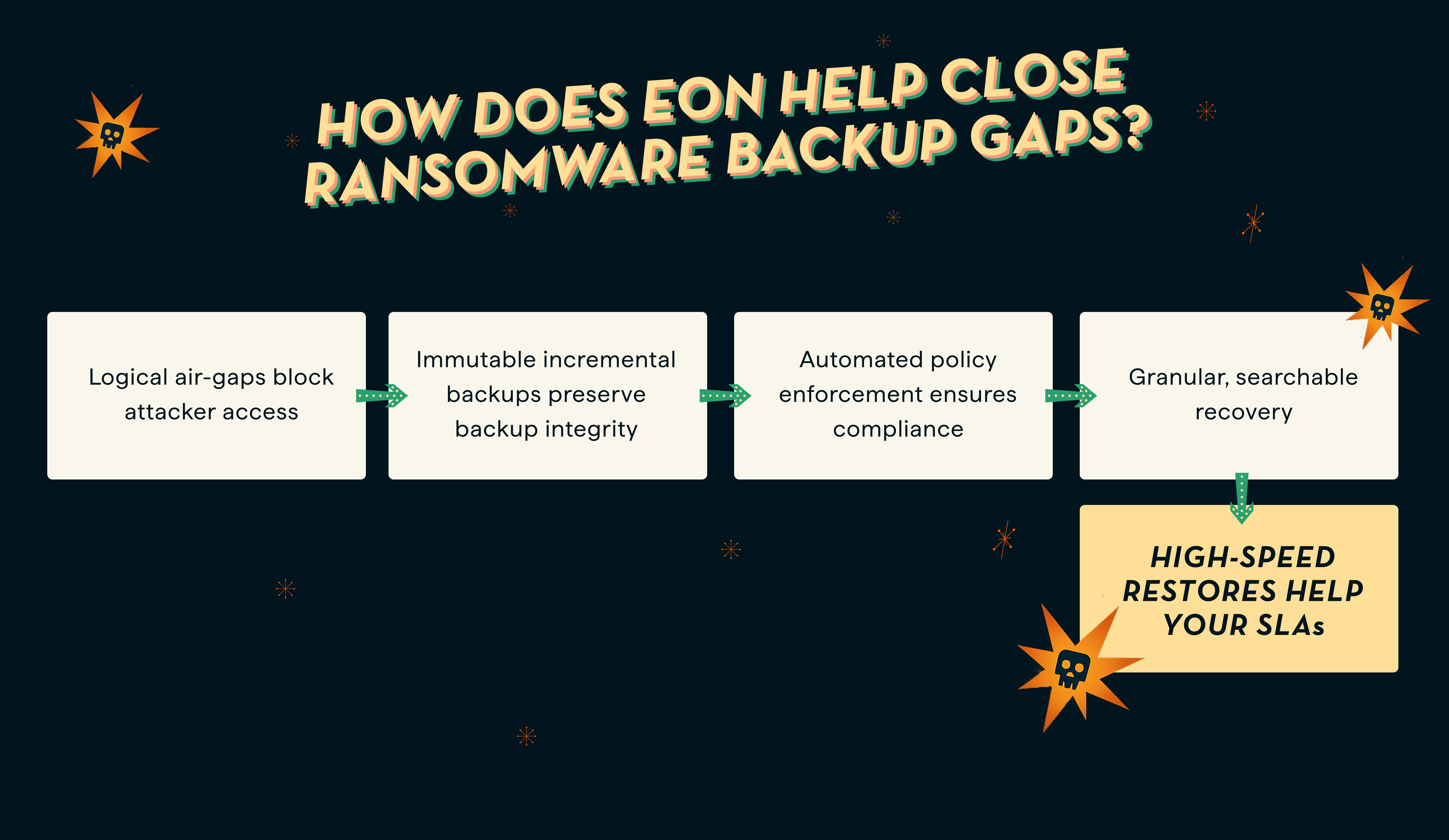
Logical air-gapping
Eon uses an immutable, logically air-gapped backup architecture to help keep backup data outside the normal production blast radius. Its backup design also focuses on reducing redundant storage and making protected data more usable for recovery and downstream use cases.
Eon also helps teams strengthen their confidence in ransomware recovery by making it easier to identify usable recovery points and recover with greater precision.
Automated policy enforcement
Eon autonomously discovers, maps, and classifies cloud resources across various cloud infrastructures (e.g., AWS, Azure, GCP). Once resources are discovered and classified, Eon helps teams apply backup policies more consistently in line with business and compliance needs, reducing drift across cloud environments.
Granular, searchable recovery
Eon’s architecture is designed to make backup data more searchable and usable, helping teams recover at a more granular level instead of defaulting to full rollback workflows. That can reduce downtime, lower operational friction, and improve confidence in recovery.
Together, these recovery paths can help teams reduce downtime and recover with more confidence.
Close your ransomware backup gaps before malicious actors attack
Cloud environments have blurred the traditional perimeter, creating scenarios where an attacker compromises a single account and uses it to wipe out both production and backup. This means ransomware backup resilience now requires more than perimeter defenses like firewalls and web gateways.
It also means businesses need to close backup gaps like same-account exposure, policy drift, weak recovery confidence, and restore workflows that are too broad or too slow when incidents hit. Who closes which gap, and in what order once an attack is underway, belongs in the ransomware response plan itself.
Real cloud ransomware protection should include isolation, immutability, policy enforcement, and recovery paths teams can actually trust when incidents hit.
If your team cannot clearly answer which backups are isolated, which recovery points are usable, and how fast critical systems can be restored, it is worth pressure-testing your backup posture now, not during an incident.
Read Eon’s ransomware solution overview to learn more about ransomware backup best practices and how to ensure ransomware backup resilience.
FAQs
Are cloud-native backups safer against ransomware?
Cloud-native backups can be safer against ransomware when the architecture includes strong isolation, policy enforcement, and recovery paths that are practical under pressure. The label alone is not enough.
How can ransomware compromise cloud backups?
Ransomware can compromise cloud backups when production and backup environments share access boundaries, compromised credentials, or the same blast radius. That is why isolation matters so much.
Is cloud immutability enough to protect against ransomware?
No. Immutability helps protect backup data from being altered or deleted, but it does not solve isolation, policy drift, or recovery confidence on its own.
Why is recovery validation important for ransomware readiness?
Teams need confidence that backups are usable before an incident happens. That may involve restore testing, recovery validation, or other ways to confirm that recovery points are practical and trustworthy.
What happens if backups are stored in the same cloud account as production?
If backups reside in the same cloud accounts as live workloads, a misconfiguration or compromised account can give attackers a path to both production and backup workloads, eliminating your recovery path.
Why are backups the weak link in ransomware defense?
Because many organizations invest more in prevention than in recovery readiness, the problem usually shows up when teams need to identify a clean backup and restore it under real-time pressure.