


What to do about PHP2Shell now
Patch, hold your old backups, then work out what changed between October 17 and your patch.
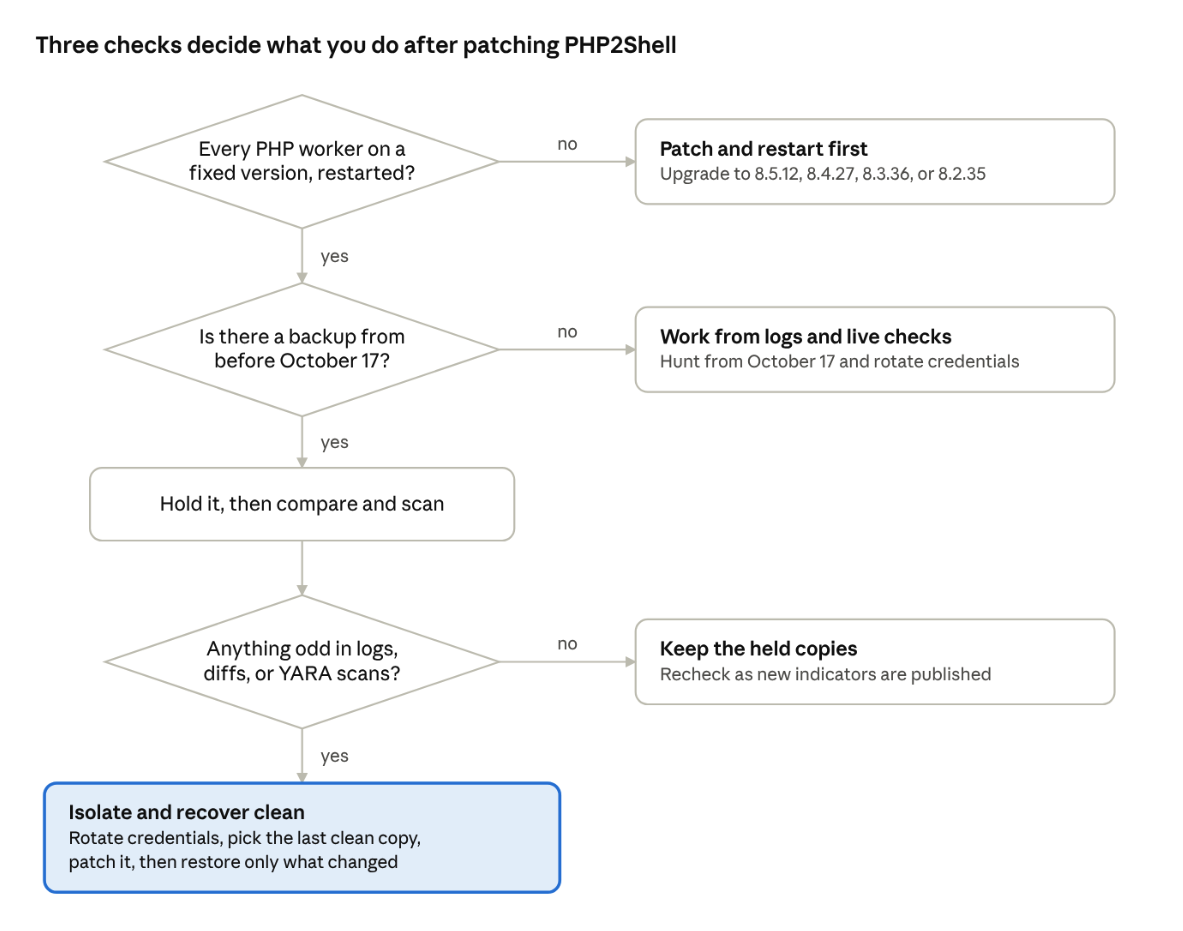
PHP2Shell next steps · 3 checks, 4 outcomes
1. Patch and restart every PHP worker
Upgrade to PHP 8.5.12, 8.4.27, 8.3.36, or 8.2.35, then restart every PHP worker so the fix loads, as CISA advises. On PHP 7.4 through 8.1, use your Linux distribution's or LTS vendor's patched package, or PHP's minimal source backports. PHP 7.3 and older get no upstream fix. Some distributions and LTS vendors have shipped patched packages for older releases, so check yours. If there's no fix, upgrade those servers or take them off the internet (Tenable).
Include PHP bundled inside vendor appliances, control panels like cPanel and Plesk, and Windows software (Huntress). Distributions often backport fixes without changing the version number, so check your distribution's security tracker.
2. Put your pre-October 17 backups on hold
The last backup from before October 17 is your baseline and your clean restore point, and a short retention policy may delete it this week. A daily snapshot from October 16 kept for 14 days expires around October 30. One kept for 7 days is already gone.
- Find the newest snapshot or recovery point from before October 17 for every server that ran PHP.
- Stop it from expiring. In AWS Backup, place a legal hold, which keeps recovery points from being deleted until you remove it (AWS). Legal holds don't cover continuous backups. For EBS snapshots that Data Lifecycle Manager created, lock them, since a snapshot that's still locked at its retention date drops out of the policy (AWS). On Azure and Google Cloud, extend retention or copy the restore point.
- Do the same for every backup taken between October 17 and your patch date. Those copies hold the evidence.
- Keep all of them somewhere the web server's cloud credentials can't reach, until your investigation is closed and you've confirmed a clean restore point for every server that ran PHP. If you find a compromise, keep them through any legal, insurance, or regulatory follow-up.
3. Check your logs and servers for signs of exploitation
The strongest signs are programs started by PHP workers and files that changed. A successful exploit can return a normal response and leave no error or crash behind, so a clean error log doesn't clear a server (Bitdefender, CrowdStrike). Memory errors and crashed workers still show attempts worth investigating. As of October 28, 2026, nobody has published web shell names or file hashes from a real victim. Look for:
- Signs of attempts: PHP errors reading "Allowed memory size of … bytes exhausted … in Unknown on line 0," which means PHP ran out of memory before any script started, and Apache workers exiting with "Segmentation fault (11)," both seen in honeypot captures by Perplexity researcher Adel Karimi.
- Multipart POSTs to / or any .php path with no User-Agent, or with the User-Agent php2shell-109618 that Fastly saw from the most widespread exploit kit. Very large bodies and session cookies are another sign, but they only show up if your logs record request size (%I with Apache's mod_logio, $request_length in nginx).
- Traffic from IP addresses published by Amazon, Karimi, and CYFIRMA. Many are shared infrastructure, so investigate hits instead of blocking them.
- PHP workers (php-fpm, php-cgi, httpd, apache2) starting shells, interpreters, curl, wget, or nc (Unit 42).
- New PHP files in web roots, executables in temp directories, auto_prepend_file settings in .user.ini or .htaccess, and new cron jobs, SSH keys, accounts, or services.
- Reads of ~/.aws/credentials, .env files, or the metadata address 169.254.169.254 by the web user.
A first pass on a Linux web server, run as root. Adjust the paths to your own:
# Signs of attempts: PHP out-of-memory errors raised before any script ran, and crashed workers
zgrep -h 'Allowed memory size.*in Unknown on line 0' /var/log/php*.log* /var/log/php*/*.log* /var/log/apache2/error.log* /var/log/httpd/error_log* /var/log/nginx/error.log* 2>/dev/null
zgrep -h 'Segmentation fault (11)' /var/log/apache2/error.log* /var/log/httpd/error_log* 2>/dev/null
zgrep -h 'exited on signal' /var/log/php*.log* /var/log/php*/*.log* 2>/dev/null

# The most widespread exploit kit's User-Agent
zgrep -hiE 'php2 ?shell' /var/log/nginx/access.log* /var/log/apache2/access.log* /var/log/httpd/access_log* 2>/dev/null

# POSTs to / or any .php path with no User-Agent. Assumes the combined log format, where User-Agent
# is the last field; RHEL's default nginx "main" format ends with X-Forwarded-For instead
zgrep -hE '"POST /(index\.php|[^ ]*\.php)?(\?[^ ]*)? HTTP' /var/log/nginx/access.log* /var/log/apache2/access.log* /var/log/httpd/access_log* 2>/dev/null | grep '"-"$'

# New or changed PHP files, dropped executables, and prepend tricks since Oct 17.
# -newerct checks change time, which touch can't set back
find /var/www /srv -type f -name '*.php' \( -newermt '2026-10-17' -o -newerct '2026-10-17' \) -ls
find /tmp /var/tmp /dev/shm -type f -perm -u+x \( -newermt '2026-10-17' -o -newerct '2026-10-17' \) -ls
grep -rnE 'auto_(prepend|append)_file' /var/www /srv --include=.user.ini --include=.htaccess 2>/dev/null

# Cron, systemd, and SSH key changes since Oct 17
find /etc/cron* /var/spool/cron /etc/systemd/system -type f \( -newermt '2026-10-17' -o -newerct '2026-10-17' \) -ls
find /root /home -name authorized_keys \( -newermt '2026-10-17' -o -newerct '2026-10-17' \) -ls 2>/dev/null

# The web user can only write its own ~/.ssh and crontab, so find its home and check there too
getent passwd www-data apache nginx
find /var/www /usr/share/httpd /var/lib/nginx -path '*/.ssh/*' \( -newermt '2026-10-17' -o -newerct '2026-10-17' \) -ls 2>/dev/null
File modified times are easy to fake, which is why the commands also check change time. Treat a clean result as a starting point; the backup comparison in step 4 checks contents instead. If anything turns up, take the server off the network, keep the logs, and rotate every credential the web user could read. Rotate them anyway on any internet-facing server that ran a vulnerable version: these flaws can also leak worker memory, including passwords, tokens, and keys, without running any code, which leaves no trace in logs, files, or backups.
4. Compare backups to see what changed
Diff a backup from before October 17 against later ones in an isolated account, and scan the copies instead of the live server. You won't tip off an attacker who is still active, and you keep the evidence even if they clean up the host.
- In a separate forensic account, create volumes from a clean snapshot and a later one, and mount both read-only.
- Compare web roots, cron, systemd, SSH keys, home directories, and /tmp by checksum.
- Run YARA rules for web shells against the mounted copies, using a maintained set such as Florian Roth's signature-base.
- Check the database too. A web shell can use the app's own database credentials to change records without adding a file. Restore a pre-October 17 database backup to an isolated instance, compare it with a later one, and look for new admin users, changed site settings, injected scripts, and changed payment or contact details.
- Pick the last clean restore point: the newest backup with no unexplained changes.
- Patch before you restore, because every backup from before October 21 holds vulnerable PHP. Then restore only what changed, so you keep legitimate work done since.
# Mount both copies read-only. ext4: ro,noload   XFS: ro,norecovery,nouuid
mount -o ro,noload /dev/nvme1n1p1 /mnt/clean     # snapshot from before Oct 17
mount -o ro,noload /dev/nvme2n1p1 /mnt/suspect   # snapshot from the window

# Compares contents, permissions, owners, and symlinks. *deleting = only in the later copy; >f = changed or missing in the later copy
for d in var/www etc/cron.d var/spool/cron etc/systemd/system root/.ssh home tmp; do
  rsync -rlpgoDcn --delete --out-format='%i %n' "/mnt/clean/$d/" "/mnt/suspect/$d/"
done
5. Check whether stolen keys reached your backups
If the web user could read cloud credentials, search CloudTrail from October 17, 2026, for anyone sharing, copying, or deleting backups. Sharing a snapshot with an outside account hands over a full copy of a disk, and deleting backups is how attackers make sure you can't recover.
CloudTrail's event history keeps 90 days of management events, so October 17 is still in range even without a trail (AWS). On Azure, check the Activity Log; on Google Cloud, Cloud Audit Logs. If your backups sit in the same account and under the same credentials as the exploited server, treat them as exposed. We covered how that happens in our post on the ChainDrop attack.
What happened with PHP2Shell?
PHP2Shell went from a leak to confirmed exploitation in under a week, and at least one attacker was trying it before the patch existed. Both flaws sit in how PHP cleans up after memory errors, and either one can give an unauthenticated attacker code execution as the web server's user (Huntress).
PHP runs about 70% of websites, per W3Techs, including WordPress, Drupal, and Joomla (BleepingComputer), and it ships inside routers, firewalls, and VPNs (TechCrunch). watchTowr calls Apache with mod_php the riskiest setup, because an attack can succeed before any application code runs (watchTowr).
So far, confirmed exploitation comes from honeypots, and Karimi notes his ran a single-worker setup that favors the attacker. The volume is large either way: Delft University of Technology's threat intelligence lab has tracked more than 50,000 exploitation requests from over 600 IP addresses, 171 of which sent exploit code or malware droppers (The Register). No compromised organization has been named publicly.
A third flaw, CVE-2026-115560, has no patch yet but only works against an unusual mix of configuration and application code. Until a fix ships, PHP's developers advise setting session.upload_progress.enabled=0 (BleepingComputer).
Why doesn't patching tell you whether you were compromised?
A patch stops new exploitation, but it doesn't remove a web shell, a cron job, or a stolen key an attacker left behind before you applied it. If an attacker reached your server between October 17 and the moment your PHP workers restarted on a fixed version, whatever they planted is still there after the upgrade.
Code running as the web user can read application config, .env files, cloud credentials in ~/.aws, and the instance metadata service, and Wiz described a separate path that could leak passwords, tokens, and API keys (per Huntress). That's why Amazon says to "investigate from at least starting on October 17th" instead of from the disclosure date (Amazon).
How Eon helps with PHP2Shell
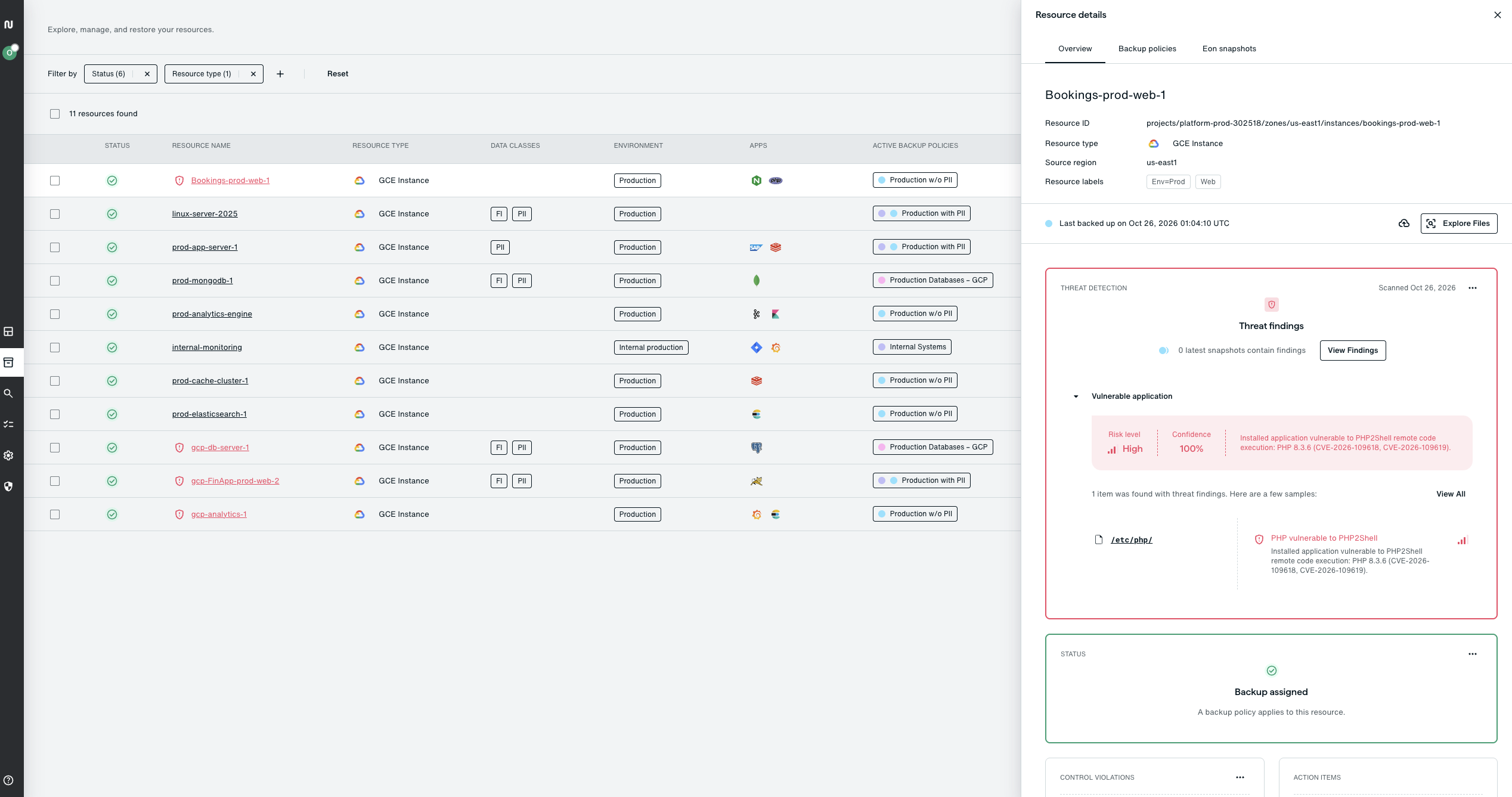
Eon covers the backup half of the steps above. Eon isn't affected by PHP2Shell, because Eon's platforms don't use PHP, and its detection complements patching instead of replacing it.
Find the exposed servers and look inside their backups
Eon flags backups that contain a PHP version vulnerable to PHP2Shell and marks each affected resource as a high-risk vulnerable application, with the version it found and the snapshots that contain it. It reads the version from the backup itself, which also catches PHP bundled inside vendor software that a package scan misses. Threat hunting then scans EC2, Azure VM, and GCP VM backups with YARA rules, including web shell signatures, so you can find indicators of compromise without touching production.
Keep the evidence safe
Backups are stored in a dedicated Eon vault account, isolated from production. Vaults are logically air-gapped and can be locked so backups stay immutable for their full retention, which means no one can delete them, not even an admin.
Recover only what changed
Eon helps you identify the last clean restore point from before a compromise, detects malicious changes inside databases, and restores the exact files, database rows, or resources that were hit, in minutes. Automatic PII and PHI classification helps you scope what an attacker could have reached.
Three months of Eon Data Protection, free
Through the Data Resilience Initiative, Eon is offering its entire data protection platform free for 3 months, for up to 50 TB of data, across AWS, Azure, Google Cloud, Microsoft 365, and Google Workspace. It connects through a single read-only role with nothing to install, activates through your cloud marketplace, and can have you protected in as little as a day. Requests are subject to approval. Eon can't create backups from before you connected it, but the next time a flaw like this lands, the clean baseline will already exist.
If you'd rather start with a second opinion on whether your backups still cover the PHP2Shell window, talk to an Eon engineer.