Article

How to Activate Backup Data in Amazon Redshift Without Restores or ETL

Eon’s AWS Redshift integration unlocks backups as queryable tables for analytics and point-in-time insight across your AWS environment.

Around
0
 min read
Updated on 
Dec 22, 2025
How to Activate Backup Data in Amazon Redshift Without Restores or ETLHow to Activate Backup Data in Amazon Redshift Without Restores or ETL
Article

How to Activate Backup Data in Amazon Redshift Without Restores or ETL

Eon’s AWS Redshift integration unlocks backups as queryable tables for analytics and point-in-time insight across your AWS environment.

Around
 min read
Industry
Size
Cloud Provider
Use Cases
Eon Solutions
Contact sales
Get a demo
Download PDF

Quick Summary

  • Eon stores database backups as tables stored in Amazon S3.
  • Eon allows customers to grant Redshift with access to their backups.
  • Amazon Redshift can query those tables directly as point-in-time datasets.
  • Teams can analyze historical data instantly with no restores, ETL, or duplicate analytics environments.

Eon integrates with Amazon Redshift, allowing you to query database backup data in place.

Why use backup data for analytics?

Because backups already hold any critical data across the organization.

They include long-range context and consistent point-in-time versions that production systems rarely preserve. When that data becomes usable:

  • You answer historical questions without rebuilding environments.
  • You cut out redundant analytics copies and pipelines.
  • You work from a single governed source of truth.
  • You reuse the same datasets for investigations, validation, compliance, and BI.

What does it mean to query backups in Amazon Redshift?

It means backups are no longer expensive and useless. Instead, they form a rich data lake that already holds critical data, instantly ready for analytics or AI/ML workflows.

Eon stores database backups as deduplicated tables in Amazon S3. With the Redshift integration, those tables appear directly in Redshift as point-in-time datasets you can query immediately.

If you want to see how a table looked last week, validate a change, or compare before-and-after states, you query the backup itself rather than a rehydrated environment.

Key benefits of querying backups in Redshift

  • Instant point-in-time analytics without waiting for restores
  • No ETL pipelines or duplicate analytics clusters
  • Trusted baselines for audits, investigations, and debugging
  • Lower cost by eliminating redundant environments and copies
  • Cross-cloud context via Eon’s unified catalog when needed
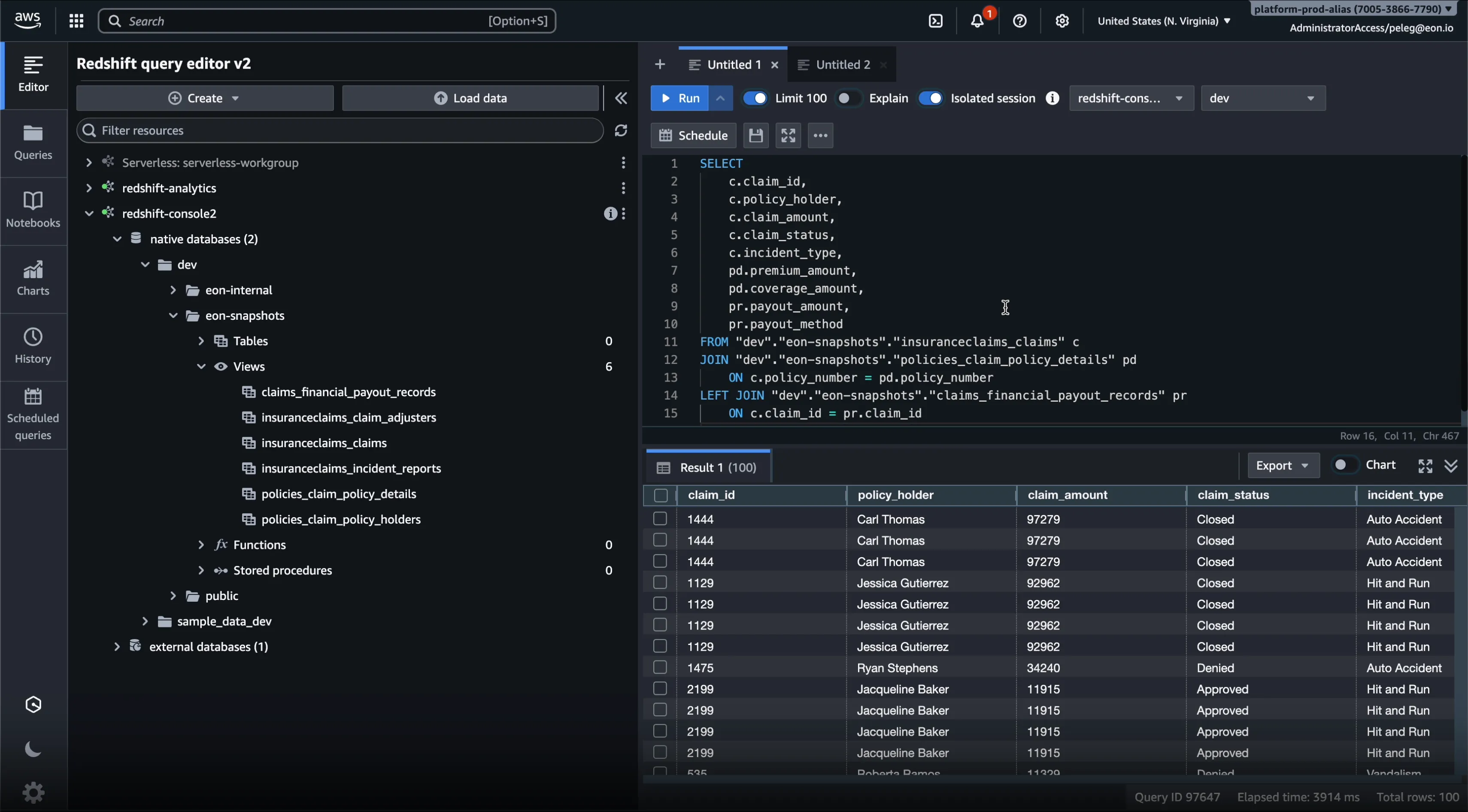
Query backup data directly in Amazon Redshift

How the Redshift integration works

A simple, AWS-native flow:

  1. Eon continuously stores backups as deduplicated Hive-partitioned tables.
    Eon introduces a modern backup format that consists of Hive-partitioned tables stored in Amazon S3.
  2. You choose which backups to share with Redshift.
    Eon grants read-only access while preserving immutability and governance controls.
  3. Redshift queries in place.
    Amazon Redshift discovers and queries the tables directly in S3.

The result: Redshift treats your backups as point-in-time datasets ready for immediate analysis.

What teams do with Redshift-queryable backups

Analytics and BI without rebuilds
Run Redshift queries on historical snapshots to validate changes, investigate incidents, or analyze trends without restoring anything first.

Faster audits and compliance checks
Search and query long-retained point-in-time data directly, instead of waiting on exports or restore jobs.

Operational insight and investigations
Backups provide a clean historical truth for debugging, root-cause analysis, and validating system behavior over time.

How Eon keeps backups usable and secure

Making backups queryable does not mean making them risky.

Baseline protections stay on by default:

  • Immutable backups
  • Logical air gaps
  • Read-only analytics access
  • RBAC and audit logs
  • Autonomous Cloud Backup Posture Management (CBPM)

Analysts get governed access to historical truth. Security teams stay in control.

Want to see this live?
Get a demo, and we’ll walk you through Redshift-queryable backups end to end.

FAQ

Which kind of backups are available?

Every relational or non-relational database backup can be queried, including DynamoDB, RDS, PostgreSQL, MySQL, or SQL Server.

Do I need to change my existing Redshift pipelines?

No. This adds a new source of point-in-time truth. Most teams keep their operational pipelines and use Eon’s Redshift access for historical checks, investigations, and validation.

Will this increase my S3 or compute cost?

No. Backups with Eon are already stored deduplicated in S3 as Hive-partitioned tables. You only pay for Redshift when you run queries. Most teams reduce spend by retiring redundant analytics copies.

Can I join backup data with my production data?

Yes. Redshift can join point-in-time snapshots with operational tables for diffing, debugging, audits, and validation.

What’s required to enable this?

Just enable Redshift access inside Eon. The platform already manages the backup tables automatically.

Is querying backups in Redshift secure?

Yes. Eon exposes database tables in strict read-only mode with immutability, RBAC, and audit logs enforced. Redshift can query the data, but cannot modify it.

Industry
Size
Cloud Provider
Use Cases
Eon Solutions
Contact sales
Get a demo
Download PDF

Quick Summary

  • Eon stores database backups as tables stored in Amazon S3.
  • Eon allows customers to grant Redshift with access to their backups.
  • Amazon Redshift can query those tables directly as point-in-time datasets.
  • Teams can analyze historical data instantly with no restores, ETL, or duplicate analytics environments.

Eon integrates with Amazon Redshift, allowing you to query database backup data in place.

Why use backup data for analytics?

Because backups already hold any critical data across the organization.

They include long-range context and consistent point-in-time versions that production systems rarely preserve. When that data becomes usable:

  • You answer historical questions without rebuilding environments.
  • You cut out redundant analytics copies and pipelines.
  • You work from a single governed source of truth.
  • You reuse the same datasets for investigations, validation, compliance, and BI.

What does it mean to query backups in Amazon Redshift?

It means backups are no longer expensive and useless. Instead, they form a rich data lake that already holds critical data, instantly ready for analytics or AI/ML workflows.

Eon stores database backups as deduplicated tables in Amazon S3. With the Redshift integration, those tables appear directly in Redshift as point-in-time datasets you can query immediately.

If you want to see how a table looked last week, validate a change, or compare before-and-after states, you query the backup itself rather than a rehydrated environment.

Key benefits of querying backups in Redshift

  • Instant point-in-time analytics without waiting for restores
  • No ETL pipelines or duplicate analytics clusters
  • Trusted baselines for audits, investigations, and debugging
  • Lower cost by eliminating redundant environments and copies
  • Cross-cloud context via Eon’s unified catalog when needed
Query backup data directly in Amazon Redshift

How the Redshift integration works

A simple, AWS-native flow:

  1. Eon continuously stores backups as deduplicated Hive-partitioned tables.
    Eon introduces a modern backup format that consists of Hive-partitioned tables stored in Amazon S3.
  2. You choose which backups to share with Redshift.
    Eon grants read-only access while preserving immutability and governance controls.
  3. Redshift queries in place.
    Amazon Redshift discovers and queries the tables directly in S3.

The result: Redshift treats your backups as point-in-time datasets ready for immediate analysis.

What teams do with Redshift-queryable backups

Analytics and BI without rebuilds
Run Redshift queries on historical snapshots to validate changes, investigate incidents, or analyze trends without restoring anything first.

Faster audits and compliance checks
Search and query long-retained point-in-time data directly, instead of waiting on exports or restore jobs.

Operational insight and investigations
Backups provide a clean historical truth for debugging, root-cause analysis, and validating system behavior over time.

How Eon keeps backups usable and secure

Making backups queryable does not mean making them risky.

Baseline protections stay on by default:

  • Immutable backups
  • Logical air gaps
  • Read-only analytics access
  • RBAC and audit logs
  • Autonomous Cloud Backup Posture Management (CBPM)

Analysts get governed access to historical truth. Security teams stay in control.

Want to see this live?
Get a demo, and we’ll walk you through Redshift-queryable backups end to end.

What You’ll Learn

Key Findings at a Glance

What You’ll Learn

Key Findings at a Glance

Experience what Eon can do for your business. Your personalized demo awaits.

Watch a demo
Eon puts cloud backup policy management on auto-pilot, keeping resources and policies in perfect sync. See it for yourself.
SEND ME THE VIDEO
See Eon in Action

Cut backup cost and complexity while adding instant restore and analytics.

See Eon in Action

Cut backup cost and complexity while adding instant restore and analytics.