

A new service is ready to ship, and someone on the platform team asks where it should run: a fresh virtual machine, or a container on the cluster you already have. Both options isolate the workload. They just do it at different layers, and that layer decides how fast the service scales, how far an attacker can reach, and what you'll need to restore after an incident.
A hypervisor abstracts the hardware, so each virtual machine runs a full guest operating system. Containers abstract the operating system, so each shares the host's kernel and carries only the app and its dependencies.
The two usually run stacked on top of each other: Kubernetes pods scheduled onto cloud VMs. That makes containerization vs virtualization a question about which layer each workload belongs on.
What is containerization?
Containerization is a way to package an application with its libraries, runtime, and configuration into a single image that runs as an isolated process on a shared operating system kernel.
On Linux, two kernel features do the isolating. Namespaces give each container its own view of process IDs, network interfaces, mount points, and hostnames. Control groups (cgroups) cap how much CPU and memory each container can use. A container runtime such as containerd or runc sets all of this up when a container starts.
Containers have existed in some form for decades, but Docker made them mainstream after its 2013 launch. Kubernetes is now the default way to run them at scale: 82% of container users run Kubernetes in production, according to the CNCF's January 2026 survey.
What is virtualization?
Virtualization is the use of software, called a hypervisor, to create virtual machines that each behave like a separate computer with their own virtual CPU, memory, storage, and operating system.
The hypervisor allocates the host's memory, CPU, and storage among the VMs running on it. Type 1 (bare-metal) hypervisors such as VMware ESXi and Microsoft Hyper-V run directly on the hardware. Type 2 (hosted) hypervisors such as Oracle VirtualBox run as an application on top of a desktop OS, which makes them easier to install but usually less efficient.
Cloud instances on Amazon EC2, Azure, and Compute Engine are virtual machines (bare-metal instance types aside). VMs were the foundation of the first generation of cloud computing.
Is Docker considered virtualization?
Yes. Docker is a form of OS-level virtualization: it virtualizes the operating system for each container, whereas a hypervisor virtualizes the hardware for each VM. Containers are operating system virtualization combined with application packaging.
On a Linux host, a Docker container is a process running on that host's kernel, with no VM involved. On Mac and Windows, Docker Desktop runs Linux containers inside a lightweight LinuxKit VM, because Linux containers need a Linux kernel to share.
Containerization vs virtualization at a glance
| ㅤ | Virtual machines | Containers |
|---|---|---|
| Architecture | Hypervisor virtualizes hardware, each VM runs a guest OS | Runtime isolates processes, all containers share the host kernel |
| Resource usage | Images in GBs, dozens per host | Images in MBs, hundreds per host |
| Startup speed | Tens of seconds to minutes | Under a second to a few seconds |
| Isolation | Hardware-level, through the hypervisor | Kernel-level, through namespaces and cgroups |
| OS flexibility | Any guest OS on one host | Same OS family as the host kernel |
| Portability | Large images in hypervisor-specific formats | One image runs on any compatible host |
| State | Persistent virtual disks | Container filesystem is discarded, state lives in volumes |
Container and VM architecture: The 2 stacks side by side
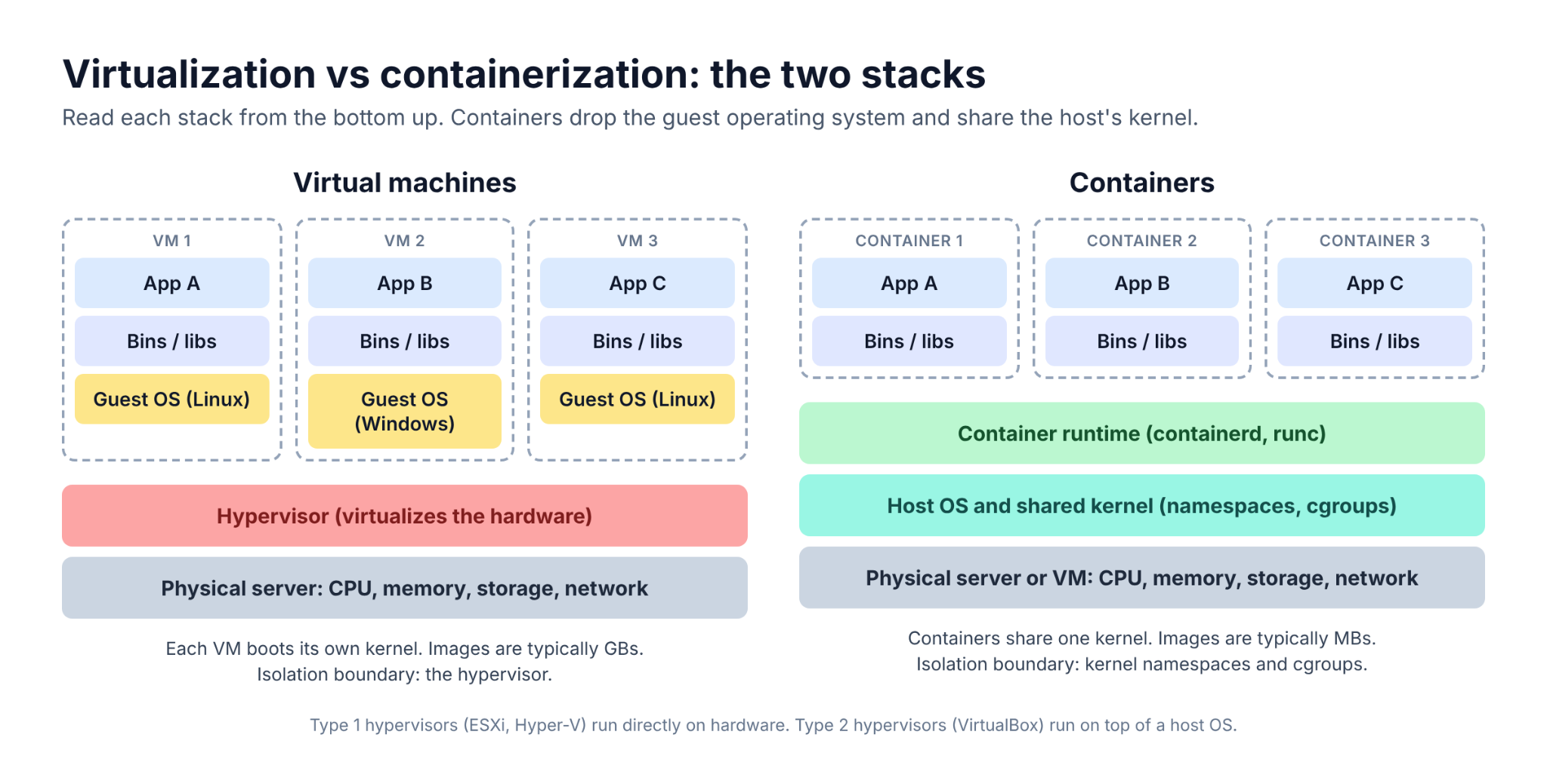
The two stacks diverge one layer above the hardware. In a VM, the hypervisor sits on the physical server, and every VM above it carries a full guest OS, its own binaries and libraries, and the app.
In a container stack, a single host OS and kernel sit on the server (or on a VM), the container runtime runs on that OS, and each container holds only the app and the libraries it needs.
Containers drop the per-workload guest OS entirely. That is where their speed and density come from, and it is why every container on a host shares one kernel.
7 key differences between containerization and virtualization
Each difference traces back to one design choice: whether every workload gets its own kernel.
1. Architecture: hardware virtualization vs OS virtualization
A hypervisor presents virtual CPUs, memory, disks, and network cards to each VM, so the guest OS runs as if it were on real hardware. A container runtime sits one level up: it virtualizes the operating system.
That changes your patching workload. With VMs, you patch the hypervisor and every guest OS separately. With containers, you patch one host kernel and rebuild images when a library needs an update, so there's only one OS to look after per host.
2. Resource usage and density
A VM image is usually several gigabytes because it contains a whole operating system, while container images are measured in megabytes. Every VM also reserves memory for its own kernel and system services before your app gets any.
The result is density. A host that runs dozens of VMs can typically run hundreds of containers, depending on how much CPU and memory each workload needs.
3. Startup speed
A VM boots firmware, a kernel, and an init system before it is ready, which takes tens of seconds to minutes. A container only starts a process, usually in under a second to a few seconds.
Fast starts are what make autoscaling and per-job CI environments work. A traffic spike can get new replicas before users notice, and every pipeline run can start from a clean image.
4. Isolation and security boundary
A VM's isolation boundary is the hypervisor. Each guest has its own kernel, so an attacker inside one VM has to break the hypervisor itself to reach the host or a neighbor.
A container's boundary is the shared kernel's namespace and cgroup features. Every container on a host makes system calls to the same kernel, so the isolation container runtimes provide isn't as high as what hypervisors provide.
5. Operating system flexibility
A hypervisor can run any OS it supports, so a Windows Server VM can sit next to a Linux VM on the same host. That's one of the main reasons mixed-OS estates stay on VMs.
Containers have to match the host kernel's OS family. Linux containers need a Linux kernel, and Windows containers need a Windows host. Windows adds a version rule too: with process isolation, the host and image build numbers must match (Windows 11 running Windows Server 2022 images is the exception), unless you run the container with Hyper-V isolation, which gives it its own kernel.
6. Portability
A container image bundles the app and every dependency, so the same image runs on a laptop, a CI runner, and a managed Kubernetes cluster in any cloud, as long as the kernel family and CPU architecture match. That portability also makes workloads easier to move between on-premises and cloud environments.
VMs move as whole machines, which is heavier. Disk images are large, and formats differ by hypervisor: AWS VM Import, for example, accepts VMDK images from VMware and VHD or VHDX images from Hyper-V, along with OVA and raw formats. Moving between platforms often means a conversion step.
7. State and data persistence
A VM's disks persist across reboots, and the OS, app, and data all live on them. Copy the disks, and you've captured the whole machine.
Containers are built to be thrown away. Data written to a container's writable layer doesn't persist once the container is destroyed. Anything worth keeping has to live outside it: in Kubernetes, that means persistent volumes for data and API objects such as Secrets and ConfigMaps for configuration.
Security trade-off: Hardware-level isolation vs a shared kernel
VMs give stronger isolation by default, and containers trade some of it for speed and density. A shared kernel gives containers a larger inter-object attack surface than a hypervisor does.
Container escapes show what that looks like. In January 2024, CVE-2024-21626 (one of the "Leaky Vessels" flaws) let a malicious image or a process started with runc exec reach the host's filesystem through a file descriptor that runc leaked into the container. A kernel flaw has a similar reach: it can affect every container on the host.
VMs aren't immune. The 2015 VENOM vulnerability (CVE-2015-3456) in QEMU's virtual floppy disk controller let an attacker with root on a guest run code on the host, which affected Xen and KVM setups. Hypervisor escapes like this are rarer and harder to pull off.
You can narrow the difference on the container side:
- Group workloads by risk: only run containers with the same purpose, sensitivity, and threat posture on one host kernel.
- Use a container-specific host OS: a minimal OS built to run containers has fewer packages to exploit than a general-purpose one.
- Restrict system calls: Seccomp profiles, AppArmor, and SELinux limit what a container process can ask the kernel to do. SELinux in enforcing mode blocks the host access the runc flaw relied on.
- Add a sandbox for untrusted code: gVisor intercepts system calls in a user-space kernel, and Kata Containers runs each workload inside a lightweight VM.
For untrusted, multi-tenant code, we'd still put a VM boundary (or a microVM) under the containers. That's the model AWS chose for Lambda and Fargate.
When to use virtualization vs containerization
Use virtual machines when:
- Legacy apps depend on a specific OS version or kernel and would need a rewrite to run in a container.
- Mixed OS environments need Windows and Linux workloads on the same hosts.
- Strict multi-tenant isolation is required, such as untrusted tenants or regulated workloads that need a hardware-level boundary.
- A workload needs full OS control, such as custom kernel modules or kernel tuning.
Use containers when:
- Microservices need to deploy and scale independently of each other.
- Rapid scaling has to add replicas in seconds during traffic spikes.
- CI/CD pipelines should build, test, and ship the same image to production.
- Short-lived jobs such as batch processing and data jobs start, finish, and exit.
Stateful databases sit in the middle. They run in containers with persistent volumes, but before moving a large production database off a VM or managed service, we'd check how much Kubernetes storage experience your team has and how you'd restore that database after a bad deploy.
How containers and VMs run together
In the public cloud, a container's host is almost always a VM. Amazon EKS managed node groups, for example, are Amazon EC2 instances whose provisioning and lifecycle EKS manages for you. Your pods get container density, and the node underneath gets a hypervisor boundary from AWS.
The line keeps blurring from both directions. AWS built Firecracker, a KVM-based virtual machine monitor that starts microVMs in under 125 ms with less than 5 MiB of memory overhead each, so Lambda and Fargate get VM-grade isolation at close to container speed.
Going the other way, the CNCF project KubeVirt runs VM workloads on Kubernetes next to containers.
So most cloud teams decide workload by workload which layer handles isolation and which layer holds the data they'd need back after an incident.
How backup differs for containers and VMs
Containerization vs virtualization ends in a split decision for most cloud teams: VMs for full-OS workloads and hard isolation, containers for services that scale and ship often. That split also leaves you with two different recovery problems.
Backing up a VM means capturing its disks, which hold the OS, the app, and the data together. On AWS, a disk-level EC2 backup captures the whole machine in one pass.
Backing up containers means protecting the state around them, since the image already sits in a registry: persistent volumes, Secrets, and the namespace objects that tie them together. Kubernetes data protection has to version those objects together, and on EKS that means snapshotting the volumes behind each namespace.
We built Eon to protect both from one place. Cloud Backup Posture Management (CBPM) discovers new EC2, Azure, and Compute Engine instances and stateful EKS namespaces as they appear, then applies the right backup policy with no manual tagging.
Backups land in logically air-gapped, immutable vaults, and recovery stays granular: a single file or volume from a VM, or a whole namespace or individual files and folders from an EKS volume. SoFi, for example, restores in under five minutes across five AWS regions. Cloud-native backup and recovery is built for exactly that split.
Not sure which of your VMs and EKS namespaces are unprotected right now? Book a demo to see your backup coverage across both.
Frequently asked questions
What is the main difference between virtualization and containerization?
Virtualization and containerization split at the layer each one virtualizes. A hypervisor virtualizes hardware, so every VM runs its own guest OS; containerization virtualizes the operating system, so containers share the host kernel and package only the app and its dependencies.
Are containers more secure than virtual machines?
No, containers aren't more secure than VMs by default. A VM has its own kernel behind a hypervisor boundary, while containers share the host kernel, so one kernel or runtime flaw can expose every container on that host. Hardened hosts, seccomp profiles, and sandboxed runtimes such as gVisor reduce that risk.
Can containers replace virtual machines?
No, containers can't replace VMs for every workload. They replace VMs well for microservices, CI/CD, and stateless services, but workloads that need a different OS, a custom kernel, or hardware-level isolation still belong on VMs. In the cloud, containers usually run on VMs anyway.
Is Kubernetes a virtualization platform?
No, Kubernetes is a container orchestrator. It schedules, scales, and restarts containers across a cluster of nodes, and those nodes are often VMs. KubeVirt lets Kubernetes manage VMs too, but a hypervisor still does the virtualization.
Which is faster, containers or virtual machines?
Containers are faster to start, usually in under a second to a few seconds, compared with tens of seconds to minutes for a full VM. Once running, containers perform close to bare metal, while VMs carry some hypervisor overhead that varies by workload.