


Okta's help pages put it in one line: "When you delete a user account, you can't undo the deletion." Microsoft's Entra documentation says something close about most object types once they leave the recycle bin: "Your administrators and Microsoft can't restore hard-deleted items."
Both vendors document these limits openly and ask customers to plan around them. Microsoft calls recoverability "a shared responsibility between Microsoft as your cloud service provider and your organization." Okta's support site answers the backup question with "Okta does not provide native backup or rollback utilities" and asks admins to document their configuration before they change it.
The ten questions below turn that shared responsibility into checks an identity team can run this quarter, covering what native tools in Entra ID and Okta do today and how to test each answer.
Why identity goes first
In Sophos's State of Identity Security 2026 survey, 71% of 5,000 IT and security leaders reported an identity-related breach in the past year. In July 2026, Okta's threat intelligence team described a vishing kit that talks employees through a fake passkey registration while the attacker enrolls its own passkey on their Microsoft Entra account. The rogue passkey stays in the directory after the call ends.
Until sign-in works and you trust it again, nobody reaches Microsoft 365, Google Workspace or the cloud consoles, and the backup console often sits behind the same single sign-on. AWS's Well-Architected Framework, written for any cloud workload, says recovery objectives "must be achievable given the recovery capabilities of its downstream dependencies," so the identity provider needs recovery targets at least as strict as your most critical app.
What you can bring back
1. Can you restore every object type you depend on?
List the objects your business runs on, then check each one against what the platform can recover.
In Entra ID, the recycle bin holds users, Microsoft 365 groups, cloud security groups, app registrations, service principals, administrative units, Conditional Access policies and named locations for 30 days. Microsoft's documentation adds "All other item types are hard deleted and can't be restored. They must be re-created." Microsoft Entra Backup and Recovery, included with P1 and P2, adds a daily snapshot, but Microsoft says it "doesn't support the recovery or re-creation of hard-deleted objects." I'll call it Entra Backup and Recovery from here on.
In Okta, a deactivated user can come back with a reactivation. A deleted user, group or app has no native restore path.
Add AI agents to the list. Entra defines an agent identity as "a special service principal," which a reusable agent identity blueprint creates. Deleting a blueprint soft-deletes every agent identity created from it, and Microsoft notes that restoring the blueprint afterwards "doesn't reverse cascade deletions that already occurred," so each agent has to come back on its own. Microsoft says agent identities follow the same soft and hard deletion rules as other service principals, and Entra Backup and Recovery covers Agent ID objects within its seven-day window. Okta registers agents as identities in Universal Directory, in early access, so they belong on the same list.
A good answer is a written list of your critical object types with a restore method next to each. Any type marked "re-create by hand" needs a documented baseline you can rebuild from, or a backup.
2. Do relationships come back with the object?
Say someone deletes the group that grants your sales team access to Salesforce, Gong and the shared drive. You can recreate a group with the same name in a minute. Finding out who was in it, which apps it opened and which roles it held is the slow part.
Recreating an Entra ID user by hand gives it a new object ID, so file shares and app permissions tied to the old ID no longer recognize the person. In Okta, a deleted group takes its app assignments with it, and the System Log can rebuild the member list only from add and remove events still inside its 90-day window. Entra Backup and Recovery restores a defined set of properties, and Microsoft says recovery "doesn't imply full object rollback." Manager and sponsor changes, group ownership and dynamic group rules sit outside its scope.
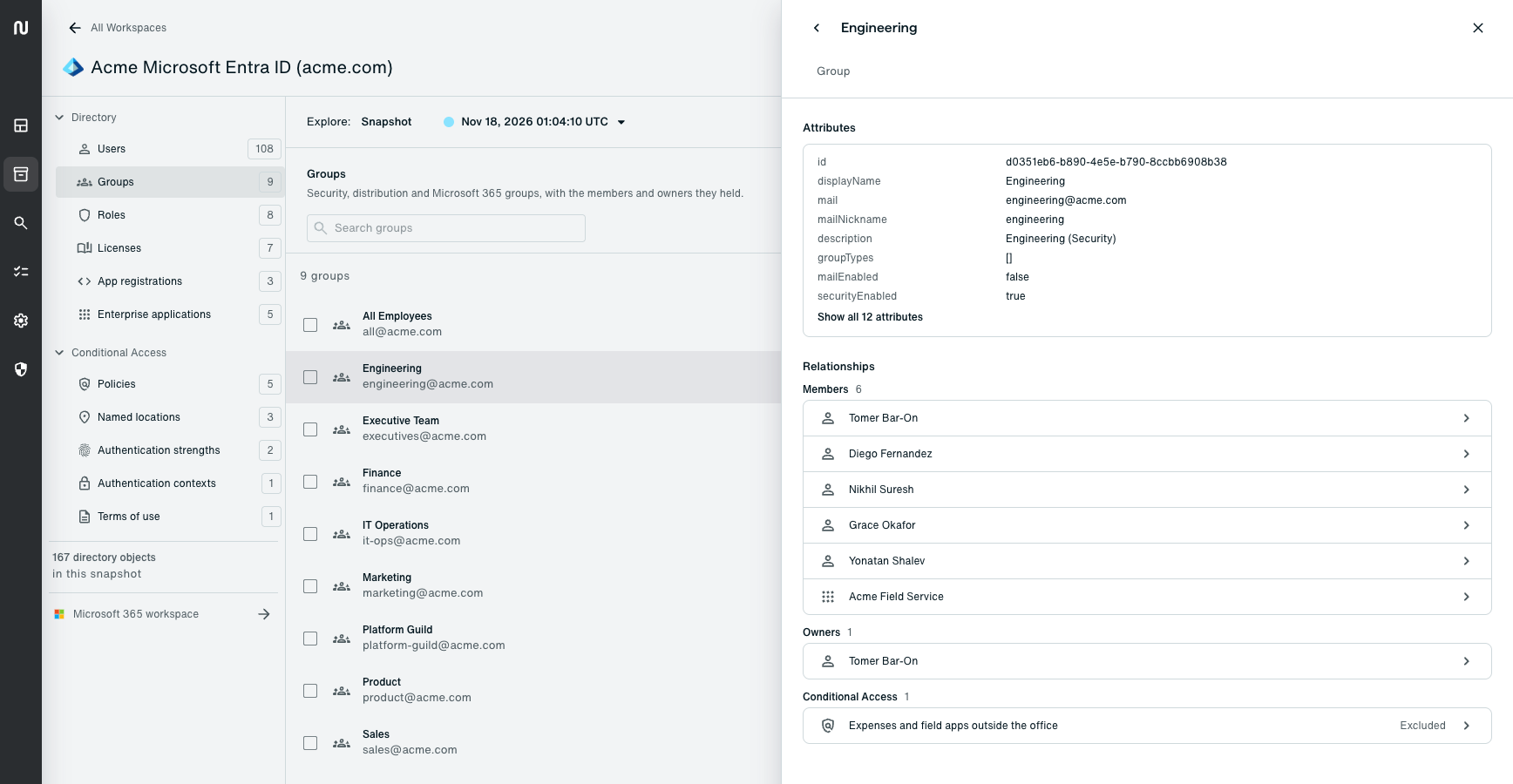
Run one test restore of a group that grants access to several apps, then count the tickets people still need to get their access back.
3. Can you restore policies, and not only objects?
Policies decide who signs in from where. Conditional Access policies land in a deleted-policies view for 30 days, which helps with a deletion and does nothing for a policy someone edited. Intune, which many Entra tenants rely on for device policy, has no recycle bin for deleted policies. Okta sign-on and password policies have no version history, and a lost rule order can let a broad catch-all rule run before the strict one meant to precede it.
One detail from Microsoft belongs in every runbook. Restore a Conditional Access policy in report-only mode first, review its effect, then enable it, because "restoring a policy to its previous state might have unintended consequences."
How far back, and from where
4. How far back can you go?
Compare your restore window with how long problems go unnoticed. The Entra recycle bin gives you 30 days, and Entra Backup and Recovery keeps seven days of history. Mandiant's M-Trends 2026 report puts the median dwell time at 14 days, so more than half of the intrusions it investigated went undetected for longer than that seven-day window, and a misconfiguration that turns up in a quarterly access review is older still.
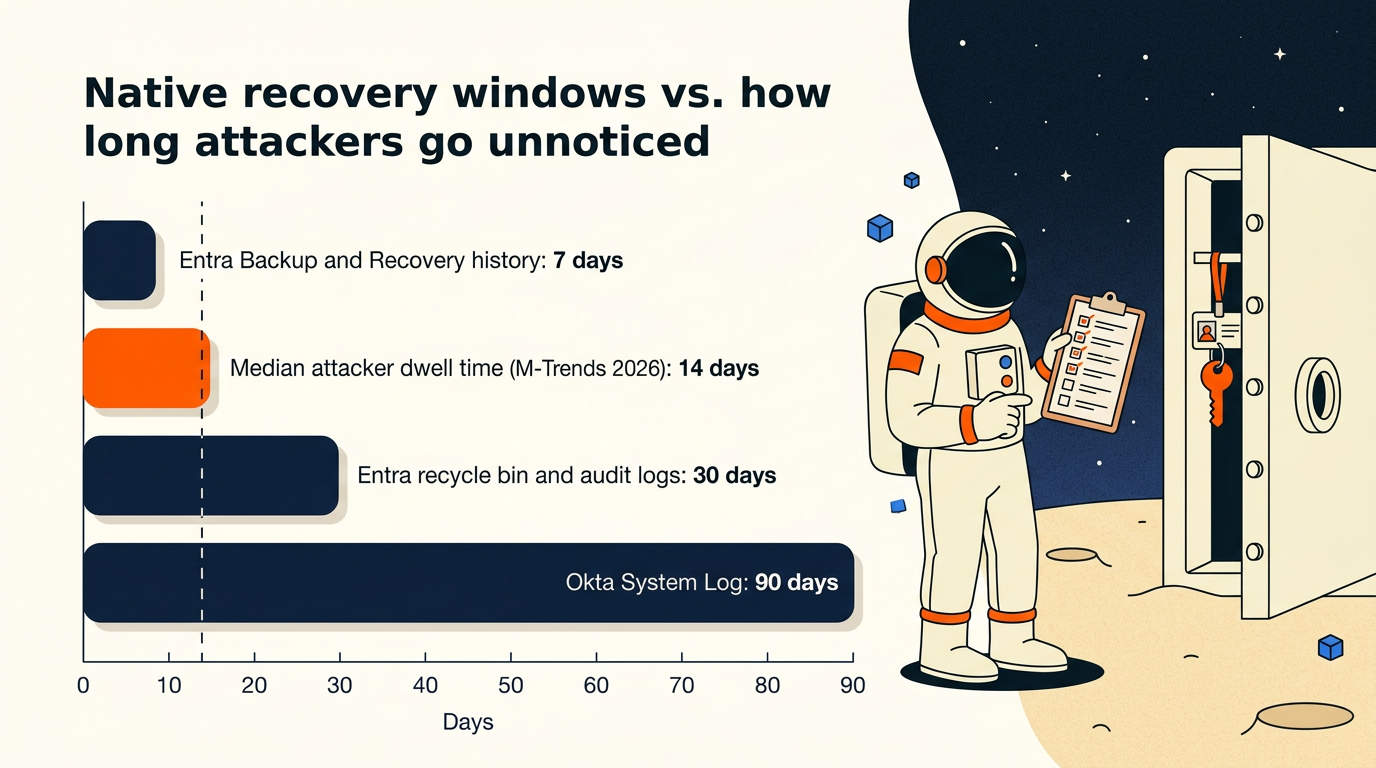
Logs help you reconstruct events. Entra keeps audit logs for 30 days on P1 and P2 and seven days on the free tier. Okta keeps System Log data for 90 days, and both vendors suggest exporting logs to a SIEM for longer history.
A good answer names a retention period that covers the longest a change could plausibly go unnoticed in your environment, with a reason you can defend to an auditor.
5. Could a compromised admin, or an agent with admin rights, reach the backup?
Assume the attacker holds a Global Administrator or Okta super admin account, then trace what that account can touch. Do the same for every automation account and AI agent with write access, since many hold standing credentials of their own. An admin can purge the Entra recycle bin early, and configuration exports in a Git repository or a storage account often sit behind the same identity provider and the same admin roles that the attacker now controls, which means the copy you planned to rebuild from may be the next thing to go.
Agents can cause this damage by mistake. One AI coding agent deleted a production database and the backups attached to it in nine seconds, using valid credentials and a permitted API call, as Eon described in a post on the incident.
Microsoft built Entra Backup and Recovery so that "no signed-in user or application, even with the highest admin privileges, can turn off, delete, or modify backups." Microsoft's Hard Deletion Protection, in preview since November, adds a seven-day block on permanent deletion for objects you enroll. Hold any other copy you keep to the same bar. Well-Architected makes the same point for any workload, listing "using the same security domain for production and backup systems" as an anti-pattern.
6. Can you reach your recovery tools when sign-in is broken?
If your backup console, your runbooks and your password vault all sit behind single sign-on through the identity provider you need to fix, an outage locks the recovery team out of its own tools.
Microsoft recommends "two or more emergency access accounts," excluded from Conditional Access policies that could block them, and tested on a schedule. Okta admins should keep an equivalent break-glass path. Well-Architected's emergency access guidance warns against access that depends "on the same systems (such as a centralized identity provider) as your normal access mechanisms." For each recovery tool, including your backup console, write down how each person on the recovery team signs in while the identity provider is down.
Knowing what changed
7. Can you see the directory as it was before the incident?
Audit logs record events. During an incident you need the state of the directory at a known good time, with group members, role holders, policy settings and app assignments as they stood. Microsoft asks customers to "regularly document and maintain the state of your tenant and its objects in an external versioned repository."
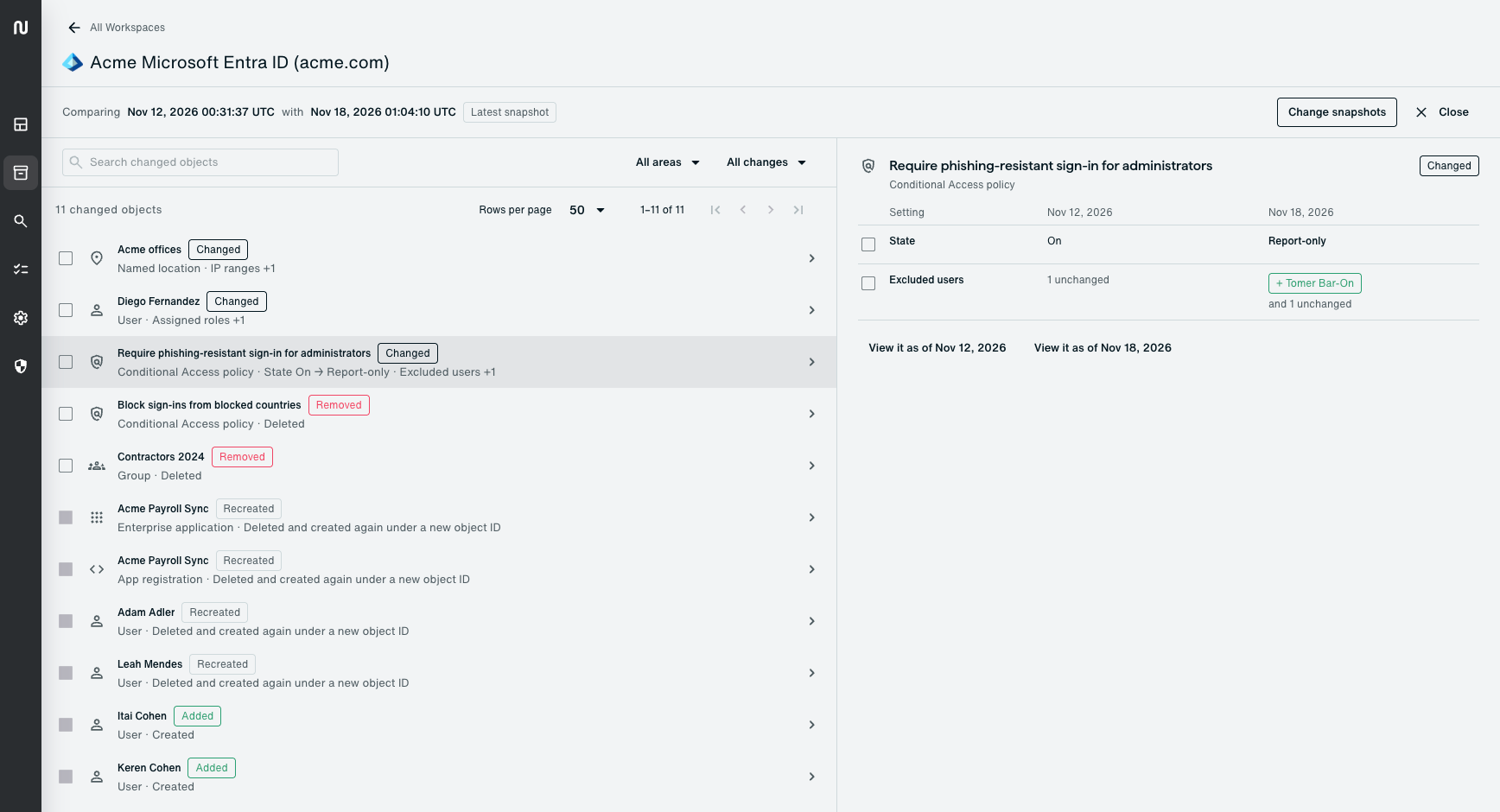
Try one question on your own tenant: who held the Global Administrator role, or the Okta super admin role, two weeks ago? If the answer takes an afternoon of log queries, you have found your gap.
8. Do you know your machine and agent identities, and who answers for each?
Palo Alto Networks reports 109 machine identities for every human one in its "2026 Identity Security Landscape" research. App registrations, service principals, OAuth grants and API tokens are identities too. So are AI agents.
Attackers use these identities as well. In the 2025 Salesloft Drift campaign, Google's threat intelligence team found that the attacker used stolen OAuth tokens to export data from Salesforce instances. Google told affected customers to "revoke and rotate API keys, credentials, and authentication tokens" for the integration.
Recovery from an incident like that depends on knowing which apps exist, who consented to them and what permissions they hold. Entra Backup and Recovery also skips "permission grants created as a result of user consent." Keep your own record of app registrations and service principals, and include them in backups.
In Entra Agent ID, permissions granted to a blueprint apply to every agent identity created from it, so one bad grant, or one grant lost in a restore, changes a whole class of agents at once. Microsoft lets you name a sponsor for each agent identity, "the human user or group that's accountable for an agent," and Okta's agent registration maps each agent to a human owner. Fill those fields in now and back them up with the agents, so the incident team knows whom to ask about each one.
9. Do you know the order, and what can't come back?
Write the sequence down: emergency access first, then the identity provider's admin roles and policies, then users and groups, then app assignments, then the SaaS and cloud data that depends on them. Before the restore begins, pause the automation and agents that write to the directory, so they don't repeat the damage or undo your fixes while you work. Disabling a blueprint in Entra Agent ID blocks every agent identity created from it from authenticating, which pauses a whole class of agents in one step. In Okta, revoking an agent's API tokens or deactivating its app integration cuts that agent off.

Then plan for what no backup restores. Neither Entra ID nor Okta lets anyone export password hashes or MFA secrets. Restoring from the recycle bin keeps a user's credentials, but recreating hundreds of deleted accounts leaves hundreds of people needing a new password and fresh MFA enrollment on the same morning, all of them calling the help desk. CISA names the help desk as the place where Scattered Spider talks staff into resetting "passwords and/or MFA tokens." Decide in advance how the help desk will verify callers when the volume spikes, such as a callback to a number on file or confirmation from the caller's manager.
10. When did you last test an identity restore?
Well-Architected's reliability pillar says "the only error recovery that works is the path you test frequently." A useful test restores a real object type, such as a group with app assignments or a Conditional Access policy, into a test environment or a scoped set of objects, with a timer running and the runbook open.
Record how long it took against the identity provider's recovery target, what the runbook got wrong and which steps needed an admin who wasn't on call. Fix those, then book the next test.
Where Eon fits
Eon Data Protection covers Entra ID and Okta. It keeps identity backups in an immutable, airgapped vault outside the tenant, covers app registrations and service principals in Entra ID, restores objects with their memberships, roles and app assignments, and lets you browse the directory as it stood at any backup point. It doesn't back up passwords or MFA secrets, since neither platform exports them, and it lists those as follow-up steps in the restore report. The Entra ID backup and Okta backup pages list coverage per platform.
The harder part: Maintaining and owning your recovery plan
A team can answer these ten questions in a few weeks. Keeping the answers true takes longer, because the directory changes every day: staff leave, apps get added, and the person who wrote the runbook moves to another team. Identity recovery tends to fall between the IAM team that owns the directory, the security team that owns the incident and the infrastructure team that owns backups. Give the restore itself one owner, put the test schedule on that person's calendar, and have whoever signs off on your disaster recovery plan see the results of every test.