Commvault vs Veeam is a long-running matchup in enterprise backup, and it still trips teams up because both platforms are strong in different areas. Pick wrong, and you inherit years of the wrong trade-off, either complexity you cannot staff or coverage that fragments as you grow. Both appear in our wider roundup of enterprise backup solutions, which weighs nine platforms on coverage, pricing, recovery, and deployment.
The real differences show up in 2026 licensing, current product tiers, and verified reviews from buyers who have run both platforms. Both platforms get a fair read, with the focus on which one fits which team.
Seven differences separate them, from architecture and licensing to cloud coverage, and each one gets a clear winner. The piece ends on where cloud-first infrastructure outgrows both.
Commvault vs Veeam: What's the difference?
Commvault is an enterprise data protection platform built for broad coverage and deep policy control.
Veeam is a data resilience platform built for virtualization-first teams that value simplicity and quick recovery.
Choose Commvault if you run a wide mix of on-premises applications, databases, and clouds and need one tool to govern them.
Choose Veeam if your core workloads are VMware, Hyper-V, or physical servers and you want a platform a small team can run. Put Veeam against a security-led platform instead and the calculus shifts, which is what Rubrik and Veeam compared works through.
Meet Commvault: Features and highlights
Commvault traces its technology to Bell Labs in the late 1980s and was built for mixed data centers. It now sells as Commvault Cloud, powered by Metallic AI, running as SaaS, self-managed software, or an appliance.
Capabilities come in three tiers. Operational Recovery covers core backup, immutable storage, and anomaly detection. Autonomous Recovery adds replication and automated failover. Cyber Recovery adds sensitive-data discovery, governance, and ThreatWise deception.
AirGap Protect and Cleanroom Recovery anchor its security story, covering immutable, logically air-gapped cloud storage and an isolated space to test clean recovery after an attack.
Meet Veeam: Features and highlights
Veeam launched in 2006 for the virtualization era and built its early reputation on VMware and Hyper-V. Its platform is hardware-agnostic, so backups follow hardware refreshes without repurchasing the management layer.
The self-managed Data Platform ships in three editions, Foundation, Advanced, and Premium, plus an Essentials bundle for small environments. Veeam Data Cloud adds a managed option with published pricing.
Recent releases lean into cyber resilience, with malware detection and a Disaster Recovery Orchestrator in the higher editions.
Commvault vs Veeam: At a glance
| | Commvault | Veeam |
|---|---|---|
| Best for | Large, mixed on-prem and multi-cloud | Virtualization-first and hybrid |
| Pricing model | Per TB, VM, or user; three tiers | Per workload (VUL); free Community Edition |
| Key strength | Widest app, database, and cloud coverage | Fast deployment, low overhead |
| Main weakness | Complexity, specialist dependency | Cost and coverage fragment in cloud |
| Ideal environment | Regulated enterprises, legacy plus cloud | VMware, Hyper-V, or physical teams |
Commvault vs Veeam: Feature-by-feature comparison
The seven differences below are where the two platforms actually diverge, showing where each one leads and where cloud-first teams find the model strained.
Architecture and origin
Commvault's roots trace to Bell Labs in the late 1980s, and it grew into a multi-component platform for mixed data centers. CommServe servers run the control plane, MediaAgents move the data, and deduplication stores keep it compact, a design that reaches across a very wide range of workloads.
That range covers almost any environment, and it carries decades of architecture that expects dedicated administration. Recent acquisitions widened it further, adding Clumio for AWS and Appranix for cloud application rebuild.
Veeam has stayed software-defined and hardware-agnostic, and its backup files are self-contained, so a restore does not need the original hardware or hypervisor to bring a workload back. Its v13 release in November 2025 added a hardened Linux Software Appliance and a Universal Hypervisor API, so KVM- and oVirt-compatible hypervisors can integrate natively.
That portability is useful for teams moving off VMware in the wake of Broadcom's licensing changes, since Veeam runs on whatever hardware they choose with no appliance lock-in.
Winner: Tie. Commvault wins on coverage and deployment options; Veeam wins on a simpler, lock-in-free model.
Ease of use and operational overhead
Commvault is powerful once configured, with deep options for complex recovery, but that depth carries a real learning curve. Teams that run it at scale usually keep backup specialists on hand, since storage-policy design, deduplication tuning, and automation workflows all need hands-on expertise to stay healthy.
Access also runs through the Command Center or the legacy Java console, which adds friction for teams expecting a single modern interface.
Veeam keeps a shallow learning curve and one unified engine, so a small team can deploy and run it without specialists. Reviewers consistently call it easy to use, though a minority describe the interface as fragmented across modules at scale.
Winner: Veeam for a shorter learning curve that a small team can run without specialists.
Licensing and cost model
Commvault offers subscription or perpetual licensing and groups features into its three tiers, so capabilities like replication and cleanroom recovery sit in higher tiers or as add-ons. Self-managed licensing bills by front-end terabyte or VM, which makes mixed environments hard to forecast.
Its SaaS rates are published, running about $58.50 to $90 per TB per month by workload, which we’ve detailed in this Commvault pricing breakdown.
Veeam licenses per workload through the portable Veeam Universal License, sold in packs, with a free Community Edition for up to 10 workloads. The per-workload cost stays flat as the data behind each workload grows, and independent Veeam pricing analyses put list pricing around $250 to $450 per workload per year, with storage separate.
Winner: Veeam for predictable scaling, though Commvault's published SaaS rates give more upfront transparency.
Cyber resilience and ransomware recovery
Commvault layers three tools for ransomware defense: ThreatWise seeds decoys and canary files that expose attackers during reconnaissance, Cleanroom Recovery spins up an isolated cloud environment to validate clean recovery points before restoring, and AirGap Protect keeps immutable copies isolated from production. None of this ships in the base platform.
ThreatWise sits in the top Cyber Recovery tier, AirGap Protect licenses as separate capacity-based cloud storage, and Cleanroom Recovery is an add-on service that only runs once AirGap Protect copies and control-plane uploads are already configured.
Threat Scan adds inline and post-backup scanning for encryption signatures, with support for custom YARA rules.
Veeam builds detection into the backup path with Recon Scanner 3.0, powered by Coveware, which watches for signals like brute-force attempts and unusual file activity.
Around it sit a YARA rule-based Threat Hunter, a Secure Restore that checks restore points for malware as they come back, and backups that are immutable by default.
The detection layer is edition-gated. Recon ships in the Advanced and Premium editions, and YARA scanning starts at Advanced, so a base Foundation license carries immutability and Secure Restore without the active detection tools.
The Premium tier adds a Ransomware Recovery Warranty and Veeam's own incident response team instead of handing the case to a partner.
Winner: Tie. Commvault leads on deception and cleanroom validation; Veeam leads on inline detection built into the backup path.
Recovery speed and granularity
Commvault offers fast, granular recovery to files and application items, and Cloud Rewind, from the Appranix acquisition, rebuilds an application's full cloud environment, networking and configuration included. That cloud-native recovery can depend on customer-managed compute, so results vary by workload.
Veeam keeps data loss close to zero with continuous data protection, and it can bring virtual machines, physical servers, and NAS back instantly. The v13 release extended that instant recovery into Microsoft Azure with clean-room validation. Recovery still runs through customer-deployed servers, proxies, and repositories that scale with the environment. For the mechanism behind that claim rather than the feature name, what continuous data protection is covers it.
Winner: Tie. Commvault rebuilds entire application environments; Veeam leads on near-zero data loss and instant recovery.
Cloud, SaaS, and Kubernetes coverage
Commvault carries one of the broadest workload lists in the market, protecting AWS, Azure, and Google Cloud alongside Microsoft 365, Active Directory, Dynamics 365, Salesforce, databases, Kubernetes, and file and object storage.
Veeam protects the three hyperscalers through three separate products, Veeam Backup for AWS, Veeam Backup for Microsoft Azure, and Veeam Backup for Google Cloud, each running its own backup infrastructure inside that cloud. That split across three separate products is one of the trade-offs we weigh in our Veeam review.
The three share no unified console or common policy engine, and a backup taken in one cloud cannot restore into another. Microsoft 365, Entra ID, and Salesforce protection comes through additional products, and Kubernetes runs through Kasten by Veeam, licensed separately per node.
Winner: Commvault for the wider workload and multi-cloud coverage.
AI readiness and backup data as an asset
Commvault ships Arlie, an AI co-pilot that integrates with Azure OpenAI Service on the backend, answers questions in plain language, and validates clean recovery points. Threat Scan now adds Google Threat Intelligence to surface threat context during analysis. The focus is operational assistance and faster triage during an incident.
Veeam has invested more heavily here. It completed a $1.725 billion acquisition of Securiti AI to fold data security posture management into the platform, then added Agent Commander, which governs AI agents and can undo their mistakes with backup data. Veeam Intelligence adds an in-product assistant across the suite.
Winner: Veeam, for the size of its data-and-AI investment, though Commvault's Arlie is the more mature in-product co-pilot today.
What real users are saying
Commvault
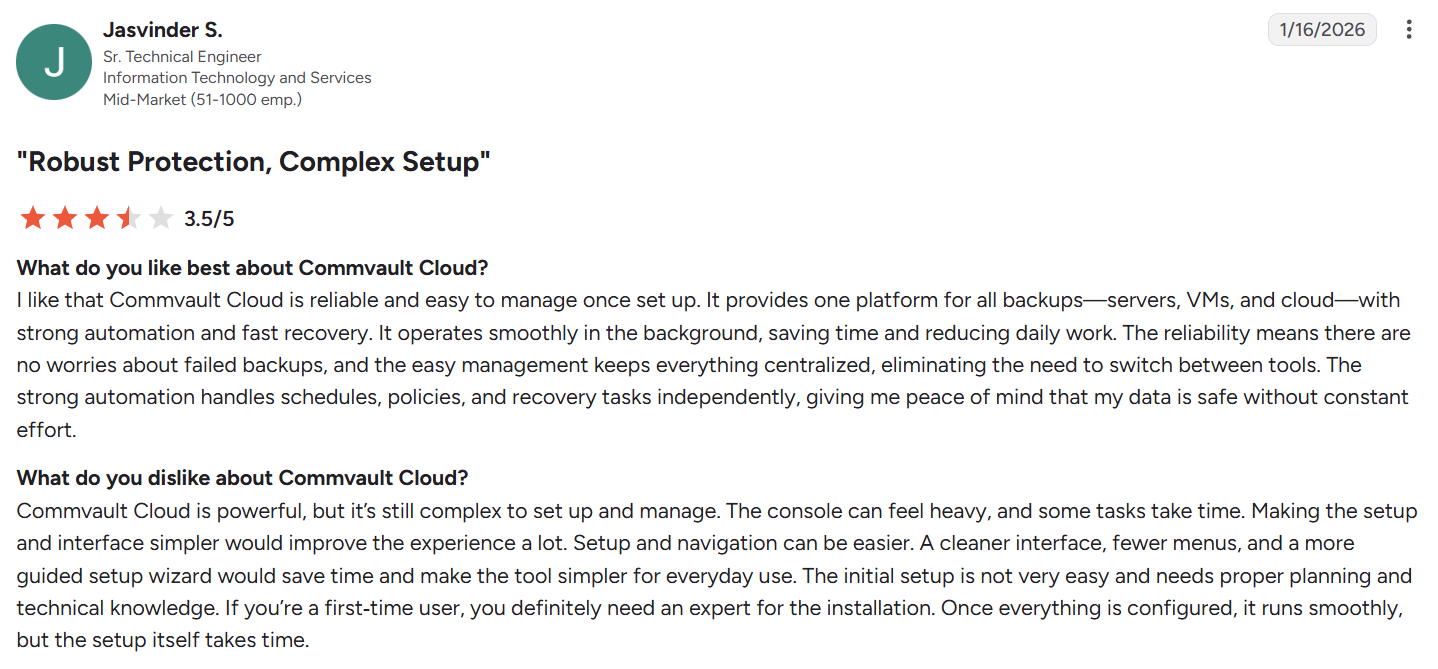
Pros:
- Reliable once it's set up. After the initial configuration, Commvault runs steadily and automates protection from a single console, which is what long-time admins value most. As Jasvinder S. put it on G2, it's "reliable and easy to manage once set up."
- One console for hybrid and multi-cloud. Commvault's real strength is centralized management across mixed estates, so teams govern on-prem and several clouds from one place. Manoj J. on G2 singled out the "centralized management it offers across hybrid and multi-cloud environments."
Cons:
- Power comes with complexity. The depth that makes Commvault capable also steepens the learning curve, and advanced work leans on specialist knowledge. Ankush V. noted that its wide feature set "can introduce complexity."
- A smaller talent pool, and pricey at scale. Fewer engineers know Commvault than Veeam, so hiring and support can lag, and costs climb as the environment grows.
Veeam
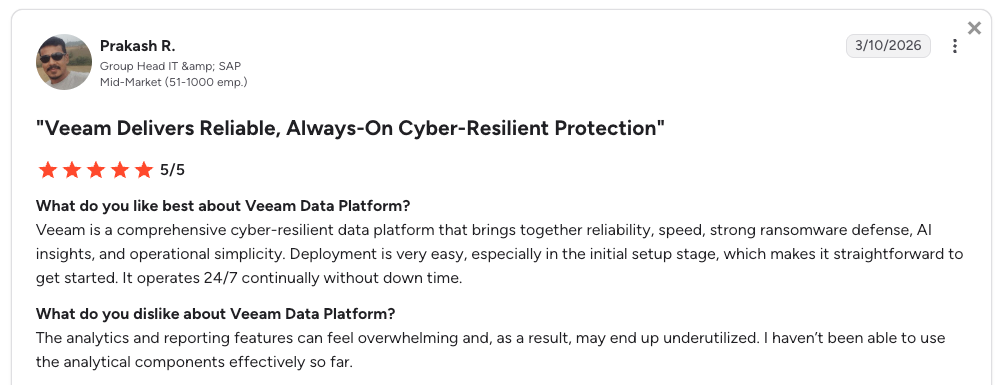
Pros:
- Fast to deploy, easy to run. Veeam's interface stays approachable and recovery is quick and dependable across virtual, physical, and cloud workloads. Prakash R. on G2 found "deployment is very easy, especially in the initial setup stage."
- Efficient, immutable restores. Veeam restores cleanly from a single file up to a full machine, and immutable copies harden those backups against tampering. As Aasish Kiri described on TrustRadius, "We take backup copy to local storage which is immutable."
Cons:
- Cost adds up for smaller teams. Advanced editions and add-ons push the price past what many smaller firms want to spend. One verified G2 user cited plain "cost barriers for small and mid‑size businesses."
- The UI can fragment at scale. As deployments grow across modules, a minority of users find the interface disjointed. Bhavesh A. on G2 shared "the interface can feel complex at times."
How to make your choice
Commvault is the better fit if:
- Your estate spans legacy on-premises systems and multiple clouds, and consolidating protection under a single policy engine is a priority.
- Regulated audit evidence and deep policy control count more than a light operating model.
- You already have Commvault skills or a license investment in place.
Veeam is the better fit if:
- Virtualization sits at the center of your environment, whether VMware, Hyper-V, or physical servers.
- A small team needs fast deployment and low overhead.
- You want a free entry point through Community Edition before committing.
Veeam vs Commvault reverses the order, not the answer. Commvault wins on coverage and control; Veeam wins on simplicity and speed. The decision comes down to which trade-off your environment can absorb, and neither was designed cloud-first. Teams that want a cloud-first option instead can start with the Commvault competitors built for that model.
A cloud-native alternative: Eon
Teams weighing Commvault against Veeam are usually asking which legacy platform is least painful to extend into the cloud. Both were built for the data center, and both run backup infrastructure inside your cloud accounts, which leaves more room for coverage gaps than most teams realize. If Veeam is the tool you're moving away from, see our list of Veeam alternatives.
In Eon's 2026 Cloud Data Infrastructure Report, 97% of multi-cloud teams trust their cross-cloud restore, yet 84% had a recovery failure in the past 12 months.
Eon is a cloud-native backup platform for AWS, Azure, and Google Cloud, with no agents or appliances. It runs no worker nodes or gateways in your accounts either: one read-only role covers all three clouds from a single control plane. Its Cloud Backup Posture Management (CBPM) discovers resources, classifies data, and enforces policy automatically, so coverage keeps up as accounts and regions change.
Recovery is granular by default. Eon restores individual files, records, or tables without rebuilding the full resource, so recovery matches the damage. SoFi used that to take recovery from a day to minutes across five AWS regions.
Storage costs climb when teams keep and protect more data than they need. Eon deduplicates globally across your protected estate before tiering, and that is how NETGEAR cut backup storage costs by 35%.
Backups land in an immutable, logically air-gapped vault in a separate trust domain by default. Because protected data lands in open formats, teams can query it directly for audits, analytics, or AI, without a restore and without a second copy.
Can your backup platform prove coverage as accounts and regions change, and restore exactly what breaks without a full rebuild? Book a demo and see how Eon verifies coverage and restores exactly what breaks across your accounts and clouds.
Frequently asked questions
Is Commvault or Veeam better?
Neither Commvault nor Veeam is better overall; it depends on your environment. Commvault covers the widest range of apps and clouds with deep policy control, while Veeam is faster to stand up and run.
Is Commvault more expensive than Veeam?
Commvault is often more expensive to start than Veeam. Veeam offers a free Community Edition for up to 10 workloads and flat per-workload pricing, while Commvault bills by terabyte, VM, or user across three tiers. Both charge for storage separately, so totals depend on your data volume and tier.
Which handles cloud-native workloads better?
Commvault covers more clouds and SaaS applications, while Veeam uses separate products per cloud. Neither removes the infrastructure you run in each account.
Which is easier to use?
Veeam is easier to use, with a shorter learning curve and faster deployment. Commvault is powerful but needs more expertise, and often specialists at scale.
Are Commvault and Veeam good for cloud-first companies?
Commvault and Veeam can protect cloud workloads, but each carries a data-center heritage that shows up as extra infrastructure to operate. Cloud-native platforms remove that infrastructure and automate posture and granular recovery.